
idgpnmonknjnojddfkpgkljpfnnfcklj
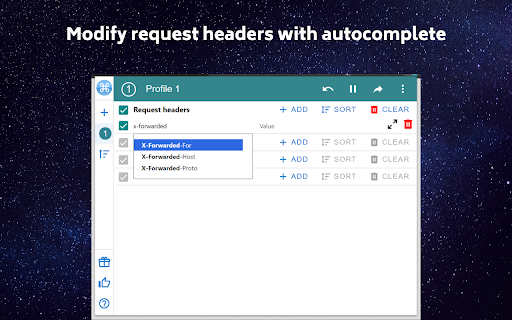

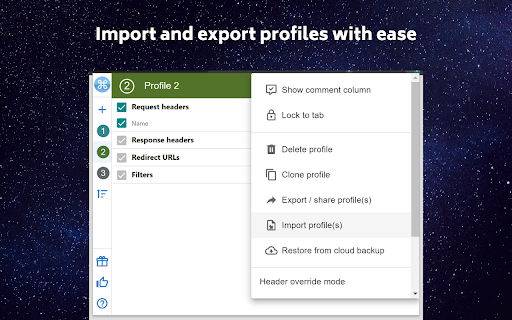
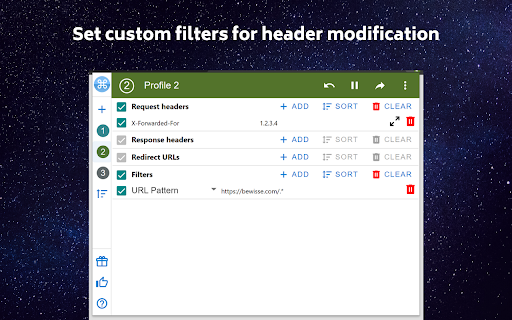


Modify HTTP request headers, response headers, and redirect URLs The most popular Chrome extension to modify headers and monitor page statistics simultaneously. ** What can ModHeader do?** - Add, modify, and remove request and response headers - Use ModHeader to set X-Forwarded-For, Authorization, Access-Control-Allow-Origin, Content-Security-Policy, and your custom headers! - Modify cookies in request / response header - Advanced Content-Security-Policy editor - Redirect URL to another - Enable header modification by URLs - Advanced filtering by tab, tab group, or window ** Why ModHeader ** - ModHeader is fast, efficient, and light-weight. You can quickly enable/disable header modification with just 1-2 clicks. - ModHeader provides you with many convenient features that will help you increase your development velocity with the least amount of frictions. Check out the big list the features below! - ModHeader is free to use, with a paid option to unlock even more features. - ModHeader works on Chrome, Firefox, Edge, and Opera. - ModHeader is used by over 800,000+ users on Chrome Web Store! ** ModHeader features ** - Add comments to header - One-click "undo" if you made a mistake - Support having multiple profiles with quick switching between profiles - Export and import profile - Easily share your profiles with others - Customize autocomplete names and values - Support for dynamic variables - Dark mode support - Sorting headers and name, value, or comments - Append value to existing request or response header - Customizable profile badge - Clone profile - Cloud backup ...and more!!! ** What is new in 4.4.0 ** - Enable ad-supported plan where users can get pro for allowing affiliated ads in extension. Users can opt-out of ads by selecting ... -> Opt out of ads (will revert back to having limited profiles and rules). ** What is new in 4.3.7 ** - Support iso_date and utc_date variable ** What is new in 4.3.6 ** - Suggest when advanced header editor is available - Suggest when a response header is incorrectly entered in request header field and vice versa - Suggest using tab domain filter, tab group filter, window filter, etc. ** What is new in 4.3.5 ** - Revise the add dialog to give more description ** What is new in 4.3.2 ** - Support query parameter as dynamic value - Support matching HTTP methods in request URL filter and exclude request URL filter ** What is new in 4.3.1 ** - Make import with auto-sync available for free - Gather feedbacks on uninstallation ** What is new in 4.3.0 ** - Allow free users access to all mods and filters, but limit number of rules to 10. ** What is new in 4.2.4 ** - Fix a minor bug with time filters ** What is new in 4.2.3 ** - Fix a minor bug with tab domain filters ** What is new in 4.1.0 ** - Update login, logout, and license checking logics ** What is new in 4.0.21 ** - Add support for advanced Content-Security-Policy modification ** What is new in 4.0.20 ** - Fix ModHeader not showing up for new users. - Add {{ip_v4}} dynamic value ** What is new in 4.0.18 ** - Support for simple dynamic value: {{uuid}}, {{url}}, {{url_origin}}, {{url_hostname}}, {{url_path}}, {{existing_value}}, {{timestamp}} ** What is new in 4.0.17 ** - Allow ModHeader to read from managed storage (for enterprise) - Fix CSS not loading correctly ** What is new in 4.0.16 ** - Add regex cookie matching and ability to retain cookie value while modifying its attributes ** What is new in 4.0.15 ** - Add support for Time filter ** What is new in 4.0.14 ** - Dependency upgrades and some minor bug fixes ** What is new in 4.0.12 ** - Support auto-sync profile import: https://docs.modheader.com/profiles/auto-sync-profile - Remove support for dynamic value as Firefox addon policy and Manifest V3 both disallow it. If you need this feature, please email support@modheader.com and we will try to figure out how to support your use-case. ** What is new in 4.0.8 ** - Support reordering profile, headers, and filters. ** What is new in 4.0.0 ** - Support enhanced cookie modification - Replace tab lock with tab filter, along with tab group and window filter - Support autocomplete customization - Dark mode support - Keyboard commands mapping - Give users more controls over share profile URLs - Paid subscription required for some of the newly introduced features. Most existing features should continue to work for free users. "webRequest" and "webRequestBlocking" are required in order for request headers modification to work. Because ModHeader doesn't know ahead of time which website the modification should apply to, it needs to request permissions for all URLs (3). "storage" permission is needed to save settings to the cloud. "contextMenus" is used to enable quick pause/unpause by right-clicking on the icon. "alarm" is used to periodically auto-sync profiles (if auto-sync is setup). ** Automation ** For Selenium WebDriver users, please try: https://github.com/modheader/modheader_selenium

Requestly: Intercept & Modify HTTP Requests
Intercept & modify HTTP(S) traffic: redirect URLs, modify headers, inject scripts, mock REST & GraphQL APIs, and more. 🚀 Best Chrome extension to supercharge Web Development & QA. Trusted by 300,000+ developers. 👉 Requestly works directly in Chrome with beautiful, modern UI and team collaboration features. Popular features – Modify HTTP Headers, Override API Responses, API Mocking, Redirect URLs, Insert Scripts & HTTP Interceptor. 🌟 Top Use Cases → Mock API Responses to build frontend when backend isn't ready → Modify HTTP Request & Response Headers → Test local JavaScript changes directly on production sites → Use HTTP Redirect Rule to load scripts from local or staging environments on production sites → Modify and Mock API Request payload, Response body, & Status Code → Override GraphQL Requests 📌 https://requestly.com/blog/what-is-requestly Requestly (now a part of BrowserStack) doesn't set up a proxy in your browser, and hence, developers don't face VPN issues or lags while using it. Requestly leverages Chrome Extension APIs under the hood to intercept & modify requests. 👉 Redirect URLs, Change Host, Modify Query Params (Map Remote or Map Local) → Use dev/staging APIs in production sites & test local changes without code changes → Debug remote Javascript by loading locally running JS in production sites → Switch Hosts (e.g. abc.com/* to xyz.com/*) using Replace Rule → Debug Ad Tracking Pixels, Debug A/B Test Campaigns, etc → Remote Debugging with Requestly on Production sites → Swap Adobe Launch (Adobe DTM) scripts in production with staging script 📌 Demo Video – https://www.youtube.com/watch?v=85GVaOWTnlE 👉 Insert Scripts to any Webpage → UserScripts are simple JavaScript/CSS code that can change the layout of a page, add or remove new functionality and content, or automate actions. → Use File Server to upload long scripts and Inject them using Script Rule → Inject your JS tags on potential customers' sites and test your features → The sales/product team can use this to demo the product directly on the prospect's website (10x engaging demo) 📌 Demo – https://www.youtube.com/watch?v=4dvucRjLwGY 👉 Requestly supports the following imports → All HTTP header profiles from ModHeader → JSON configuration for Redirects & Scripts from Resource Override → XML configuration from Charles Proxy (Map local isn't supported in chrome extension yet due to technical limitations in browser) 👉 Additional Features → Enable/Disable rules with a single click → Export and import the rules and maintain a backup for your rules → Easy collaboration with others. Share Rules with other Users in one click 📌 Demo – https://www.youtube.com/watch?v=BM7kTFy-vdc

ModBox – Modify headers, block requests
Modify HTTP headers, block assets or domains & redirect requests. Organise rules by folder and tab, optionally scope to domains. 🎉 Summary Create global or domain scoped rules to modify headers, block assets/domains & redirect. Organise by folder and tab, with a focus on clean UX for developers. 🤟 Features - Create rules to modify HTTP request and response headers - Create rules to block HTTP requests & even block entire sites - Create rules to redirect requests to your own assets - Scope your tabs and rules to specific domains and url criteria - Organise your rules by a folder and tab structure, with drag'n'drop and clone - Quickly toggle individual rules, tabs, folders and globally - Export & Import rules by folder - Compact mode - No tracking, no commercial version, no funny business 0.0.7 - (feature) rule reset moved into settings area with confirmation 0.0.3 - drag'n'drop folders and tabs - tab level requestDomain - clone folder and tab

Redirect Path
The HTTP Header & Redirect Checker for SEO Redirect Path flags up 301, 302, 404 and 500 HTTP Status Codes as well as client side redirects like Meta and Javascript redirects, bringing potential issues that may not otherwise be seen to your attention immediately. As well as flagging up redirects and errors, the plugin also displays other HTTP Headers (such as server types and caching headers) and the server IP Address at the click of a button. All the magic happens on your computer, so it doesn’t “phone home” to anyone (except when auto-updating itself) and is instantaneous. The redirect path logo is from the "Iconic" icon set, which can be found here: http://somerandomdude.com/work/iconic/ Please note, by using this extension you agree to our End User Licence Agreement: https://www.ayima.com/browser-extensions-eula 4.0: Fixed runtime bugs and potential security flaws, plus added support for Ayima AI 3.0: Updated the extension to support Googles Manifest V3 roll out, no other major changes 2.0.0.6: Major rewrite - a lot of logic has been changed under the hood allowing us to display Meta and Javascript redirects for the first time.

tweak: mock and modify HTTP requests
Mock or modify your HTTP requests to test, develop and demo your web application tl;dr tweak allows you to mock and modify HTTP requests without leaving the browser You can intercept requests/API calls and 🪄 ﹥ Modify ⁃ Response data and headers ⁃ Status code ⁃ Request payload 💸 ⁃ Request headers 💸 ﹥ Delay individual requests/API calls ﹥ Export and import rules to organize and share your configs with your team ﹥ Search requests in the background to import them automatically Premium 💸 ﹥ Modify the response data by writing custom JavaScript ﹥ Organize your workspace with collections ﹥ Change rules in bulk using global custom variables ﹥ Create mock data with random generators ﹥ Use tweak’s breakpoints and logpoints to debug requests/API calls What you CAN’T do with tweak 🚫 ﹥ Replace documents such as HTML/CSS/Images Useful links 🔗 ﹥Getting started https://tweak-extension.com/docs/intro ﹥FAQs https://tweak-extension.com/faqs ﹥Changelog https://tweak-extension.com/changelog ﹥Support help@tweak-extension.com
