
feahianecghpnipmhphmfgmpdodhcapi
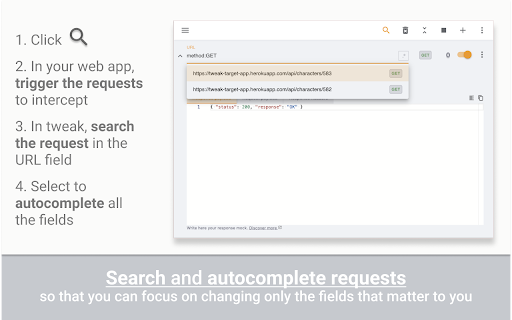


Mock or modify your HTTP requests to test, develop and demo your web application tl;dr tweak allows you to mock and modify HTTP requests without leaving the browser You can intercept requests/API calls and 🪄 ﹥ Modify ⁃ Response data and headers ⁃ Status code ⁃ Request payload 💸 ⁃ Request headers 💸 ﹥ Delay individual requests/API calls ﹥ Export and import rules to organize and share your configs with your team ﹥ Search requests in the background to import them automatically Premium 💸 ﹥ Modify the response data by writing custom JavaScript ﹥ Organize your workspace with collections ﹥ Change rules in bulk using global custom variables ﹥ Create mock data with random generators ﹥ Use tweak’s breakpoints and logpoints to debug requests/API calls What you CAN’T do with tweak 🚫 ﹥ Replace documents such as HTML/CSS/Images Useful links 🔗 ﹥Getting started https://tweak-extension.com/docs/intro ﹥FAQs https://tweak-extension.com/faqs ﹥Changelog https://tweak-extension.com/changelog ﹥Support help@tweak-extension.com

Mokku
Adds the API mocker MOKKU to Chrome Developer Tools for seamless integration & testing. 🚀 Take Control of Your API Workflows with Mokku Stop waiting for backend deployments or struggling with unstable staging environments. Mokku is the ultimate developer tool that integrates directly into your Chrome DevTools to let you mock, modify, and manage API responses seamlessly. Whether you're building a frontend against a non-existent API or testing edge-case error states, Mokku gives you the power of a full mock server right inside your browser. Complete Control: Specify JSON bodies, HTTP status codes, time delays (latency), and custom headers. GraphQL Native: Full support for mocking GraphQL queries and mutations. Dynamic Responses: Go beyond static files. Write JavaScript functions to return complex, conditional data based on the request. Dynamic URL Matching: Use patterns like /goals/:goalId (powered by path-to-regexp v8.2.0). URL parameters are passed directly to your response functions. Pro Editor: Built-in Monaco Editor (the engine behind VSCode) for a premium coding experience. Modify request headers globally or on a per-URL basis. Perfect for testing auth tokens or custom headers without touching your source code. Projects: Group mocks and headers by project to keep your workspace clutter-free. Import/Export: Share mocks with your team or backup your setup by exporting project-based configurations. ⚙️ How it Works Mokku adds a dedicated tab to your Chrome DevTools. You can: Click-to-Mock: Pick any existing network call from your logs and turn it into a mock with one click. Start from Scratch: Create custom mocks manually for APIs that don’t exist yet. Safe Injection: Mokku is non-intrusive. It only injects scripts into localhost by default. For all other domains, it remains inactive until you manually enable it from the panel. Secure Storage: Your mocks are stored safely within your Chrome profile storage. Stop waiting for the backend. Start building with Mokku.

Netify
Debugging proxy that will allow you to intercept and mutate requests from a web page Netify is a debugging proxy that will allow you to intercept and mutate your requests, like Fiddler or Charles, but it more compact and implemented directly in the Chrome. Features that Netify gives you: - Filter requests for proxy by URL, method or type of resource. - Redirect request to arbitrary URL. - Adding, replacing and removing request headers. - Replacing the request body, text/JSON, Base64 or form data. - Replacing the response status code. - Adding, replacing and removing response headers. - Replacing the response body with a text value, Base64, or file's content. - Adding an extra response delay - Cancel request on the client. - The above changes can be made according to predefined rules, by script or by making changes to the intercepted request (like breakpoint). Attention!!! This extension is based on the experimental features of the Chrome Devtool protocol, which may lead to inoperability with the update of the browser. If you have some trouble with Netify or you have some suggestions, please report it here (https://github.com/vladlavrik/netify/issues)

Inssman: Open-Source: Modify HTTP Request
Inssman add custom rules to modify HTTP requests and responses. It is a free developer tool that which helps developers to organize their work more fast and easy. Inssman monitors the browser network for all tabs and if finds a request which matches one of the rule will accordingly modify. ✳️ What can Inssman do?✳️ 👉 Redirect Request: ➡️ Redirect any request like HTML/CSS/JS/JSON/...etc. 👉 Block Request: ➡️ Block all type of request like GET/POST/PUT/...etc 👉 Modify Query Params: ➡️ Easily remove presenting parameters in the url or replace the existing one or adding new parameter. 👉 Modify Header: ➡️ Add/Remove/Append request and response headers. One of example is developer can fix issue like CORS by setting Content-Security-Policy, X-Frame-Options headers and all headers can by change by provide header and value. 👉 Modify Response: ➡️ This cool feature can return custom data from the network. Now is possible to return data types like HTML/CSS/JS/JSON. By choosing one of type developer can write custom code in the editor which has powerful user interface like VSCODE which supports everything that developer need to write code. 👉 Inject File: ➡️ You can easily inject external CSS and JavaScript files into any web page by simply providing the link to the file. This is a great way to quickly modify the style or functionality of a website without needing to manually edit the code. If you want to inject your own custom code into a web page you can enter HTML, CSS, or JavaScript directly into the extension, and it will be injected into the page as if it were part of the original code. 👉 HTTP Logger: ➡️ This feature allows you to easily view and analyze the request and response headers of all tabs in one place, giving you valuable insights into the data being exchanged. 👉 Modify Request Body: ➡️ Now it is possible to modify the request body for both APIs, XMLHttpRequest and Fetch. This new feature allows modification of the body without making any changes to the code. 🙌These all features are free and there isn't any limitation to create a rule.

ModResponse - Mock and replay API
Mock, modify, and replay API. Easy setup. No proxy needed. No code change required. ModResponse is a powerful and easy-to-use tool for web developers that simplifies the process of modifying, stubbing, and replaying HTTP responses. It requires no extra proxy or code change to be made, allowing you to quickly and conveniently test different scenarios and debug edge cases. With ModResponse, you can modify the API response, return different HTTP status code, add delay to your request, etc. You can also reroute your HTTP request to a different server, allowing you to test your local changes in production domain within seconds, without the risk of breaking production. ModResponse does not require extra proxy or making any code change. It can modify pretty much any HTTP request, not just XHR requests. Simply install it and you are ready to go! ** What can ModResponse do?** - Record and replay HTTP response - Stub HTTP response - Reroute request to a different URLs - Change HTTP response body, status code, and headers - Delay HTTP requests to simulate slow network - Simulate network errors - Advanced filtering by tab, tab group, window, or time - Demo with fake data Want to create perfect data for your product demo? With ModResponse, you can replace the actual API response with a fake one that contains the data you want. No need to change your real data or make code change. - Speed up slow requests Do you have API requests that are taking a long time to finish, and every time you make a small UI tweak you need to wait >10 seconds for the API request to finish to visualize your change? Using replay response, you can record and replay the slow API request. That way, you will only need to wait on the slow API request once. All subsequent requests to be served from the cached response within a few milliseconds. - Develop against edge cases Need to handle a 4XX or 5XX status code from an XHR request, or try out how your UI will behave with a very long string? Using replay response or stub response, you can modify the response body, status code, or response headers to simulate different scenarios that you need to handle. - Develop against unimplemented APIs Are you a web developer who is blocked because an endpoint you depend on is not yet implemented? Using stub response, you can mock the API response so you can start developing against that endpoint. That way, you can develop the frontend while others implement the endpoint (as long as the actual implementation return the response in the same format). - Testing on production domains Do you need to integrate with a third party platform that only works on your production domain? Using proxy request, you can reroute the request from your production domain to localhost or a dev domain, allowing you to test your changes on your production domain without the risk of breaking it. - Debug edge cases Need to test how your app behaves when some resources takes too long to load, or when they fail to load due to network errors? With ModResponse, you can add artificial delay and simulate different network error conditions so you can debug and handle edge cases with ease. ** Other ModResponse features ** - Support having multiple profiles with quick switching between profiles - Export and import profile - Easily share your profiles with others - Dark mode support - Customizable profile badge - Clone profile ...and more!!! "debugger" is required in order for response modification to work. "tabs" permission is required for prefilling the URLs, and for tab filter, tab group filter, and window filter to work. "storage" and "unlimitedStorage" are required to store the response modification. "contextMenus" is used to enable quick pause/unpause by right-clicking on the icon. ** Known issues ** 1, You will see ["ModResponse" started debugging this browser] banner when ModResponse is activated. This is because it uses the debugger API, which is needed for response modification. Due to Chrome's security policy (https://crbug.com/1096262), that banner would show up on all tabs even when a tab is not being modified, and it may still for a few more seconds after ModResponse is paused or disabled. To hide it, you can run chrome with --silent-debugger-extension-api command line switch. 2, Clicking on the "Cancel" button on the ["ModResponse" started debugging this browser] banner will not deactivate ModResponse. To deactivate it, please open ModResponse and click on the "Pause" button. Once paused, the banner should disappear in a few seconds.
