
nfaboplgcinooacenccbofkaadcfbkkb
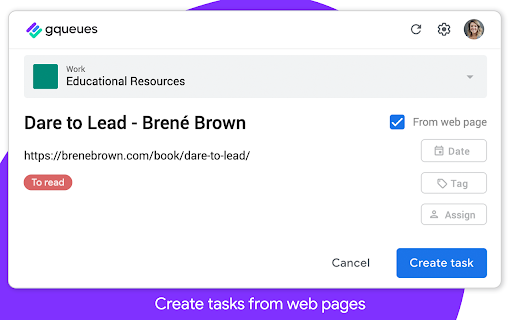

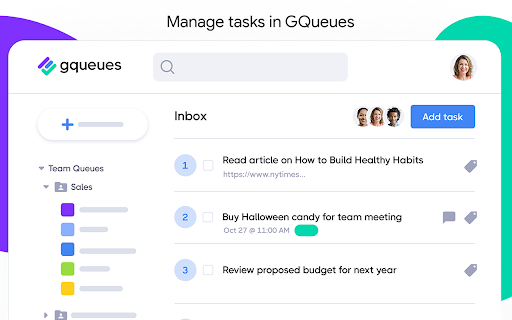
Easily create tasks for GQueues - the task manager built for teams on Google Workspace. Capture your to-dos on the fly from anywhere on the web. Quickly create a new task to send right to your GQueues account, then get back to what you were doing. Want to save an article for your team meeting? Come across a source that could be useful for research on a big project? Just remembered you still need to book a babysitter for this Saturday? The GQueues Chrome Extension’s got you covered. Just log your thought and send it off to your GQueues inbox. If you select “From web page,” the URL of the site you’re on will be automatically added to the task so it’s easy to return to later. No more getting derailed from your work at hand. No more opening tabs on tabs on tabs of pages you want to read. The Chrome Extension makes it easy to capture it all in one central location so it’s not forgotten. The GQueues Chrome Extension requires a GQueues account to work. GQueues is a task management app designed specifically for Google users. With GQueues you get: • Deep integration with Google Workspace including Chrome, Gmail, Calendar, and Drive • Simple, intuitive interface • Core task management including subtasks and repeating tasks • Robust search and task filters • Easy collaboration with shared folders and assignments for delegating work • Mobile apps for Android and iOS

Category Tabs for Google Keep™
Better organise your Google Keep notes Tired of wasting time looking look through and re-sorting all of your notes on Google Keep? With Category Tabs for Google Keep™, you can now sort your new and existing notes by category. Each category represents one color. Adding a note to a category is very easy, just change the color of the note. When you want to view the notes you have sorted by color, simply click on the note color you wish to view. If you would like to view your you entire collection of notes/checklists, there is an “All” option next to the color options (this option is set by default). Category Tabs for Google Keep™ seamlessly integrates into the page and the options to look at your notes/checklists in list view or gird view is still available. The ability to post a quick note/list/picture is still available as well and is still placed in the same spot as it usually is. This application supports all the colors offered by Google Keep. You can access the settings by opening the menu in google keep, and hit "Customize Categories"

Yanado - Task Management inside Gmail
Yanado turns your Gmail into powerful collaboration tool. Create tasks and turn emails into tasks within seconds. Yanado lets you create and manage your tasks and projects without leaving your Gmail. CREATE TASKS FROM EMAILS - Create tasks from emails with a single click, add them to projects and set reminders. - Easily find email related to the tasks just by clicking on the task in the list. TASK MANAGEMENT - Create tasks and TO-DO lists in seconds within your Gmail. - Use tags to improve search and organization of your tasks. - Create custom statuses to support your own processes. SHARE TASKS - Delegate tasks and discuss details with your team members. PROJECT MANAGEMENT - Manage project progress and track who is doing what in your team. DUE DATES & REMINDERS - Never miss a deadline again by setting due date and reminders on your tasks (synced with Google Calendar). REAL TIME NOTIFICATIONS - Receive project updates right inside your Gmail and reduce the number of emails you are getting. VISUALISE YOUR WORK -Choose between a simple list or a kanban-view with cards to easily visualize your work. GREAT FOR - If you spend majority of your time within your Gmail and you have lots of tasks to manage, Yanado is perfect tool for you to help you get organized better without leaving your Gmail. For details about pricing, check the pricing page on our website.

Notes for Gmail™ by cloudHQ
Add annotations on your emails to remember something, or to coach how to craft a good email. If emails were letters, Notes for Gmail™ by cloudHQ would be sticky post-it notes. Highlight a section of an email that you received, and make a note about it. Keep it for yourself or email it to someone else. The notes are embedded directly within your email message and stored on Google Gmail™ servers, allowing you to view them on your mobile phone as well. No more having to respond to someone by saying "see edits below in red", or wishing that you could write a note on an email. Now, you can just use Notes for Gmail™ by cloudHQ and never lose a thought. It is also useful to add information to your email message, such as the project ID or customer ID, so you can easily search for that email. cloudHQ. Helping your productivity, 1 click at a time. cloudHQ Website: https://www.cloudhq.net App Website: https://www.gmail-notes.com/ Pricing: https://www.gmail-notes.com/pricing Support page: https://support.cloudhq.net/category/browser-extensions/gmail-notes/ Blog: https://blog.cloudhq.net

ActiveInbox: Organize Gmail™ tasks
Overwhelmed by too many to-dos in your inbox? Turn Gmail into an effortless task manager to never forget anything. Turn Gmail into a task manager, and take control of all your conversations. Our mission is simple really... we want to give all of us the tools to achieve meaningful happiness. Our business supports this by making elegant software, infused with proven psychology, to help us all absorb the shocks of life and become truly effective. DESIGNED FOR EXECS, MANAGERS & FOUNDERS ActiveInbox has a free trial to get a taster of being in control. It's "A 'must try' if you want to easily keep yourself on track in an undoubtedly busy world" - Richard Gaspar ActiveInbox works where you already do: in Gmail and on mobile. There's no need to adopt a new tool to accomplish... Stop emails sinking into the inbox swamp by turning them into tasks with due dates and adding them to projects. Don't 'send and pray' emails you spent precious time writing. Deliver at the time they'll be read and let ActiveInbox track them to completion. Achieve inbox zero, then glide through your day, by having just one place to focus on emails and tasks, and breaking your Today list into digestible chunks. Oh, and we're the original Gmail plugin - ActiveInbox has been supporting customers since 2006.
