
lcmhimhhdbhdjlbnfcknbnnffcikniec


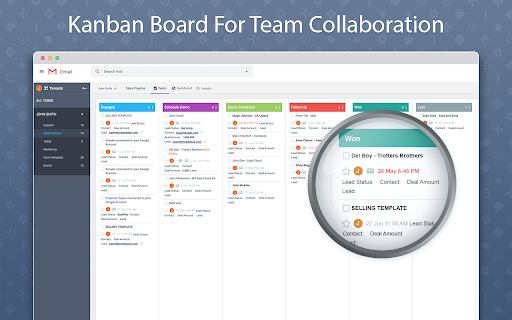

Yanado turns your Gmail into powerful collaboration tool. Create tasks and turn emails into tasks within seconds. Yanado lets you create and manage your tasks and projects without leaving your Gmail. CREATE TASKS FROM EMAILS - Create tasks from emails with a single click, add them to projects and set reminders. - Easily find email related to the tasks just by clicking on the task in the list. TASK MANAGEMENT - Create tasks and TO-DO lists in seconds within your Gmail. - Use tags to improve search and organization of your tasks. - Create custom statuses to support your own processes. SHARE TASKS - Delegate tasks and discuss details with your team members. PROJECT MANAGEMENT - Manage project progress and track who is doing what in your team. DUE DATES & REMINDERS - Never miss a deadline again by setting due date and reminders on your tasks (synced with Google Calendar). REAL TIME NOTIFICATIONS - Receive project updates right inside your Gmail and reduce the number of emails you are getting. VISUALISE YOUR WORK -Choose between a simple list or a kanban-view with cards to easily visualize your work. GREAT FOR - If you spend majority of your time within your Gmail and you have lots of tasks to manage, Yanado is perfect tool for you to help you get organized better without leaving your Gmail. For details about pricing, check the pricing page on our website.

FollowUp.cc for Gmail
Lightweight productivity suite for Gmail. The fastest way to organize your professional life. Extend your inbox: Follow-up Reminders, Email Tracking, Auto Follow-up, Contacts Lookup, Send Later, Email Snooze. An essential tool for business professionals managing tasks and developing business relationships. Install & set up in seconds. Achieve Inbox Zero. Be more productive. • VIEW CONTACTS AS YOUR BROWSE EMAIL Every time you open an email, you'll see who's in it in your sidebar, all reminders or details connected to them, and everything we found about them online including data about their company. • EMAIL REMINDERS AND RECURRING REMINDERS Stop the sticky notes and inbox clutter, set reminders as you send email. It takes 1 click in Compose window, or BCC a special email to set a follow-up reminder. Reminders work wherever email works. Use email to set reminders — days monday@followup.cc, tuesday@followup.cc .. or timed email 1week@followup.cc. Extension works only in Gmail. • FOLLOW UP AUTOMATICALLY Send a chain of emails in case your recipient doesn't reply. Use our predefined templates, or set up your own. • SEE WHEN YOUR EMAILS ARE OPENED Use Open Tracking and confirm your emails have been successfully opened. A simple alternative to read receipts. • SCHEDULE EMAILS TO BE SENT IN THE FUTURE Use send later to work on your time and schedule emails to send in the future. • BOOKMARK WEBPAGES FOR LATER READING Bookmark or send yourself web pages. Add notes and schedule to arrive to your inbox at a specified time (eg. weekend). • MANAGE REMINDERS IN GOOGLE CALENDAR FollowUp.cc works where you work. You don't need to login to a special system to manage your data. Does FollowUp.cc work on other platforms? Extension only works in Gmail, but our intuitive email reminders work on any email platform. Can I change my timezone? Yes. Login at FollowUp.cc's webapp to change your timezone, reminder format and other settings.

Gmelius: Shared Inboxes & AI Email Assistants for Gmail
Save 1 hour daily: AI Assistants sort your emails, draft replies & shared inboxes let your team take over conversations for you. Gmelius is the AI-powered email management platform built natively for Gmail. It lets generative-AI assistants sort, draft replies and dispatch messages, offers shared inboxes and shared labels inside Gmail, and keeps everything in perfect sync across your team and tools. ✨ AI Assistants for Gmail – Reply, Sorting and Dispatch agents cut routine email work by an hour a day. 📨 Shared Inbox inside Gmail – manage support@, sales@ or any group address with clear open → pending → closed statuses, assignees, tags, @mentions and notes. 🏷 Shared Gmail Labels – turn any Gmail label into a live thread your whole team can follow. 🎛 Custom views – flip an inbox or label into specific views depending on your operational needs. 🤖 Automation rules and SLA timers – create “If-This-Then-That” flows, auto-assign owners and stay inside promised response times. 📊 Analytics dashboards – track volumes, resolution time and teammate workload at a glance. All features live where you already work, so your team keeps its Gmail muscle memory and gains new productivity super-powers. ✨ Highest Star Rating in our Class. 🏆 Leader of the shared inbox space. 🚀 Y Combinator S19 This is our browser extension that completes our solution for Gmail and Google Workspace customers. Key features: ✨ AI Assistants for Gmail: Meet AI assistants whose job it is to manage your Gmail inbox. ✓ AI Reply Assistants - They draft replies to your emails. ✓ AI Sorting Assistants - They sort and classify your incoming emails. ✓ AI Dispatching Assistants - They route emails to the right teammates. 📨 Shared Inbox: Transform Gmail into a collaboration platform. Make great teamwork possible in Gmail by reinventing how your team manages inboxes like support@ or invoices@. Replace cluttered Google Groups and help desks with a shared inbox built for Gmail. Discover the smartest alternative to Google Groups, Help Desks, Hiver, Front, etc. 🏷️ Gmail Shared Labels ✓ Share existing or new Gmail labels with members of your team ✓ Synchronize conversations in real-time across all devices (e.g., mobile, desktop) 👥 Team Collaboration ✓ Real-time syncing across all devices ✓ No more bcc nor fwd! ✓ Email Notes and @mentions to add context to any conversation ✓ Assign or delegate emails to members of your team 🤓 Workflow Intelligence ✓ Automate repetitive tasks with rules for internal and external workflows ✓ SLA rules, auto responder, auto assignment and more ✓ Ex: “when this email gets answered add automatically reply and assign it to that team member” 📧 Shareable Email Templates for Gmail ✓ Make email writing easy and fast ✓ Improve your team's consistency and performance ✓ Proposal, Sales, Marketing, Custom Templates - easily created and shared Swiss-grade privacy and security Headquartered in Switzerland, Gmelius follows a strict Privacy-by-Design framework. Your data stays confidential, is securely processed, and is never used to train AI models. Explore our Trust Center any time. For more details, please see https://gmelius.com/legal/security Install the extension, start your 7-day free trial, and see how AI + Gmail can unlock real email productivity for your team. Need a guided tour? Book a demo at gmelius.com/request-demo =============================== © Gmelius. Less Email. More Life. Gmail is a registered trademark of Google Inc.; Gmelius is not affiliated with Google.

GQueues for Gmail
Turn emails into actionable tasks with GQueues - the task manager built for teams on Google Workspace. Turn your emails into action items in GQueues. Link or attach the email thread to a task to view from inside GQueues. Streamline your email processing and take control of your inbox with GQueues for Gmail. The GQueues for Gmail Chrome Extension requires a GQueues account to work. GQueues is a task management app specifically designed for Google users. With GQueues you get: • Deep integration with Google Workspace including Chrome, Gmail, Calendar, and Drive • Gmail integration to turn your emails into tasks • Simple, intuitive interface • Core task management including subtasks and repeating tasks • Robust search and task filters • Easy collaboration with shared folders and assignments for delegating work • Mobile apps for Android and iOS

ActiveInbox: Organize Gmail™ tasks
Overwhelmed by too many to-dos in your inbox? Turn Gmail into an effortless task manager to never forget anything. Turn Gmail into a task manager, and take control of all your conversations. Our mission is simple really... we want to give all of us the tools to achieve meaningful happiness. Our business supports this by making elegant software, infused with proven psychology, to help us all absorb the shocks of life and become truly effective. DESIGNED FOR EXECS, MANAGERS & FOUNDERS ActiveInbox has a free trial to get a taster of being in control. It's "A 'must try' if you want to easily keep yourself on track in an undoubtedly busy world" - Richard Gaspar ActiveInbox works where you already do: in Gmail and on mobile. There's no need to adopt a new tool to accomplish... Stop emails sinking into the inbox swamp by turning them into tasks with due dates and adding them to projects. Don't 'send and pray' emails you spent precious time writing. Deliver at the time they'll be read and let ActiveInbox track them to completion. Achieve inbox zero, then glide through your day, by having just one place to focus on emails and tasks, and breaking your Today list into digestible chunks. Oh, and we're the original Gmail plugin - ActiveInbox has been supporting customers since 2006.
