
nejdeohbihmiaamplfbgdoeaoikcanjm
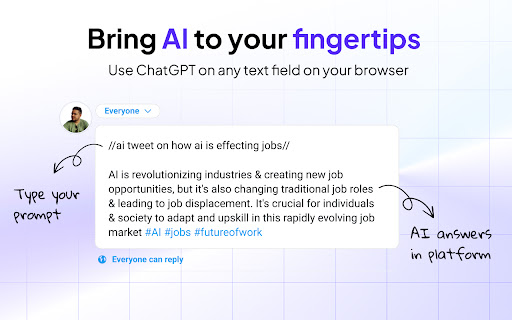


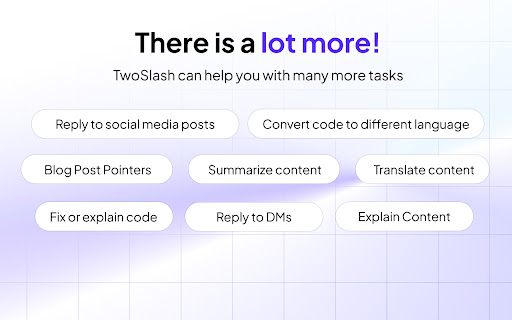
Type '//ai' in any text field on your browser and unleash the power of ChatGPT AI. 🚀 Welcome to TwoSlash, the ultimate productivity tool that harnesses the power of ChatGPT AI to enhance your online experience. 🌟 Features at a Glance: ✓ Fix bugs and write code in your preferred programming language ✓ Create and improve social media content across multiple platforms ✓ Write, reply, and summarize emails for a professional touch ✓ Generate and understand Google Sheets formulas seamlessly ✓ Translate content to different languages with accuracy ✓ Boost your productivity with AI-powered tasks ✨ How It Works Simply type "//ai" anywhere you can enter text on the web, and watch as your ideas transform into reality. TwoSlash empowers you to generate content, improve grammar, translate languages, write and fix code, and much more—all with the speed and precision of ChatGPT AI. Let your creativity flow, while TwoSlash handles the heavy lifting. 🔒 Simple Pricing, No Hassle Enjoy the full range of TwoSlash features with our straightforward pricing plan. For just $9 per month, unlock unlimited access to all current and upcoming features, without the need for an API key. Experience the power of TwoSlash today and take your productivity to new heights. 👨💻 Coding Made Effortless Developers, rejoice! TwoSlash makes coding a breeze. Fix bugs, write code in your preferred programming language, explain complex code snippets, and even convert code to a different language—all in seconds. With TwoSlash, your coding journey becomes smoother and more enjoyable. 🐦 Supercharge Your Social Media Presence Level up your social media game with TwoSlash. Craft compelling Facebook, LinkedIn, Instagram, and Twitter posts effortlessly. Engage with your audience by leveraging AI to reply to comments and direct messages, and watch your social media presence grow organically. 📧 Professional Emailing, Simplified Impress clients and colleagues with professional emails, written flawlessly by TwoSlash. Compose new emails, reply promptly, and summarize lengthy email threads with ease. TwoSlash ensures your communication stands out, giving you more time to focus on what matters most. 📊 Master Google Sheets with ChatGPT's AI Supercharge your Google Sheets productivity using TwoSlash. Generate complex formulas right within Google Sheets, saving you valuable time and effort. Need to understand a specific formula? TwoSlash provides clear explanations, empowering you to navigate spreadsheets effortlessly.

OpenAI ChatGPT Mini
Access OpenAI ChatGPT in a mini window, perfect for multitasking devs to stay connected without leaving their workspace. Introducing OpenAI Chat Mini, a sleek Chrome extension that allows developers and AI enthusiasts to access chat.openai.com in a compact and convenient mini window. Stay connected with OpenAI Chat without switching tabs or leaving your current workspace. Ideal for multitasking, this extension makes it easy for devs to collaborate, learn, and explore while remaining focused on their projects. Built using manifest v3, OpenAI Chat Mini is compatible with the latest Chrome browser features, ensuring smooth performance and a seamless user experience.

Syncia - Power of ChatGPT on any website
Syncia is a browser extension that allows you to use Open AI's GPT in any website. Syncia enables users to chat with ChatGPT by opening a sidebar on any website by using the shortcut ctrl+shift+x. In addition, it provides a floating menu underneath any selected text on any website that allows users to generate text summaries, check grammar issues, and customise text length so on ! 🦾 Features 🗨️ Chat with ChatGPT through a sidebar. 🔑 Use your own Open AI API key. 📜 Quick menu underneath any selected text which allows you to summarise, simplify language, translate, and more. 🗂️ Allows to store custom prompts and use them with quick menu. 💯 Fully customisable settings page. 🔐 Secure and fully Free and open source forever. (Please consider giving this project a star 🌟 and contributing 💖 to support the project.) For more info check out https://github.com/Royal-lobster/Syncia Note: If shortcut is not working, Enter "chrome://extensions/shortcuts", under Syncia set new keyboard shortcut for "Open the sidebar"

ChatGPT Chrome Extension - Silly Ai
Chat GPT powered writing companion that enables you to write, rewrite, and translate anything anywhere. 👋 Say hello to Silly AI's ChatGPT Chrome Extension, your new writing partner! Designed to simplify and elevate your writing process, this extension is as feather-light and unobtrusive as they come. No more cluttered workspace - we're all about a seamless, widget-free experience. 🚫💻 This easy-to-use tool is supercharged by ChatGPT and is operational on practically any website. Need to jot down a comment, draft an email, create social media content, or even fill out a job application? 📝 Silly AI's ChatGPT extension has got you covered. Just write it with a '>>' symbol then your prompt and hit Enter or Return key(⏎) on your keyboard. and sit back to watch the AI do its magic! 🪄✨ Our promise to you is an uninterrupted writing process. Forget about copy-pasting or unnecessary clicking - Silly AI is all about maintaining your writing flow. 🌊 This extension works on almost all websites, from Google Docs to spreadsheets, bringing AI efficiency to your fingertips.👌 But Silly AI's ChatGPT extension isn't just about writing. You can rewrite, summarize, translate, explain, and even reply to texts anywhere, all with a single command. 📚🌍 And guess what? No ChatGPT (OpenAI) account is required! Plus, you get 20000 free tokens every month for your daily tasks. 🎉 What's more, Silly AI's ChatGPT extension delivers consistently high speed and quality for all users, free or premium. Choose your preferred AI - OpenAI's Chat GPT, Google's BARD, or our unique hybrid API for diverse content. 🚀 Add a personal touch to your writing by setting the tone, verbosity, or creativity per site - make it professional for LinkedIn, casual for Twitter, or extra creative for Google Docs. 🕴️💃🎨 Silly AI remembers your preferences, so you only have to set it once. Remembering complex commands or shortcuts is a thing of the past. 📜 With Silly AI's ChatGPT extension, just type '>>', your prompt, and hit Enter. Want to give your AI assistant a unique name? Go right ahead! 🎈 Your experience with Silly AI's ChatGPT extension is just like using ChatGPT, but without the need to visit a separate site. Pay the same amount and recharge tokens as needed, with an easy-to-track system right within your browser. Plus, we're all about privacy. 🔒 Your prompts and writing history are saved locally and deleted once you refresh the page. So, ready for a smoother, more efficient writing experience? 👍 1. Click "Add to Chrome" at the top-right corner. 🖱️ 2. Refresh your open tabs to activate the extension. 🔄 3. Type '>>' followed by your prompt and hit Enter. ⌨️ Welcome to the future of writing with Silly AI’s ChatGPT Chrome Extension. Your words, our magic. 🌈🖊️

BrowserGPT
Generate text using ChatGPT wherever you type in the browser Introducing BrowserGPT - the ultimate browser extension for generating text using ChatGPT! With BrowserGPT, you can harness the power of ChatGPT technology to generate high-quality text in any place you type on your browser. Whether you're composing emails, writing documents, or sending messages, BrowserGPT makes it easy to generate text on the fly. One of the key features of BrowserGPT is its convenience. You can activate it by typing "gpt:" in any text field, and the extension will automatically generate text based on what you've typed so far. This means you can use ChatGPT without having to switch between different applications or web pages, making the whole process much faster and more efficient. So if you're looking for a way to generate high-quality text quickly and easily, give BrowserGPT a try!
