
iimdmhmbedafhnjdccafpegfkadhkpoj
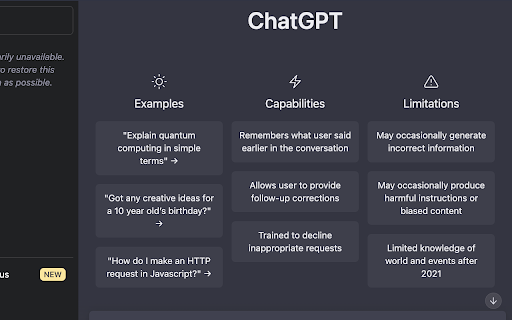
Access OpenAI ChatGPT in a mini window, perfect for multitasking devs to stay connected without leaving their workspace. Introducing OpenAI Chat Mini, a sleek Chrome extension that allows developers and AI enthusiasts to access chat.openai.com in a compact and convenient mini window. Stay connected with OpenAI Chat without switching tabs or leaving your current workspace. Ideal for multitasking, this extension makes it easy for devs to collaborate, learn, and explore while remaining focused on their projects. Built using manifest v3, OpenAI Chat Mini is compatible with the latest Chrome browser features, ensuring smooth performance and a seamless user experience.

Definio AI: Multi-Modal AI Sidebar
Definio runs every LLM model from one sidebar. Throw your question at any of them, switch on a whim, never open a new tab. Definio AI is a powerful AI assistant that brings multiple language models together in a single browser extension—helping you explore, reason, and research faster, directly within your browsing flow. 🚀 CHAT WITH THE TOP AI MODELS – ALL IN ONE PLACE: Models from all major providers. 🧠 ASK BETTER QUESTIONS, GET SMARTER ANSWERS: Select any text on a page and start a conversation with multiple AI agents at once. Cross-check facts, get diverse insights, or bring specialised models into the discussion—right from your browser sidebar. ⚡ BUILT FOR DEEP THINKING AND FAST WORK: Use AI to break down dense content, summarize complex topics, compare perspectives, or brainstorm ideas—all without switching tabs. Definio adapts to your browsing context for precise, real-time assistance. 📷 COMPUTER VISION & SCREENSHOTS: Capture the active tab or snip a region with one click and drop it straight into the chat. Vision-capable models read the screenshot for you—ask "what does this chart say," "translate this menu," "what's broken in this UI," or "summarise the page I just captured." You can also drop in your own image files (PNG, JPG, WebP) and combine selected text, screenshots, and typed questions in the same message for richer prompts. ⌨️ CHAT SHORTCUTS – TYPE "/" TO RUN COMMANDS: - /new — start a new chat - /model — switch the AI model mid-conversation - /search — toggle web search on or off - /think — toggle extended thinking on or off - /theme — flip between dark and light mode - /capture — screenshot the visible tab - /snip — screenshot a region you draw Plus Alt+Shift+O (Option+Shift+O on Mac) to open the side panel from anywhere—rebindable in chrome://extensions/shortcuts. 🔄 YOUR AI WORKFLOW, SUPERCHARGED: Whether you're a student, researcher, or professional, Definio helps you turn questions into knowledge. Use customizable shortcuts to boost productivity—summarize articles, extract key points, or auto-respond to content. 💡 WHY DEFINIO? Unlike traditional AI chatbots, Definio lets you bring multiple minds into the room. It's not about one model's opinion—it's about reaching clarity through comparison, consensus, and control. 📝 Whether you're researching, learning, or need quick explanations — Definio AI Chat is your intelligent companion right in your browser. Multiple Access Options: - Keyboard Shortcut: Press Alt+Shift+O (default shortcut, customizable in Chrome extensions settings) to open the AI Chat side panel instantly - Right-click Menu: Right-click anywhere on any webpage and select "Open Chat" to launch the AI Chat side panel - Extension Icon: Click the Definio AI extension icon in your browser toolbar to open the side panel Quick Access Methods: - Once the side panel is open, you can select any text on the page to automatically send it to the AI Chat for analysis or questions - Use the right-click "Open Chat" option for instant access without needing to select text first - The side panel stays open as you navigate between different websites, keeping your chat history accessible Chrome Limitations: - ⚠️ The extension does not work with PDF files viewed in the browser - ⚠️ For best experience with text selection, open the side panel first and then select the text you want to discuss with AI - Privacy First: Unlike popup extensions, Definio AI works in its own dedicated space without injecting content into web pages - Non-Intrusive Design: The side panel never covers or alters the content you're reading - Better Workflow: Ask questions about what you're reading without losing your place in the text or having floating boxes interrupt your flow - Persistent Chat: Keep your AI conversation visible while continuing to read and navigate the web - Seamless Integration: Instantly discuss any text you encounter while browsing

Prompt Optimizer - SecondBrain
SecondBrain: The Prompt Optimizer That Refines, Explains, and Saves Your Best Work Stop wrestling with AI to get the output you need. You write an instruction, the chatbot misinterprets it, and you waste ten minutes iterating. SecondBrain is a transparent prompt optimizer built specifically for everyday AI users. We clarify your intent, tighten your wording, and show you exactly what changed. Once you secure the perfect result, you can instantly build a library of repeatable requests. Try it with the next prompt you were about to rewrite manually. WHAT DOES SECONDBRAIN DO? SecondBrain is a Chrome extension that functions as a transparent prompt optimizer. It refines your rough AI instructions into precise, highly effective prompts by cutting fluff and clarifying your core intent. Once you achieve the perfect output, you can save and bookmark prompts directly in your browser for fast retrieval on repeatable tasks. How This Prompt Optimizer Transforms Your Workflow TL;DR Key Takeaways: Clarifies intent: Turns vague requests into precise instructions. Ensures consistency: Delivers reliable formatting for recurring AI tasks. Integrates seamlessly: Works inside your current chat environment. Turn vague input into clear directives We tighten your wording so the AI understands exactly what you require. We preserve your original context. We only add structure when it actively improves the result. We cut the useless filler immediately. Get consistent AI output every time Better task framing leads to reliable formatting. Whether you are writing, researching, or debugging code, you get repeatable results for recurring tasks. You no longer have to guess how the AI will respond. Fit directly into your existing habits You start with a messy research idea, refine it with one click, and send the cleaner version in seconds. Use this tool exactly where you already chat with AI to eliminate manual rewriting. See the Edits Before You Send The fastest way to trust an optimization tool is to see it improve your own words in real-time. Before (The Original Request) Imagine starting with a vague request for a blog draft. It lacks direction. It leaves too much room for the AI to guess your target audience and formatting requirements. After (The Optimized Request) We refine that exact intent with absolute clarity. You receive the specific structure you need without any obvious padding. What changed and why: Goal clarified: The core objective is front-loaded. Filler removed: Unnecessary conversational text is deleted. Format defined: Output constraints are explicitly listed. Context preserved: Your original parameters remain intact. Save Prompts and Bookmark Prompts That Actually Work TL;DR: Never lose good work: Save successful prompts instantly. Organize easily: Bookmark by project or outcome. Build a system: Create a reliable personal library over time. Save prompts by specific task or project Stop losing your best work to the chat history feed. Start saving prompts for repeat use so you can retrieve them instantly. This maintains your output quality over time. Bookmark prompts for instant reuse Keep highly effective instructions close at hand with a lightweight saving habit. This completely eliminates the need for endless scrolling to find that one template that worked last week. Build a highly functional personal library Focus strictly on quality. Keep only the instructions that consistently prove useful. You will build a reliable workflow system instead of a random, messy pile of text. Practical Use Cases Across Your AI Workflow SecondBrain adapts to the exact tasks you repeat daily. Writing and Editing: Clean up tone, tighten drafts, and structure content briefs fast. Researching: Refine complex queries, build comparison matrices, and synthesize scattered notes. Coding: Request tighter code blocks, format debugging tasks, and write precise bug reports. Structuring Output: Generate reliable tables, lists, and reusable frameworks. Works with the AI tools you already use Quick Answers Before You Install (FAQ) Does it always make text longer? No. Highly effective instructions are often concise and well-structured. We cut fluff instead of adding it. Can I save prompts and bookmark prompts for later? Yes. You can bookmark inputs immediately and retrieve them through our streamlined library interface. Is it useful for simple, one-sentence queries? Simple queries often work fine natively. The biggest performance gains occur when your requests are nuanced, multi-step, or frequently repeated. Will it work inside my favorite AI chat interfaces? Yes. It operates directly inside the native environments of major AI platforms. Is an API key required? You do not need an API key to start. Install the extension and begin optimizing immediately. Close the Gap Between a Rough Idea and Perfect Output Start communicating with AI precisely. Generate clearer instructions without the bloat. View exact text improvements and understand the logic behind them. Build an easily accessible library of saved prompts. Install the top prompt optimizer today and watch your next request improve before you hit send.

AI Sidebar - Chat with Claude, Deepseek, Gemini, Grok
AI Sidebar is your all-in-one AI sidebar for Claude, Gemini, Grok, Deepseek. Chat with all AI. AI Sidebar brings a powerful assistant directly into your browser. It helps you write, read, summarize, translate, analyze, and work faster without switching between tabs. Use it while browsing any website to ask questions, create drafts, improve text, understand long content, extract useful information, and compare responses from different AI engines in one convenient side panel. Whether you are replying to emails, reviewing articles, working with documents, translating text, analyzing screenshots, or brainstorming ideas, AI Sidebar keeps helpful tools close to your workflow. AI Sidebar is designed for everyday productivity. 📩 Write emails, replies, posts, reports, and product descriptions 📚 Summarize articles, PDFs, documentation, and web pages 🌍 Translate selected text, messages, and documents ✍️ Improve grammar, clarity, tone, and structure 🖼️ Analyze screenshots and extract text from images 💻 Get coding help, debugging support, and technical explanations 🔎 Compare answers from different AI engines 💡 Brainstorm ideas, outlines, titles, and content variations Instead of opening multiple tabs or copying text between tools, you can keep your assistant available while you work. ⚡ Built for real browser workflows AI Sidebar helps you stay focused while browsing, writing, researching, studying, or managing daily tasks. Use it on websites, email platforms, social networks, dashboards, documents, support tools, and content editors. You can select text, ask a question, rewrite a paragraph, simplify a complex section, or create a polished response in seconds. It is useful for professionals, students, developers, researchers, marketers, writers, support teams, and anyone who wants faster access to AI assistance inside the browser. AI Sidebar supports a wide range of AI engines for different needs, including writing, reasoning, coding, research, translation, summarization, and visual understanding. You can choose the best engine for your task, compare outputs, and continue working without leaving the current page. 📚 Read, summarize, and understand faster 📝 Summarize articles and reports 🔍 Explain difficult sections in simpler language 📌 Extract key points from documentation 🛒 Review product pages or support content 💻 Understand technical material ✅ Create outlines, notes, and action items This makes research, learning, and daily reading easier and more efficient. 🌍 Translate and adapt content AI Sidebar helps you work across languages directly from your browser. You can translate selected text, emails, web pages, and document content. It can also help adapt tone, improve fluency, simplify wording, or make text sound more natural for a specific audience. This is useful for international communication, customer support, research, localization, and content creation. 🖼️ OCR and visual analysis AI Sidebar can help extract and understand text from screenshots, images, and visual content. 📷 Turn screenshots into editable text 📄 Summarize visible information 📊 Understand charts, layouts, or image-based content 🔎 Process mixed text and visual inputs 🗒️ Create notes from captured material This expands AI assistance beyond plain text and makes browser-based work more flexible. ✍️ Writing assistant for every website AI Sidebar helps you write better and faster wherever you work. Use it to draft, rewrite, shorten, expand, polish, or change the tone of your content. It can help with professional emails, social posts, blog drafts, comments, documentation, support replies, product copy, and internal notes. You can keep your writing assistant open beside the page and improve text without interrupting your workflow. 🔒 Simple, fast, and always available AI Sidebar is built for speed and convenience. Open it when you need help, ask a question, process selected text, summarize a page, translate content, or create a draft. Everything happens inside your browser, so you can stay focused on the page you are using. 🌐 Browser sidebar assistant for daily work 🤖 Multiple AI engines in one workspace ✍️ Writing, rewriting, and editing support 📚 Page summaries and content explanations 🌍 Translation and multilingual assistance 🖼️ OCR and visual content support 💻 Coding and technical help 💡 Research, brainstorming, and productivity tools ⚡ Fast access without constant tab switching 🎯 Useful for work, study, support, marketing, and personal tasks Install AI Sidebar today and bring powerful AI assistance into your browser whenever you need it.

ChatGpt Popup
ChatGpt Popup is a chrome extension that allows users to chat with ChatGpt. ChatGpt Popup is a chrome extension that provides quick access to ChatGpt's AI language model on any webpage. Users can open the extension popup on any page using a shortcut key or by selecting text, and can ask any question in two modes - chatGpt and GPT-3. Features: - Supports all popular search engines Google, Bing, DuckDuckGo, ... - Supports official OpenAI API - Simple access via shortcut key "ctrl + m" or text selection - Icon in right bottom of page for easy access - Extension popup to ask any question - Two modes - chatGpt and GPT-3 - chatGpt mode can answer follow-up questions - GPT-3 mode is faster and more stable. Source code: - https://github.com/longpddev/chatgpt-google-extension - https://github.com/wong2/chat-gpt-google-extension
