
gabfffndnhbbjlgmbogpfaciajcbpkdn
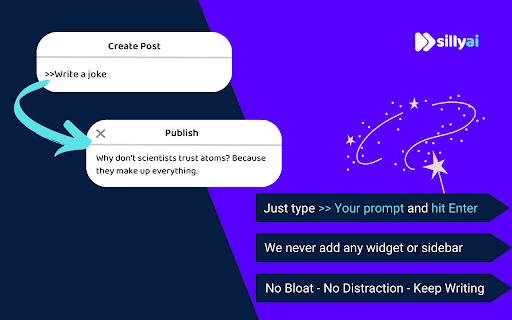


Chat GPT powered writing companion that enables you to write, rewrite, and translate anything anywhere. 👋 Say hello to Silly AI's ChatGPT Chrome Extension, your new writing partner! Designed to simplify and elevate your writing process, this extension is as feather-light and unobtrusive as they come. No more cluttered workspace - we're all about a seamless, widget-free experience. 🚫💻 This easy-to-use tool is supercharged by ChatGPT and is operational on practically any website. Need to jot down a comment, draft an email, create social media content, or even fill out a job application? 📝 Silly AI's ChatGPT extension has got you covered. Just write it with a '>>' symbol then your prompt and hit Enter or Return key(⏎) on your keyboard. and sit back to watch the AI do its magic! 🪄✨ Our promise to you is an uninterrupted writing process. Forget about copy-pasting or unnecessary clicking - Silly AI is all about maintaining your writing flow. 🌊 This extension works on almost all websites, from Google Docs to spreadsheets, bringing AI efficiency to your fingertips.👌 But Silly AI's ChatGPT extension isn't just about writing. You can rewrite, summarize, translate, explain, and even reply to texts anywhere, all with a single command. 📚🌍 And guess what? No ChatGPT (OpenAI) account is required! Plus, you get 20000 free tokens every month for your daily tasks. 🎉 What's more, Silly AI's ChatGPT extension delivers consistently high speed and quality for all users, free or premium. Choose your preferred AI - OpenAI's Chat GPT, Google's BARD, or our unique hybrid API for diverse content. 🚀 Add a personal touch to your writing by setting the tone, verbosity, or creativity per site - make it professional for LinkedIn, casual for Twitter, or extra creative for Google Docs. 🕴️💃🎨 Silly AI remembers your preferences, so you only have to set it once. Remembering complex commands or shortcuts is a thing of the past. 📜 With Silly AI's ChatGPT extension, just type '>>', your prompt, and hit Enter. Want to give your AI assistant a unique name? Go right ahead! 🎈 Your experience with Silly AI's ChatGPT extension is just like using ChatGPT, but without the need to visit a separate site. Pay the same amount and recharge tokens as needed, with an easy-to-track system right within your browser. Plus, we're all about privacy. 🔒 Your prompts and writing history are saved locally and deleted once you refresh the page. So, ready for a smoother, more efficient writing experience? 👍 1. Click "Add to Chrome" at the top-right corner. 🖱️ 2. Refresh your open tabs to activate the extension. 🔄 3. Type '>>' followed by your prompt and hit Enter. ⌨️ Welcome to the future of writing with Silly AI’s ChatGPT Chrome Extension. Your words, our magic. 🌈🖊️

FutureWrite AI for Writing & More w/ ChatGPT
Free-Boost writing w/ AI! FutureWrite w/ ChatGPT for emails & more. Say bye 2 writer's block & hello 2 smarter,faster writing. Boost writing w/ AI! FutureWrite w/ ChatGPT for emails & more. Say bye to writer's block & hello to smarter, faster writing. FutureWrite is the ultimate writing assistant for professionals. With its AI-powered technology and easy-to-use interface, it helps you write smarter and succeed faster. From crafting perfect cover letters and LinkedIn summaries to writing job descriptions, email responses, and capturing meeting notes, FutureWrite has got you covered. Say goodbye to writer's block and hello to efficient, effective, and flawless writing. Unlock your full potential with FutureWrite and Write Smarter & Succeed Faster! Seamless integration with popular platforms such as Gmail and LinkedIn. With its integration into the Gmail email reply window, FutureWrite.AI appears right next to the send button, allowing you to easily compose and edit your emails without ever leaving your inbox. Similarly, in LinkedIn, FutureWrite.AI appears next to the Job Apply button, making it easy to craft the perfect cover letter or summary for your job applications. Free for Ever: FutureWrite.AI is a 100% free writing assistant that can be used by anyone, anytime, anywhere. Best Writing Assistant: FutureWrite.AI beats all other writing assistants in the market with its advanced features and ease of use. Integration: Seamlessly integrates with popular platforms like Gmail and LinkedIn, appearing next to the send button in the Gmail email reply window and next to the Job Apply button in LinkedIn, allowing you to easily compose and edit emails and craft the perfect cover letter or summary without ever leaving the platform. Works in Every Webpage: FutureWrite.AI works seamlessly in every webpage, ensuring that you never have to switch between different tools while writing. All Languages Supported: FutureWrite.AI supports all languages, making it accessible to professionals from all over the world. Secured and Privacy Built-in: FutureWrite.AI takes your privacy and security seriously. The tool is built with robust security features to ensure that your data is safe and secure. Created by Professionals for all Professionals: FutureWrite.AI was created by a team of professionals who understand the needs of other professionals. The tool is designed to make your life easier and help you succeed in your career. No Need for Chat GPT Account: Unlike other writing assistants, FutureWrite.AI does not require you to have a Chat GPT account to use the tool. Works Independently: FutureWrite.AI is a standalone tool that works independently, allowing you to use it on any device or platform. You can now auto-generate contextual responses to tweets on the Twitter App. 🐦💬 All current users of the FW Chrome extension will have access to the Tweet Response feature. 🖥️🔗 Simply select the reply option on any tweet that you’d like to reply to. 👉💬 Click on the FutureWrite icon on the reply input field. 🖊️🔮 FutureWrite’s context window will open. In this window, you need to provide an input prompt about what you’d like to do with the context. You can either manually input your context prompt or select from the following hints in the dropdown. 🪟❓ Congratulations – For tweets about achievements 🎉🏆 Retweet – For tweets that can be re-posted 🔄📢 Agree – For tweets you agree with 👍😄 Disagree – For tweets you disagree with 👎😤 Ask More – For tweets about insufficient information 🤔❓ Expand More – For tweets seeking advice or opinions 🗣️📈 Select Generate AI Response and select one from the 5 drafts generated. The selected response will be auto-filled into the reply input field. 🤖✉️

StudyMateAI
A browser extension for accessing GPT-3 while browsing or viewing PDF files 📚 Are you looking for a way to study smarter, not harder? Introducing StudyMateAI – the ultimate AI-powered study assistant! With StudyMateAI, you can take your studying to the next level by accessing GPT-3's advanced natural language processing and machine learning algorithms. This browser extension allows you to easily access AI tools such as text summarization, flashcards, and question answering, all while browsing or viewing PDF files. But that's not all – StudyMateAI also features advanced AI browsing and search capabilities, allowing you to quickly and easily find the information you need, right when you need it. Plus, with our state-of-the-art Chat GPT AI model developed by OpenAI, you can get instant definitions and explanations for any word or concept you're struggling with. The StudyMateAI extension is perfect for students, researchers, or anyone who wants to learn more efficiently. It enhances the interface and adds new features that will help you improve your workflow and save time. And with our easy-to-use browser integration, you can seamlessly use StudyMateAI while browsing, googling, or viewing a PDF in your browser. 🚀 We're always looking to improve StudyMateAI, so click "support" to send us your feature requests. 🤝 Current Features • Access to GPT-3 for text summarization, flashcards, and question answering • Advanced AI browsing and search capabilities • Instant definitions and explanations for any word or concept you're struggling with • Seamless browser integration for effortless use 🧑💻 Next Features • Additional AI tools for more efficient studying • Multiple themes for personalized studying experience • Compatibility with more file types 📆 Planned Features • Integration with more educational platforms • Enhanced AI-powered note-taking • Collaborative study features • More personalized learning suggestions • Website with version features, FAQ & help, contact, and more information Transform the way you learn with StudyMateAI – the world's AI-powered study assistant. Download StudyMateAI today and start studying smarter!

Syncia - Power of ChatGPT on any website
Syncia is a browser extension that allows you to use Open AI's GPT in any website. Syncia enables users to chat with ChatGPT by opening a sidebar on any website by using the shortcut ctrl+shift+x. In addition, it provides a floating menu underneath any selected text on any website that allows users to generate text summaries, check grammar issues, and customise text length so on ! 🦾 Features 🗨️ Chat with ChatGPT through a sidebar. 🔑 Use your own Open AI API key. 📜 Quick menu underneath any selected text which allows you to summarise, simplify language, translate, and more. 🗂️ Allows to store custom prompts and use them with quick menu. 💯 Fully customisable settings page. 🔐 Secure and fully Free and open source forever. (Please consider giving this project a star 🌟 and contributing 💖 to support the project.) For more info check out https://github.com/Royal-lobster/Syncia Note: If shortcut is not working, Enter "chrome://extensions/shortcuts", under Syncia set new keyboard shortcut for "Open the sidebar"

Javy: GPT-4 powered assistant
GPT-4 powered tool for quick access to the answer to any question Javy brings the power of OpenAI's language model to your browser. With this extension, you can have a virtual assistant at your fingertips, ready to answer questions, provide information, and complete tasks. Simply type in your query, and GPT-4 will generate a response, offering you relevant and accurate information in a matter of seconds. Whether you need help with homework, want to find the latest news, or just need a quick translation, GPT-4 has you covered. The extension utilizes cutting-edge AI technology to understand natural language and deliver high-quality results. Download the GPT-4 powered assistant today and experience the future of search.
