
bhdfllifdfodbkihgmahlfmddlmfdjak

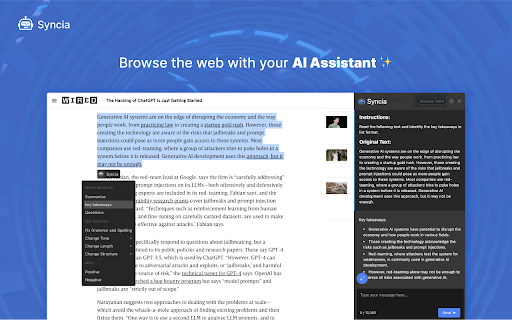


Syncia is a browser extension that allows you to use Open AI's GPT in any website. Syncia enables users to chat with ChatGPT by opening a sidebar on any website by using the shortcut ctrl+shift+x. In addition, it provides a floating menu underneath any selected text on any website that allows users to generate text summaries, check grammar issues, and customise text length so on ! 🦾 Features 🗨️ Chat with ChatGPT through a sidebar. 🔑 Use your own Open AI API key. 📜 Quick menu underneath any selected text which allows you to summarise, simplify language, translate, and more. 🗂️ Allows to store custom prompts and use them with quick menu. 💯 Fully customisable settings page. 🔐 Secure and fully Free and open source forever. (Please consider giving this project a star 🌟 and contributing 💖 to support the project.) For more info check out https://github.com/Royal-lobster/Syncia Note: If shortcut is not working, Enter "chrome://extensions/shortcuts", under Syncia set new keyboard shortcut for "Open the sidebar"

GPTEnhancer
Provides you the feature to upload files to ChatGPT and make it more user specific UPDATE: 1. New UI 2. Now users can provide 100 word long custom prompt which can be written in the text box before submitting a file. ----------------------- Boost your interaction with ChatGPT using GPT-Enhancer, the ultimate companion extension designed to enhance your AI conversation journey. With GPT-Enhancer, you can seamlessly integrate any file type into your ChatGPT context/history, empowering the AI model to provide more accurate and contextually aware responses. Perfect for developers, our extension has the ability to read programming files, providing assistance in debugging, test writing, and more. But GPT-Enhancer isn't just for coders - it's for anyone looking to elevate their ChatGPT experience. The best part? We're just getting started. GPT-Enhancer is committed to continuous improvement, with an exciting roadmap of features set to roll out. On the horizon, you can look forward to Smart Highlighting for key information, Conversation Summaries for quick recaps, and Chat Bookmarking for easy referencing. Your input matters to us. We welcome feature requests and feedback to help shape the future development of GPT-Enhancer. Experience the future of AI conversations with GPT-Enhancer. Download today. --------------------- Please follow the steps below to upload a file: 1. Click the "Submit" button to initiate the file upload process. 2. Specify the desired delay between chunks in seconds. By default, the delay is set to 8 seconds. #Optional: Now you can provide a 100 word long custom prompt before submitting the file. Directly type your prompt in the text box at the bottom of the page. 3. Select the file you wish to upload and click the "Submit" button. 4. Once the file is being uploaded, the button will turn 'Yellow' and the text will be automatically divided into manageable chunks with appropriate formatting and numbering. 5. It is important to press the "Stop Generating" button as soon as the GPT starts providing answers for the given prompt. This step allows the extension to work efficiently and input the chunks accurately. Failure to perform this step may result in errors. 6. When the entire text has been successfully uploaded, the "Submit" button will turn 'Green' to indicate completion. -------Privacy-------- We prioritize your privacy and ensure that we do not collect any files or data from you, so you can enjoy our services without any concerns.

ChatGPT, Bing & Bard For Chrome: Kursor
Discover an unparalleled web browsing experience with Kursor, the comprehensive solution for all your online communication needs. Summarize, translate, rephrase, correct grammar, and create content with just one click. Experience the future of web surfing with Kursor, powered by GPT-AI ! Kursor utilizes the power of OpenAI's GPT- AI to revolutionize your browsing, ensuring seamless integration and the latest technology. 💸 100% Free and Unlimited Use Kursor is entirely free to use, with no restrictions on the number of searches you can perform. 🖱️ One-Click Functionality Effortlessly select any text on the web and access Kursor's powerful features like summarizing, translating, rephrasing, and grammar correction with just one click. 🔎 ChatGPT for LinkedIn: Gain valuable insights into job opportunities by seamlessly integrating LinkedIn's job data, helping you stay informed and connected in the professional world. 🌐 50+ Language Translations Translate text into over 50 languages, breaking down language barriers and accessing content from around the globe. 🎭 10+ Tonalities for Rephrasing Rephrase text in more than 10 different tonalities, giving your content a unique and customized feel. 💬 AI-Driven Chat Ask questions and resolve queries instantly with our AI chat window powered by ChatGPT. 📝 Versatile Composition Functionality Compose emails, messages, paragraphs, tweets, articles, or blog posts with specified objectives, length, and tone. 🔥 Easy Access to Third Window Open the third window effortlessly using cmd + shift (for Mac) / ctrl + shift (for Windows). ⚡ Swift Response Time Enjoy smooth and timely responses with our seamless integration of GPT technology. 📧 Contact Us for Support Reach out to our team anytime at contact@kursor.in for any assistance or inquiries. Install Kursor now and elevate your web browsing experience with the power of ChatGPT!

FutureWrite AI for Writing & More w/ ChatGPT
Free-Boost writing w/ AI! FutureWrite w/ ChatGPT for emails & more. Say bye 2 writer's block & hello 2 smarter,faster writing. Boost writing w/ AI! FutureWrite w/ ChatGPT for emails & more. Say bye to writer's block & hello to smarter, faster writing. FutureWrite is the ultimate writing assistant for professionals. With its AI-powered technology and easy-to-use interface, it helps you write smarter and succeed faster. From crafting perfect cover letters and LinkedIn summaries to writing job descriptions, email responses, and capturing meeting notes, FutureWrite has got you covered. Say goodbye to writer's block and hello to efficient, effective, and flawless writing. Unlock your full potential with FutureWrite and Write Smarter & Succeed Faster! Seamless integration with popular platforms such as Gmail and LinkedIn. With its integration into the Gmail email reply window, FutureWrite.AI appears right next to the send button, allowing you to easily compose and edit your emails without ever leaving your inbox. Similarly, in LinkedIn, FutureWrite.AI appears next to the Job Apply button, making it easy to craft the perfect cover letter or summary for your job applications. Free for Ever: FutureWrite.AI is a 100% free writing assistant that can be used by anyone, anytime, anywhere. Best Writing Assistant: FutureWrite.AI beats all other writing assistants in the market with its advanced features and ease of use. Integration: Seamlessly integrates with popular platforms like Gmail and LinkedIn, appearing next to the send button in the Gmail email reply window and next to the Job Apply button in LinkedIn, allowing you to easily compose and edit emails and craft the perfect cover letter or summary without ever leaving the platform. Works in Every Webpage: FutureWrite.AI works seamlessly in every webpage, ensuring that you never have to switch between different tools while writing. All Languages Supported: FutureWrite.AI supports all languages, making it accessible to professionals from all over the world. Secured and Privacy Built-in: FutureWrite.AI takes your privacy and security seriously. The tool is built with robust security features to ensure that your data is safe and secure. Created by Professionals for all Professionals: FutureWrite.AI was created by a team of professionals who understand the needs of other professionals. The tool is designed to make your life easier and help you succeed in your career. No Need for Chat GPT Account: Unlike other writing assistants, FutureWrite.AI does not require you to have a Chat GPT account to use the tool. Works Independently: FutureWrite.AI is a standalone tool that works independently, allowing you to use it on any device or platform. You can now auto-generate contextual responses to tweets on the Twitter App. 🐦💬 All current users of the FW Chrome extension will have access to the Tweet Response feature. 🖥️🔗 Simply select the reply option on any tweet that you’d like to reply to. 👉💬 Click on the FutureWrite icon on the reply input field. 🖊️🔮 FutureWrite’s context window will open. In this window, you need to provide an input prompt about what you’d like to do with the context. You can either manually input your context prompt or select from the following hints in the dropdown. 🪟❓ Congratulations – For tweets about achievements 🎉🏆 Retweet – For tweets that can be re-posted 🔄📢 Agree – For tweets you agree with 👍😄 Disagree – For tweets you disagree with 👎😤 Ask More – For tweets about insufficient information 🤔❓ Expand More – For tweets seeking advice or opinions 🗣️📈 Select Generate AI Response and select one from the 5 drafts generated. The selected response will be auto-filled into the reply input field. 🤖✉️

Power Prompt For ChatGPT & OpenAi
Power Prompt is a Chrome Extension for ChatGPT/OpenAi Power Users is a cutting-edge Chrome extension that takes your Ai interaction to the next level. With this extension, you can maximize the potential of the state-of-the-art language model and experience a seamless and efficient conversation. The Power Prompt v1 beta allows you to choose from different models, load and save prompt templates, set temperature and prompt length and tokens. Source code and instructions available at https://github.com/ruvnet/powerprompt
