
ojdbfphobphdlgloniofafojolaalnlm
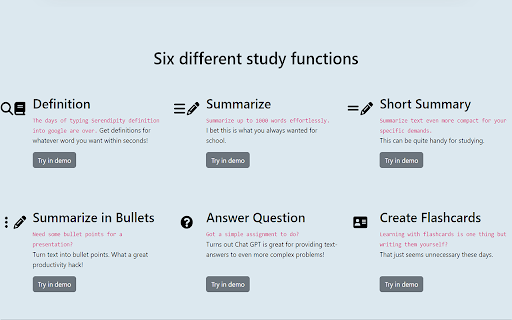
A browser extension for accessing GPT-3 while browsing or viewing PDF files 📚 Are you looking for a way to study smarter, not harder? Introducing StudyMateAI – the ultimate AI-powered study assistant! With StudyMateAI, you can take your studying to the next level by accessing GPT-3's advanced natural language processing and machine learning algorithms. This browser extension allows you to easily access AI tools such as text summarization, flashcards, and question answering, all while browsing or viewing PDF files. But that's not all – StudyMateAI also features advanced AI browsing and search capabilities, allowing you to quickly and easily find the information you need, right when you need it. Plus, with our state-of-the-art Chat GPT AI model developed by OpenAI, you can get instant definitions and explanations for any word or concept you're struggling with. The StudyMateAI extension is perfect for students, researchers, or anyone who wants to learn more efficiently. It enhances the interface and adds new features that will help you improve your workflow and save time. And with our easy-to-use browser integration, you can seamlessly use StudyMateAI while browsing, googling, or viewing a PDF in your browser. 🚀 We're always looking to improve StudyMateAI, so click "support" to send us your feature requests. 🤝 Current Features • Access to GPT-3 for text summarization, flashcards, and question answering • Advanced AI browsing and search capabilities • Instant definitions and explanations for any word or concept you're struggling with • Seamless browser integration for effortless use 🧑💻 Next Features • Additional AI tools for more efficient studying • Multiple themes for personalized studying experience • Compatibility with more file types 📆 Planned Features • Integration with more educational platforms • Enhanced AI-powered note-taking • Collaborative study features • More personalized learning suggestions • Website with version features, FAQ & help, contact, and more information Transform the way you learn with StudyMateAI – the world's AI-powered study assistant. Download StudyMateAI today and start studying smarter!

GPTEnhancer
Provides you the feature to upload files to ChatGPT and make it more user specific UPDATE: 1. New UI 2. Now users can provide 100 word long custom prompt which can be written in the text box before submitting a file. ----------------------- Boost your interaction with ChatGPT using GPT-Enhancer, the ultimate companion extension designed to enhance your AI conversation journey. With GPT-Enhancer, you can seamlessly integrate any file type into your ChatGPT context/history, empowering the AI model to provide more accurate and contextually aware responses. Perfect for developers, our extension has the ability to read programming files, providing assistance in debugging, test writing, and more. But GPT-Enhancer isn't just for coders - it's for anyone looking to elevate their ChatGPT experience. The best part? We're just getting started. GPT-Enhancer is committed to continuous improvement, with an exciting roadmap of features set to roll out. On the horizon, you can look forward to Smart Highlighting for key information, Conversation Summaries for quick recaps, and Chat Bookmarking for easy referencing. Your input matters to us. We welcome feature requests and feedback to help shape the future development of GPT-Enhancer. Experience the future of AI conversations with GPT-Enhancer. Download today. --------------------- Please follow the steps below to upload a file: 1. Click the "Submit" button to initiate the file upload process. 2. Specify the desired delay between chunks in seconds. By default, the delay is set to 8 seconds. #Optional: Now you can provide a 100 word long custom prompt before submitting the file. Directly type your prompt in the text box at the bottom of the page. 3. Select the file you wish to upload and click the "Submit" button. 4. Once the file is being uploaded, the button will turn 'Yellow' and the text will be automatically divided into manageable chunks with appropriate formatting and numbering. 5. It is important to press the "Stop Generating" button as soon as the GPT starts providing answers for the given prompt. This step allows the extension to work efficiently and input the chunks accurately. Failure to perform this step may result in errors. 6. When the entire text has been successfully uploaded, the "Submit" button will turn 'Green' to indicate completion. -------Privacy-------- We prioritize your privacy and ensure that we do not collect any files or data from you, so you can enjoy our services without any concerns.

Javy: GPT-4 powered assistant
GPT-4 powered tool for quick access to the answer to any question Javy brings the power of OpenAI's language model to your browser. With this extension, you can have a virtual assistant at your fingertips, ready to answer questions, provide information, and complete tasks. Simply type in your query, and GPT-4 will generate a response, offering you relevant and accurate information in a matter of seconds. Whether you need help with homework, want to find the latest news, or just need a quick translation, GPT-4 has you covered. The extension utilizes cutting-edge AI technology to understand natural language and deliver high-quality results. Download the GPT-4 powered assistant today and experience the future of search.

BrowserGPT
Generate text using ChatGPT wherever you type in the browser Introducing BrowserGPT - the ultimate browser extension for generating text using ChatGPT! With BrowserGPT, you can harness the power of ChatGPT technology to generate high-quality text in any place you type on your browser. Whether you're composing emails, writing documents, or sending messages, BrowserGPT makes it easy to generate text on the fly. One of the key features of BrowserGPT is its convenience. You can activate it by typing "gpt:" in any text field, and the extension will automatically generate text based on what you've typed so far. This means you can use ChatGPT without having to switch between different applications or web pages, making the whole process much faster and more efficient. So if you're looking for a way to generate high-quality text quickly and easily, give BrowserGPT a try!

GPT Code Reviewer
This extension enables users to upload files for ChatGPT to analyze and summarize. The author is 陳棨煜 (Chi-Yu Chen) in MHCI lab, Dept CSIE, National Formosa University. The GPT Code Reviewer Ext will automatically put multiple project source content into ChatGPT input field with check length. With the prompts: manual, API, parameters,flow chart and review. The GPT Code Reviewer will analyze these code, ans it be your great coding helper.
