
najbgpipgacnhjcaabbhdaddlmebmopb

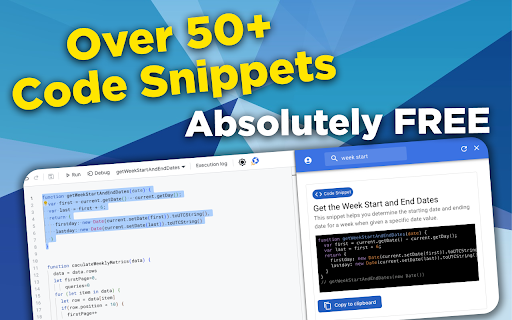


A feature-packed tool aimed at enhancing your coding capabilities on the Google Apps Script editor. Welcome to the first-ever AI-Powered Chrome Extension built specifically to help you write code faster and more efficiently in Google Apps Scripts. NitroGAS's AI Co-pilot is specifically trained on the best practices for creating scripts and apps in Google Apps Script - helping you automate Google Sheets, Forms, Docs, Slides, and more. In addition to our flagship AI Co-pilot feature, you'll get access to some Quality of Life features such as: Dark/Light themes, quick links to recent Apps Script projects, and a free collection of code snippets that'll help code faster. This NitroGAS Chrome Extension is a featured packed tool built by Bootstrapping Tools to help make writing code in Google Apps Script easier and faster. If you're familiar with our Youtube Channel, you know that we're big fans of creating custom solutions for Google Sheets, Docs, Slides, and more. NitroGAS was built to help us build scripts faster so we know that it'll help you as well! Paid Features (w/ license key) - NitroGAS Co-pilot - - Trained specifically to help you automate Google Sheets, Docs, Forms, Slides, Calendar, and more using Google Apps Scripts - - Will output code comments and instructions to help you manage the code moving forward - - NOT SUBSCRIPTION BASED, the last thing you need is another subscription. To make it more affordable, we've designed a pass model where you buy access for a week, a month, or a year w/o any auto-renewals. One-time payments with no recurring charges. It's a breath of fresh air isn't it?

PageOne
Collects and organizes your browsing history into annotable, portable, topic-based tree lists in Markdown If you feel the same during web browsing: - Piling lots of browser tabs and hesitate to close them? - Easily get distracted by irrelevant links on a web page? PageOne automatically collects and organizes your browsing history into tree lists, according to topics you set up. You can then review, annotate and export them into text-based Markdown format. - To help you stay in a single tab -- Your browsing history is organized into a tree list for easy tracking and jumping among links. - To help you get focused -- Reminds you the topic you set up before browsing/searching. - Annotate links on the organized browsing history list -- and export them to free Joplin notebooks as markdown! 1. Find PageOne light bulb icon on browser extension toolbar. 2. Click the icon and in the popup, input your topic or idea. Alternatively, open a new tab to show the same PageOne page. 3. Start searching/browsing under the topic by clicking the Google button. 4. Check back the browsing history tree anytime by clicking the light bulb icon. You can then add notes here or mark some history items as done. Visit our website for tutorial videos: https://sites.google.com/view/hyperfocal/pageone/en 1. Feel no worry browsing within a single page You can easily review your browsing history as a popup page by clicking the extension icon (a lightbulb) on browser. The browsing dependency are traced and well-organized into tree lists. 3. A list for a topic Allows to easily set and switch between topics. Let PageOne the default page to help you set a topic before browsing. (Or turn this off in Options pane). 4. Your search term as the topic Use the Google button to set topic and search at the same time. ☑ Check as done. Consider a browsing list as a TODO list for review. ☆ Star and highlight a URL. ✎ Take whatever note you want. 6. Sync with the free note taking app (Joplin) Freely edit your browsing history as a note in Markdown. One topic, one note. Allows both sync forward and backward! Joplin link: https://joplinapp.org/ 7. Use TabGroup to open multiple topics at the same time. 8. Dock as side-panel Turn on/off side-panel view in options page. ☆ Release notes: v1.1.4: - Search topic through the main topic inputbox. - Directly edit the tree lists in the Markdown view. v1.2: - With the new Chrome feature -- Side panel, PageOne can dock on the web browser. Just select PageOne from the drop-down list of the side panel. - Integrate with Chrome's tab groups -- your topic name is group name. With this you can keep topics in opened tabs and switch among them quickly. v1.3: - Improve tracking for history tree construction. - Add switch between pop-up or side-panel view.

Appsheet Trigger
Auto Sync and Activate Actions on Appsheet. AppSheet Trigger is a browser extension designed to automate tasks and synchronize data between the user's database and the platform. This application helps users easily update data from their database to the platform and automatically trigger actions and perform auto-sync operations without the need for manual intervention. Key Features : Automatic Data Sync (Auto Sync): The extension can automatically synchronize data between the user's database and the platform. This ensures that the data in the platform is always updated and consistent with the user's database. Automatic Action Triggering: Can automatically trigger actions within the platform based on pre-set configurations. Users can customize actions so the extension automatically performs them when certain conditions are met. Integration: The extension is tightly integrated with the platform. When users are working within the platform, the extension detects the relevant tab and triggers the necessary automation as needed. Settings Management and Storage: The extension stores user settings, such as sync status and sync interval, allowing users to easily manage when and how automated tasks are executed. Limited Access Permissions: Requires only a few basic permissions, including access to browser tabs, storing settings, and executing scripts, but it does not collect or store any personal data from users. Simple User Interface: The extension features an intuitive interface that allows users to configure and customize settings easily without requiring programming knowledge. How It Works: Automatic Detection: The extension checks the user's browser tabs and only activates when the tab is related to the platform. Auto Sync: Once configured, the extension will sync data at intervals set by the user. Action Triggering: The extension can automatically trigger actions based on the user's needs (e.g., data sync, performing specific tasks in the platform). This application is ideal for: Developers or users working with platforms who need a tool to automate synchronization and action tasks. Users who want to increase productivity and save time by minimizing manual actions when working with their platform. In Summary: Add-ons is a useful tool for those who work frequently with the platform and want to automate data synchronization and action triggering without manual intervention, making workflows more efficient and faster.

GAS IDE Enhancer
Provides enhancements for Google Apps Script IDE Allows you to improve the experience of interacting with Google Apps Script online IDE. Adds some visual enhancements and tools. In new version added auto enable dark theme if system them is dark. Improve performance.

Google Apps Script Tools
It is an extension that adds functionalities to the new development environment of Google Apps Script It is an extension that adds functionalities to the new development environment of Google Apps Script, below the new aggregate functionalities are displayed: - Allows you to select themes for the editor - Allows you to show or hide the file panel - Allows you to search for words in several files (in the following version it will show the name of the file) - Activate or deactivate the line wrap
