
fmaffcpmcjbiaofiacacbpbhimijoiom
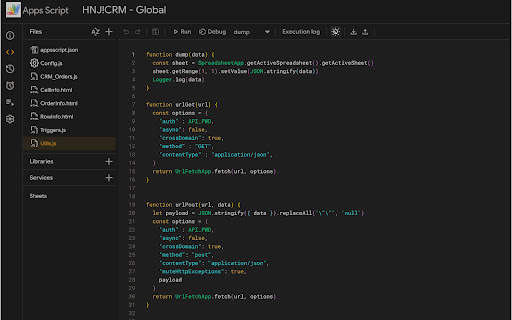
Provides enhancements for Google Apps Script IDE Allows you to improve the experience of interacting with Google Apps Script online IDE. Adds some visual enhancements and tools. In new version added auto enable dark theme if system them is dark. Improve performance.

Apps Script Libraries
This extension allows you to search for Apps Script libraries and install them directly from Apps Script IDE this extension will help you streamlines the process of discovering and installing Google Apps Script libraries right from the Apps Script IDE. With an integrated search functionality, you can quickly find libraries, view details, and install them into your project with ease. Save time and enhance your development workflow by managing external libraries without leaving the IDE.

Chromium Open IDE
Link remote source.chromium.org code path to your local chromium src. `COI` gives you a context menu for opening files in your editor (`VSCode`) on [Chromium Code Search](https://source.chromium.org), [Chromium Code Review](https://chromium-review.googlesource.com) , [Google Git](https://chromium.googlesource.com) and [webdiff-for-coi](https://pypi.org/project/webdiff-for-coi). Install this [Chrome Extension](https://chrome.google.com/webstore/detail/chromium-open-ide/oodolphplfmnljcohclgdikkoljjambi)/[MSEdge Extension](https://microsoftedge.microsoft.com/addons/detail/chromium-open-ide/ggfoollpnfolfaejalpiihpobcpbegkl) and related [VSCode Extension](https://marketplace.visualstudio.com/items?itemName=FangzhenSong.chromium-source-opener). - For [Chromium Code Search](https://source.chromium.org): \ right-click on line number and select `Open My Editor`, it will open the file in your editor at the selected line. - For [Chromium Code Review](https://chromium-review.googlesource.com): \ right-click on code block and select `Open My Editor`, it will open the file in your editor at the selected line. - For [Google Git](https://chromium.googlesource.com): - click on the line number (optional). - choose and right-click on any code block. - select `Open My Editor`. It will open the file in your editor (at the selected line). - For [webdiff-for-coi](https://pypi.org/project/webdiff-for-coi): \ right-click on code block and select `Open My Editor`, it will open the file in your editor.

Google Apps Script Copilot
An AI Extension that will help you write google apps script code. This Extension will help you write and explain Google Apps Script Code using AI. Features: - Realtime Chat with AI directly inside your Apps Script IDE - Spotlight Feature (Ctrl + 0) that let's you instantly generate and directly insert the code to the Apps Script IDE (Deprecated) - Access to Chat History - Comment Questions Based Inline Suggestion - Code AutoComplete - Reasoning Added to Chat - Stop Streaming Support in Chat - Multiple File Context in Chat - Add To Chat Feature to add code & terminal snippets to Chat - Dark Mode Added - More Features Coming Soon... This Extension is not affiliated with or endorsed or sponsored by Google.

Big Apps Script Files Section
Makes the files section in the Google Apps Script sidebar big. This simply makes the Files section in the Google Apps Script sidebar big, which is helpful if you have a lot of files.
