
iigobcdpmngdgiacebgenbccmdacnjhp

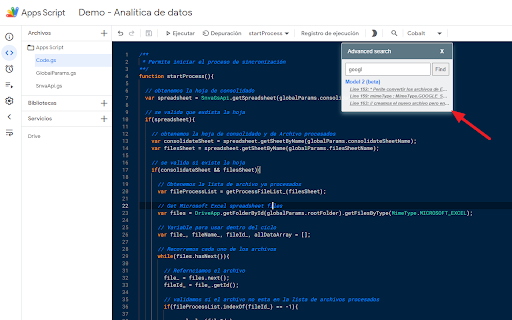
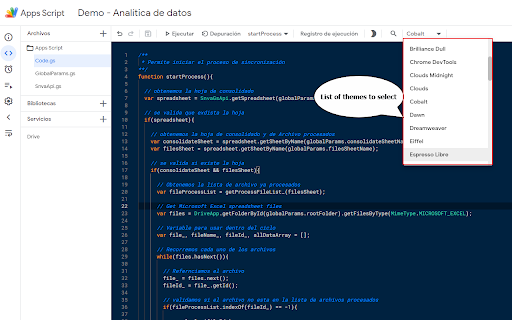
It is an extension that adds functionalities to the new development environment of Google Apps Script It is an extension that adds functionalities to the new development environment of Google Apps Script, below the new aggregate functionalities are displayed: - Allows you to select themes for the editor - Allows you to show or hide the file panel - Allows you to search for words in several files (in the following version it will show the name of the file) - Activate or deactivate the line wrap

NitroGAS
A feature-packed tool aimed at enhancing your coding capabilities on the Google Apps Script editor. Welcome to the first-ever AI-Powered Chrome Extension built specifically to help you write code faster and more efficiently in Google Apps Scripts. NitroGAS's AI Co-pilot is specifically trained on the best practices for creating scripts and apps in Google Apps Script - helping you automate Google Sheets, Forms, Docs, Slides, and more. In addition to our flagship AI Co-pilot feature, you'll get access to some Quality of Life features such as: Dark/Light themes, quick links to recent Apps Script projects, and a free collection of code snippets that'll help code faster. This NitroGAS Chrome Extension is a featured packed tool built by Bootstrapping Tools to help make writing code in Google Apps Script easier and faster. If you're familiar with our Youtube Channel, you know that we're big fans of creating custom solutions for Google Sheets, Docs, Slides, and more. NitroGAS was built to help us build scripts faster so we know that it'll help you as well! Paid Features (w/ license key) - NitroGAS Co-pilot - - Trained specifically to help you automate Google Sheets, Docs, Forms, Slides, Calendar, and more using Google Apps Scripts - - Will output code comments and instructions to help you manage the code moving forward - - NOT SUBSCRIPTION BASED, the last thing you need is another subscription. To make it more affordable, we've designed a pass model where you buy access for a week, a month, or a year w/o any auto-renewals. One-time payments with no recurring charges. It's a breath of fresh air isn't it?

Apps Script Libraries
This extension allows you to search for Apps Script libraries and install them directly from Apps Script IDE this extension will help you streamlines the process of discovering and installing Google Apps Script libraries right from the Apps Script IDE. With an integrated search functionality, you can quickly find libraries, view details, and install them into your project with ease. Save time and enhance your development workflow by managing external libraries without leaving the IDE.

AppsScript Color
Provides folders display and a dark color theme to the google apps script editor. AppsScript Color provides other color themes for Apps Script developers. These dark themes are more contrasted and comfy, allowing to code for hours ! Choose from the 'Colors' integrated menu one of the following themes : 3 dark themes are available in the IDE (themes only applies to the IDE, not to the full page) Use the "Sun/Moon" icon to toggle the dark mode on and off, To select a different color theme, open the IDE action menu with [F1] (while focusing the IDE), then type either "theme", or one of the following: For now the extension applies a color theme of your choice on Apps Scripts open on script.google.com It works for standalone scripts and scripts linked to native Google documents. AppsScriptColor also add a structured Folder view for a tidier file list ! To add folders, rename your files to include the path in their name: myFolder/some_subfolder/myfileName - [#39](https://github.com/JeanRemiDelteil/appsScriptColor/issues/39) Fix: issue with Chrome Update - [#31](https://github.com/JeanRemiDelteil/appsScriptColor/issues/31) Updated the extension to support Chrome Extension Manifest V3 - [Clean-up] Remove all Maestro related code - [#30](https://github.com/JeanRemiDelteil/appsScriptColor/issues/30) Fix: Navigating away from file does not remove light blue highlighting - [#22](https://github.com/JeanRemiDelteil/appsScriptColor/issues/22) Fix: Creating a New Project (script) with the Extension will crash Chrome - [#20](https://github.com/JeanRemiDelteil/appsScriptColor/issues/20) Fix: Duplicated entries in action menu - [#19](https://github.com/JeanRemiDelteil/appsScriptColor/issues/19) Mitigated: Color insertion fails when no function - Full support of the new GAS online IDE (not all theme are available) - Custom theme editor allows to create theme derivated from the 3 default themes\ Find the Theme Editor in the color menu - New Folder system: use the '/' character in your file names to display a structure Folder view This will allow great compatibility with the new CLASP command line tool (https://github.com/google/clasp) - Fix Color not applied at page loading - Fix GAS CSS update for font - New scroll-bar color for Black fox console - Added custom Folders to sort your files locally ! - Updated color schemes to account for the folders - Minor bug fixes : the extension only run script edit page - New color theme : Darcula, with bigger font - Colors menu: Choose from the 2 existing themes or set to the default - Added more suited color for HTML template tokens ( )

Pragmatic AI - Google Apps Script Coding Companion!
Adds a code‑review and suggestion assistant to the Google Apps Script editor using the Gemini API! This is a beta version. Pragmatic AI brings Google’s Gemini models into the Apps Script editor so you can review, enhance, and generate code without leaving your flow. A focused side panel lets you choose context (Editor/All/No Code), include execution logs when needed, and tune model parameters and then deliver clean, well-structured suggestions you can paste back into your project. All requests to the Gemini API are made client-side, and your code never leaves your browser except for the call to the Gemini API. The assistant activates on pages under https://script.google.com/. The Gemini API Key is stored locally inside the Chrome browser local storage, safe and secure. Built for Apps Script: Knows the editor context and optionally pulls in the execution log to ground responses. Real engineering tasks: Code Review for fast audits; Enhance to refactor, optimize, add comments/tests; Ask Gemini for custom prompts. Gemini controls: Switch among current Gemini 2.5/2.0 text models and adjust temperature, top-p, top-k, and max tokens. Clean UI: Sections for Code Context, Actions, Ask Gemini, and Gemini Response with copy/clear and scrollable output. Theme switch: One-tap day/night mode for bright labs or late-night debugging. Your Privacy is Protected: The extension stores your Gemini API key locally. This key, along with your code, is transmitted exclusively to the Gemini API for completion requests and is not shared with any other external parties. ============================================ What you can do Review code — Identify smells, risky patterns, missing returns, and better practices for Apps Script services. Ask Gemini — Describe tasks (e.g., “Create a Gmail to Sheets importer with batching & exponential backoff”) and generate ready-to-adapt code. Tune responses — Pick the model and set decoding sliders for the right balance of creativity vs. determinism. We recommend using "Gemini 2.5 Flash Lite" for great quality of responses. Use the Reset button to reset the values to their defaults. Open the Google Apps Script editor and launch the Pragmatic AI side panel. Paste your Gemini API key once (saved locally) in the API Settings and Usage section. You can get your Gemini key from https://aistudio.google.com/apikey Choose Code Context and (optionally) tick Execution log. Click Review code, Enhance code, or type your prompt in Ask Gemini and hit Send. Copy results from Gemini Response into your project. API key: stored locally; not uploaded to external servers by the extension. Data use: Code and prompts are sent to Gemini only when you request a completion. Open settings: Clear or replace your API key anytime in API Settings and Usage.
