
ciggahcpieccaejjdpkllokejakhkome
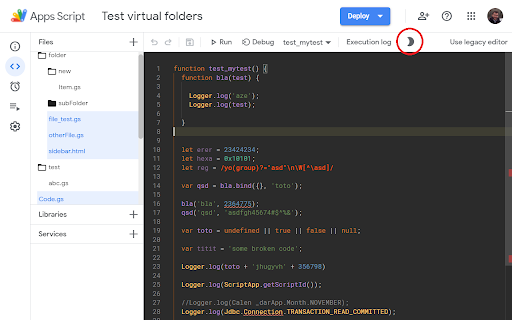


Provides folders display and a dark color theme to the google apps script editor. AppsScript Color provides other color themes for Apps Script developers. These dark themes are more contrasted and comfy, allowing to code for hours ! Choose from the 'Colors' integrated menu one of the following themes : 3 dark themes are available in the IDE (themes only applies to the IDE, not to the full page) Use the "Sun/Moon" icon to toggle the dark mode on and off, To select a different color theme, open the IDE action menu with [F1] (while focusing the IDE), then type either "theme", or one of the following: For now the extension applies a color theme of your choice on Apps Scripts open on script.google.com It works for standalone scripts and scripts linked to native Google documents. AppsScriptColor also add a structured Folder view for a tidier file list ! To add folders, rename your files to include the path in their name: myFolder/some_subfolder/myfileName - [#39](https://github.com/JeanRemiDelteil/appsScriptColor/issues/39) Fix: issue with Chrome Update - [#31](https://github.com/JeanRemiDelteil/appsScriptColor/issues/31) Updated the extension to support Chrome Extension Manifest V3 - [Clean-up] Remove all Maestro related code - [#30](https://github.com/JeanRemiDelteil/appsScriptColor/issues/30) Fix: Navigating away from file does not remove light blue highlighting - [#22](https://github.com/JeanRemiDelteil/appsScriptColor/issues/22) Fix: Creating a New Project (script) with the Extension will crash Chrome - [#20](https://github.com/JeanRemiDelteil/appsScriptColor/issues/20) Fix: Duplicated entries in action menu - [#19](https://github.com/JeanRemiDelteil/appsScriptColor/issues/19) Mitigated: Color insertion fails when no function - Full support of the new GAS online IDE (not all theme are available) - Custom theme editor allows to create theme derivated from the 3 default themes\ Find the Theme Editor in the color menu - New Folder system: use the '/' character in your file names to display a structure Folder view This will allow great compatibility with the new CLASP command line tool (https://github.com/google/clasp) - Fix Color not applied at page loading - Fix GAS CSS update for font - New scroll-bar color for Black fox console - Added custom Folders to sort your files locally ! - Updated color schemes to account for the folders - Minor bug fixes : the extension only run script edit page - New color theme : Darcula, with bigger font - Colors menu: Choose from the 2 existing themes or set to the default - Added more suited color for HTML template tokens ( )

GAS Prettier + AI Completion
Google Apps Script Prettier Formatter Chrome Extention with AI Completion GAS Prettier integrates the popular Prettier code formatter directly into the Google Apps Script editor, allowing you to easily format both your HTML and Google Apps Script (GAS) files with a single click. Some key features of GAS Prettier: - Registers Prettier as the default formatter for the GAS editor. - Supports formatting of both HTML and GAS files. - Provides a warning message if there are any errors during the formatting process. - Ai completion (working good on small google script file) - Open source, so the community can contribute and help improve it. How to Format Document? Just use current Format Command (Ctrl + Shift + F) or Click Right Click it will show format button and just click format button. This extension aims to streamline the development workflow for GAS developers by ensuring consistent code formatting across your project. No more manual formatting or fighting with different editor settings - just hit the format button and let Prettier do the work. The GAS Prettier extension is available for free on the Chrome Web Store. I encourage you to check it out and let me know what you think! If you have any feedback or would like to contribute, the project is open source on GitHub.

AppSheet View Customizer
Customize Your Way to Better AppSheet Apps Appsheet View Customize - Boost Your Appsheet Workflow by 3X A free extension that optimizes your Google Appsheet experience, saves time, and increases productivity. Who is this for? -Frequent Google Appsheet users -Developers looking to optimize app development workflow -Anyone wanting to customize Appsheet interface for better efficiency Key Features 1. Resize Data Columns - Automatically fix and adjust column sizes for optimal viewing - Add options to hide Display Name, Description, Search, Scan - Optimized display for smaller screens (MacBook, laptops) 4. Looker Studio Integration -Embed Looker Studio dashboards directly into Appsheet -Professional data visualization -Combine the power of both Google tools 5. Thousand Separator Display (BETA) -Show separators when entering numbers: 100,000 instead of 100000 -Easier to read and reduces input errors -Currently in testing and improvement phase 6. Auto Display Name with AI -Use Google AI Studio to automatically generate Display Names -Convert column names from MySQL standard to formatted, readable text -Multi-language support (Vietnamese, English, and more) -Batch process multiple columns and tables at once How to Use -Install the extension from Chrome Web Store -Open Appsheet and work as usual -Click the extension icon to enable/disable features -For AI feature: Get API key from Google AI Studio and paste into extension Requirements -Chrome/Edge/Brave browser -Google Appsheet account -(Optional) API key from Google AI Studio for AI features Notes -Completely free extension -No user data collection -Open source and transparent -Continuous updates and improvements 2025 Update -Added options to hide UI components -Performance optimization for smaller screens -Improved thousand separator feature -Enhanced AI processing capabilities Support If you encounter any issues or have feature suggestions, please contact us through reviews or support email. Save Time - Increase Efficiency - Work Smarter with Appsheet View Customize!

Gemini EDU Prompt Assistant (TW)
備註:此擴充會需要使用Google AI Studio API設定,請自行至Google AI Studio取得 --- Gemini Prompt Assistant for Education This Chrome extension serves as an assistant specifically designed to help educators and students leverage Gemini more effectively in an educational setting. It streamlines the process of crafting and managing prompts with the following features: 1️⃣ Prompt Templates: Allows users to instantly populate the prompt field with a single click of a button. 2️⃣ Manual Prompt Storage: Users can navigate to a "Custom" section within the extension to manually add, edit, and save their own frequently used prompts. 3️⃣ AI-Powered Prompt Optimization (PARTS Principles): When adding a new custom prompt, users can utilize a built-in AI function to analyze and refine it. 4️⃣ 'Gems' Instruction Optimization (Markdown Syntax): This feature (also available when adding new prompts) uses AI to specifically optimize instructions intended for "Gems" (custom versions of Gemini). Important Note (備註) Requires Google AI Studio API Key: Please be aware that this extension requires an API key from Google AI Studio to function. You must go to the Google AI Studio website to obtain your own personal API key and configure it within the extension's settings.

Looker Studio Auto Refresh
Auto-refresh and automated pagination of your Google Looker Studio reports, on a chosen interval. 📊📈📉 Auto-refresh & auto-switch your Google Looker Studio reports! Put your Looker Studio dashboards on the big screen and let the extension handle refreshing and pagination across all your open reports. (Currently, only users with editing privileges can refresh reports - until Google opens it up further.) The extension simulates the internal mechanism of refreshing the report data, and it's not like hitting F5 (reload page). ✨ Features: 1️⃣ Set a custom refresh interval, with optional daily scheduling. 2️⃣ Automatically switch between pages in a report - even in presentation mode. 3️⃣ Cycle through Chrome tabs with different reports at custom intervals. 4️⃣ Supports embedded Looker Studio reports (on the official domain). 🚩🚩 Important Notice 🚩🚩 Refreshing reports that pull from paid cloud databases (e.g., BigQuery) may incur costs. We take no responsibility for any charges resulting from frequent refreshes. By installing, you acknowledge this risk. Over-refreshing can lead to unexpected billing. 1. Open your desired Looker Studio dashboard and refresh it manually (F5). 2. Click the extension icon to activate and get your license. 3. Verify the license and configure your refresh & switching settings.
