
ddaoiephbgngpbpiagcpmgabnjmlfefl

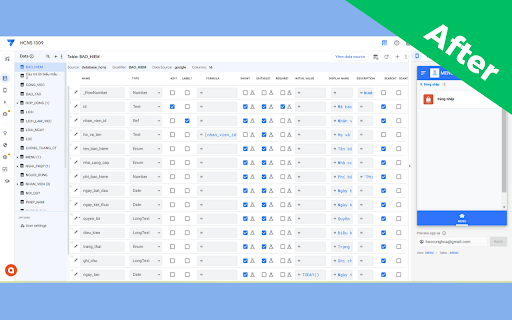
Customize Your Way to Better AppSheet Apps Appsheet View Customize - Boost Your Appsheet Workflow by 3X A free extension that optimizes your Google Appsheet experience, saves time, and increases productivity. Who is this for? -Frequent Google Appsheet users -Developers looking to optimize app development workflow -Anyone wanting to customize Appsheet interface for better efficiency Key Features 1. Resize Data Columns - Automatically fix and adjust column sizes for optimal viewing - Add options to hide Display Name, Description, Search, Scan - Optimized display for smaller screens (MacBook, laptops) 4. Looker Studio Integration -Embed Looker Studio dashboards directly into Appsheet -Professional data visualization -Combine the power of both Google tools 5. Thousand Separator Display (BETA) -Show separators when entering numbers: 100,000 instead of 100000 -Easier to read and reduces input errors -Currently in testing and improvement phase 6. Auto Display Name with AI -Use Google AI Studio to automatically generate Display Names -Convert column names from MySQL standard to formatted, readable text -Multi-language support (Vietnamese, English, and more) -Batch process multiple columns and tables at once How to Use -Install the extension from Chrome Web Store -Open Appsheet and work as usual -Click the extension icon to enable/disable features -For AI feature: Get API key from Google AI Studio and paste into extension Requirements -Chrome/Edge/Brave browser -Google Appsheet account -(Optional) API key from Google AI Studio for AI features Notes -Completely free extension -No user data collection -Open source and transparent -Continuous updates and improvements 2025 Update -Added options to hide UI components -Performance optimization for smaller screens -Improved thousand separator feature -Enhanced AI processing capabilities Support If you encounter any issues or have feature suggestions, please contact us through reviews or support email. Save Time - Increase Efficiency - Work Smarter with Appsheet View Customize!

AppSheet Sync Skipper
Skip the sync, speed up your AppSheet workflows AppSheet Sync Skipper AppSheet Sync Skipper is a lightweight Chrome Extension that helps you skip the default sync process in AppSheet by directly sending data to your AppSheet app via its API. This enables faster actions, more efficient workflows, and a smoother experience when triggering changes or submitting form data. ⚙️ What it does: Detects special URLs with AppSheet parameters (e.g. ?appid=...&accesskey=...) Extracts information and sends it to AppSheet’s API Displays the status of requests (success, error, pending) Automatically closes the triggering tab (if needed) This is useful for AppSheet developers who want to simulate form submissions, bypass sync delays, or build automation tools using AppSheet's public API. 🎯 Purpose AppSheet Sync Skipper helps you skip manual Sync in AppSheet workflows by sending structured data directly to the AppSheet API via a custom URL. Ideal for performing Add, Edit, or Find actions with a single link. Step 1: Set up a "Go to a website" Action in AppSheet In your AppSheet app, create an action of type: "Go to a website" ID=123,124,125 → 3 rows with 3 key IDs. action: Add → Creates a new row in the Orders table. action: Edit → Updates the Invoices table. Step 2: Attach the link to a button, event, or automation When this URL is opened, the extension detects the parameters, sends a request to AppSheet's API, and then closes the tab automatically. appid | Your AppSheet app ID accesskey | Your AppSheet API access key tablename | The name of the table to interact with action | One of: "Add", "Edit", or "Find" locale (optional) | Defaults to "en-US if not provided location (optional) | Defaults to "47.623098,-122.330184" if not provided timezone (optional) | Defaults to "Pacific Standard Time" if not provided Any other parameters | Treated as column names and values for the row data This will send a POST request to the AppSheet API to insert a new row into the Customers table. Click the extension icon to view a log of recent API requests. Each entry includes: - Success – Successfully sent to AppSheet - Error – Failed to send - Pending – Currently being processed Only the 10 most recent requests are saved in memory. - It's recommended to open the link in a new browser tab to ensure the extension can capture and process it. - Make sure the Chrome Extension is installed and enabled on the browser where the action is triggered. - Do not include sensitive credentials like access keys in public actions unless you trust the user.

AppSheet Notification Extension
Displays toast notifications filtered by user email and app ID. AppSheet Notification Extension After years of waiting, I finally built it myself—a simple, no-nonsense Chrome extension that brings real-time toast notifications for AppSheet. No more missing updates or waiting for email alerts. Now, you get instant notifications, just like they should be. How It Works Install the extension, and whenever your AppSheet app needs to notify you, it sends a message to the notification server. The extension then pops up a clean, modern toast notification right in your browser. Setup Guide 1. AppSheet Configuration Go to AppSheet → Automation → Bots Add a new Webhook action Set the URL to: https://chrome-appsheet-toast-extension-production.up.railway.app/notification Use the POST method and send a JSON body like this: { "title": "Task Completed", "description": "Your task has been successfully processed.", "targetEmail": "your.email@example.com", "targetAppId": "your-app-id" } That’s It! No clutter, no unnecessary alerts—just real-time notifications when you need them. It’s simple, smooth, and finally the way AppSheet notifications should work.

AppSheet Table Formatter
Format and style tables in AppSheet applications. Customize table appearance, borders, fonts, and add print functionality. AppSheet Cover Table - Print Optimization Tool for AppSheet AppSheet Cover Table is a powerful extension that enhances the printing experience on the AppSheet platform. Specifically designed for AppSheet users, this extension provides comprehensive table formatting and printing capabilities. Key Features: • Convenient print buttons in toolbar and screen corner • Easy table customization with font, color, and alignment options • Flexible table size and border adjustments • Heading format support (H1, H2, H3) with multiple customization options • Quick settings save and apply across multiple tables Benefits: • Save time with intuitive printing interface • Create professional and readable reports • Flexible customization for business needs • Improve workflow efficiency in AppSheet Technical Features: • Real-time style preview • Persistent settings storage • Seamless integration with AppSheet interface • Responsive design support Free to use and easy to implement, AppSheet Cover Table is an essential tool for AppSheet users looking to optimize their printing workflow.

AppSheet Password Field Fixer
Automatically converts password input fields to proper password type on AppSheet login page Automatically converts password input fields from text type to password type on AppSheet login page for enhanced security and privacy protection. 🔧 Key Features: - Auto-detects Password fields on appsheet.com/start/ - Converts type="text" to type="password" instantly - Works immediately upon page load - No configuration required - fully automatic - Lightweight and performance-friendly ⚡ How to Use: 1. Install the extension 2. Visit appsheet.com/start/ 3. Password field will be automatically secured Perfect for AppSheet users who prioritize login security and want proper password field masking without manual intervention. 🎯 Why Use This Extension: Sometimes AppSheet login forms display password fields as plain text, making your credentials visible on screen. This extension ensures your password is always properly masked for privacy and security. Works with dynamic content loading and provides fallback mechanisms for maximum reliability across different AppSheet page configurations.
