
fdhhhjfaflnaopgeplkpcdppiifpgmap
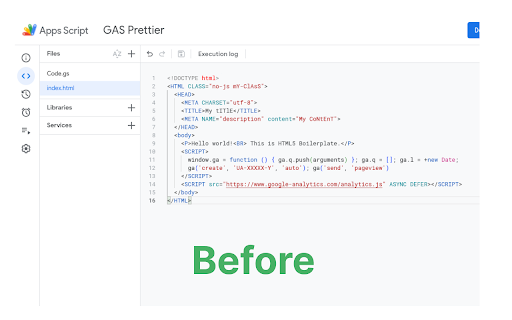
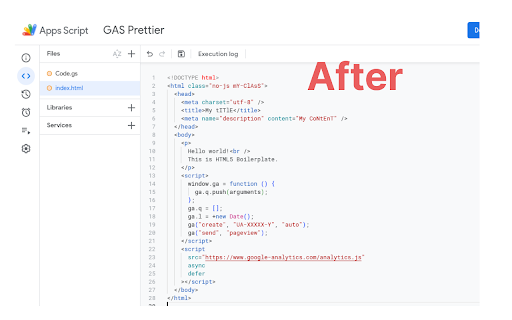
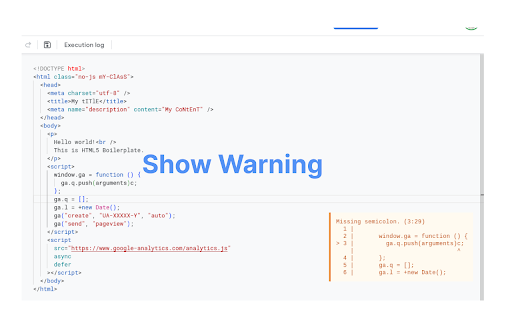
Google Apps Script Prettier Formatter Chrome Extention with AI Completion GAS Prettier integrates the popular Prettier code formatter directly into the Google Apps Script editor, allowing you to easily format both your HTML and Google Apps Script (GAS) files with a single click. Some key features of GAS Prettier: - Registers Prettier as the default formatter for the GAS editor. - Supports formatting of both HTML and GAS files. - Provides a warning message if there are any errors during the formatting process. - Ai completion (working good on small google script file) - Open source, so the community can contribute and help improve it. How to Format Document? Just use current Format Command (Ctrl + Shift + F) or Click Right Click it will show format button and just click format button. This extension aims to streamline the development workflow for GAS developers by ensuring consistent code formatting across your project. No more manual formatting or fighting with different editor settings - just hit the format button and let Prettier do the work. The GAS Prettier extension is available for free on the Chrome Web Store. I encourage you to check it out and let me know what you think! If you have any feedback or would like to contribute, the project is open source on GitHub.

Powerful Google Form Filler
Chrome extension to AutoFiller Google Form This extension designed to simplify your workflow with Google Forms. It provides a seamless login experience with your Google account and automatically fills in form fields, saving you time and reducing repetitive typing. Text input ✓ Choice ✓ Checkbox ✓ Drop-down ✓ Date&Time ✓ ..etc

AI Chrome Extension powered by ChatGPT - Magictool AI
Your All-in-One AI Chrome Extension featuring ChatGPT, AI Writer, Grammar Checker, Paraphraser, Youtube Summarizer +20 more. Get access to ChatGPT and GPT4o (paid), ask questions and get instant answers Proofread your writing with our Grammar Checker. Select any sentence on the page and get instant grammar check Write professionally using our AI Writer and Paraphraser which allows you to choose your writing style Summarize Youtube videos as well as Web Articles and PDF documents with the help of ChatGPT. Take beautiful Screenshots directly from your browser 🎁 Try it out now. You will get free credits "every day" to use our AI Chrome Extension. You need to "create an account" to use the extension. 1- Grammar Checker: Select text on any page to check grammar and spelling using ChatGPT 2- ChatGPT Access: you will be able to use ChatGPT every day 3- Chat with PDF documents using AI and PDF.js 4- Youtube Summary: Summarize Youtube Videos (Transcript and Comments) 5- Summarize Articles and Web Pages 6- GPT4o * 7- Generate AI Images 8- Data Scraper (Extract information from any page) 9- Magic Editor: Private AI Text Editor 10- Explain text 11- Youtube Video Dubbing using AI*: watch Youtube videos dubbed in other languages 12- Improve text: improve your writing including grammar and composition 13- Simplify language 14- Make Shorter 15- Make Longer 16- Paraphraser: paraphrase your writing in different styles 17- Summarize paragraphs 18- Continue writing 19- Add Emojis 20- Translate text (using Google translate) 21- Take Notes 22- String Manipulation (upper and lower case, length ..etc) 23- Magic Shortcut: invoke ChatGPT from any text field on the page by starting your line with the magic word "magic:" 24- Dark mode toggle: Force Dark Mode for any webpage 25- Add your own custom command/prompt 26- Reader View: Read web pages in a clutter-free format by removing ads, header, sidebars, and pop-ups. 27- Data Analysis (CSV/XLS): Analyze CSV and Excel files easily with the help of ChatGPT 28- Timer 29- Todo Checklist 30- AI Writer: write in different styles and lengths using AI 31- AI Paraphraser: Paraphrase your paragraphs to avoid plagiarism using ChatGPT in different writing styles 32- Screenshot Capture and Beautification * Pro & Pro+ plans only (GPT-4o Voice and Video NOT supported yet) ** We utilize ChatGPT Technology to provide our AI features 🙌 There is no other extension available that combines all of these features in one package This extension is free trial, you will receive daily credits to try all our AI tools, if you need more credits then please subscribe to any of our payment plans: https://magictool.ai/pricing 1- All non-AI tools on magictool.ai 2- Text manipulation features (ex: upper and lower case, etc...) 3- Take Notes 4- Magic Editor (without the AI features) 5- Data scraping for pages 6- Night mode toggle for pages 7- Todo list 8- Timer 9- Screenshot Capture and Beautification ⭐ Who is it for? In addition to ChatGPT, our AI tools helps you with the following: AI writer and paraphraser while choosing your style, Use a grammar checker to proofread your writing, spelling checker, simplifying language, and generating AI images, which are beneficial for writers, digital marketers and SEO professionals. Researchers can greatly benefit from the web article summarisation, grammar checking in academic writing, paraphrasing sentences, also summarizing pdf files using AI, enabling them to write and skim through lengthy documents efficiently with the help of ChatGPT. Finally you can also get a summary of a Youtube video to save time. Our AI tools can assist you in doing your homework, studying, essay writing, checking your grammar, paraphrasing, chatting with Chat GPT, summarizing Youtube Videos and PDF documents, note-taking, notepad, todo list and timers You can ask ChatGPT to write code snippets and explain code on Stackoverflow Access quick answers by summarizing web pages and lengthy PDF files. Enhance your workplace communication and write emails in a specific tone with the help of AI and ChatGPT. Conveniently check grammar, paraphrase paragraphs in different styles, and enjoy a smart notepad right in your browser, you can also extract data from pages such as google maps. Finally you generate a summary of Youtube videos. You can also take screenshots for any area in the page and even make it more beautiful before download ⭐ Privacy: why should I trust you with my privacy? 1- Each version of Magictool AI is strictly reviewed by Google 2- You can decide domains in which the extension will not be activated (via the "Private Domains" setting) Video: https://youtu.be/NwT_b5YGHxU 3- We collect minimal user information (only name and email) 4- Our code is minimal - less than 1/2 MB - since we only add the code we need 5- We don't use Google analytics and we don't load any external code in our extension, everything is included in the extension 6- We collect usage data (which features do you use) but we allow you to disable it from the settings, and we share what is sent to our servers with you 7- When using our AI features we send your input to Open AI servers so we can't guarantee how they use your text, please check their privacy policy if you are interested. 8- Please check our privacy policy for more details We really care about your privacy and we consider it our own

Apps Script Editor PRO
The best chrome extension for Google Apps Script developers. AI assistant, Vim shortcuts, themes, snippets, file tree and more! Extension that adds functionality to the Google App Script Editor. 1. 💼 Icons for project files and folders 💼 2. 📡 Allows to collapse and group groups of files contained in each folder with one click. 📡 3. 💻 Use of keyboard shortcuts and VIM commands. 💻 4. ⌨️ Keyboard shortcut ( Alt+J ) to go back in the file tree. ⌨️ 5. ⌨️ Keyboard shortcut ( Alt+K ) to move forward in the file tree. ⌨️ 6. 🖌️ 51 available themes to modify the editor interface to your liking. 🖌️ 7. 🌎 Available in 5 different languages. 🌎 8. 📦 Button for downloading all project files in a single .zip file 📦 9. ⌨️ Keyboard shortcut ( Alt+B ) to show/hide file tree. ⌨️ 10. ✨ Custom snippets code!! 11. ✨ AI Assistant 12. ✨ Github integration 📜 CHANGELOG 📜 V1.0.1: - Cursor bugs fixed and new VIM commands added. V1.2.0: - Improved some VIM commands - Added a button to show/hide the file tree V1.2.1: ✨ - You can now create, edit and reuse your own code snippets directly in the Google Apps Script editor. V1.2.2: ✨- Now you can create your own themes for the code editor. ✨- New interface design, improved user experience. V1.3.0: ✨- Snippet Store Discover, share, and import code snippets from the community ✨- AI Assistant Edit and create files with AI-powered assistance ✨- Global Search Search across all project files instantly ✨- Account & Sync Free account with cloud sync — your snippets always with you V1.3.2: ✨- Github Integration Connect your project to a GitHub repository and keep your files in sync ✨- Replace Files Now you can replace and search for text in all your files.

SheetsGPT - AI Google Sheets Formula Maker
AI extension that uses AI to provide Sheets functions Introducing our cutting-edge Chrome web extension, designed to revolutionize the way you interact with spreadsheets online. This AI-powered tool seamlessly integrates with your browser, bringing the power of advanced Google Sheets/Excel formulas directly to your fingertips, all without leaving your web page. Whether you're analyzing data on the web, managing online finance trackers, or working on shared project management sheets, our extension offers the ability to quickly create and explain formulas from natural language. Natural Language Processing: Simply type your desired action or calculation in plain English, and let our AI-powered extension do the rest. No more struggling with complex formula syntax. Fine-tuned AI: Use our quick and simple AI model specifically trained on Google Sheets and Excel Formulas. Instant Conversion: Experience real-time transformation of your natural language commands into Google Sheets formulas with lightning-fast speed. Say goodbye to tedious manual formula creation. Accuracy and Efficiency: Our advanced AI algorithm ensures accurate interpretation of your commands, generating precise Google Sheets formulas tailored to your specific requirements. Enhanced Productivity: Save valuable time and increase productivity by seamlessly integrating natural language processing into your Google Sheets or Excel workflow. Focus on analyzing data rather than wrestling with formula syntax. User-Friendly Interface: Intuitive design and user-friendly interface make it easy for users of all skill levels to harness the power of natural language to streamline spreadsheet tasks.
