
mpodoaaiifocfbchaphabldebijoilgp


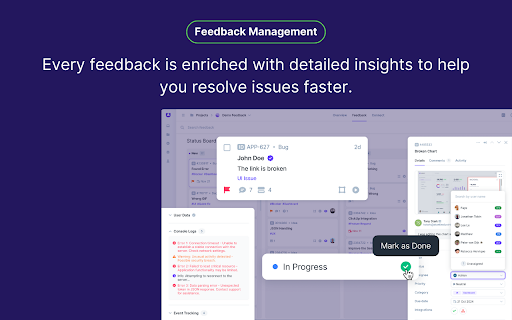

Userback is a visual feedback & bug reporting tool for websites Userback is the ultimate visual feedback and bug reporting tool, empowering product teams to streamline their processes with ease. With the Userback browser extension, developers, designers, and product managers can capture actionable feedback in seconds. Annotate screenshots, record videos, and submit feedback directly from your browser. Effortlessly collaborate by inviting your team and integrating with tools like Jira, Slack, GitHub, and more to boost productivity and deliver better products, faster. ✨ FEATURES + Lightning-Fast Screenshots: Capture full pages, tabs, or selected areas with ease. + Powerful Annotations: Draw, pin comments, and highlight critical issues. + Video Recording: Share your screen and voice with annotations across pages. + Feedback Management: Assign tasks, track progress, and resolve faster. + Inbox Notifications: Centralize all feedback for easy tracking and management. + Detailed Metadata: Automatically capture logs, event tracking, and browser details. + Feedback Widget: Collect user feedback and surveys directly from your website. ✨ KEY BENEFITS + Rich context requires 33% less interactions required to resolve feedback + Reduce bug report management time by 42% + Speed time to resolution 10X versus email and spreadsheets + Centralized feedback reduces monthly management across all feedback by over 20% + Create a frictionless feedback submission process for internal testers and clients ✨ WHAT CUSTOMERS SAY + "Awesome tool to gather customer feedback and bugs" - Kaushal, Founder + "Elegant, simple, and great value for money" - JP, Product Manager + "Love it, use it every day" - Daniel, Web Developer Join over 20,000 software teams who trust Userback to help them build better products with fast, actionable user feedback.

BugHerd: Visual Feedback & Bug Tracking Tool
BugHerd is a visual feedback and bug tracking tool for websites BugHerd makes it easy for clients to leave website feedback and report on bugs. Let clients simply point, click and comment - BugHerd grabs a screenshot, saves technical details and creates a task for your team to track. Goodbye endless emails! 📝 In-context Feedback Clients drop a pin to show feedback in context on a web page. No need for accounts or log-ins - send clients a link and let them comment away. Feedback stays pinned to the exact page element, so your team always knows exactly what to change. 🖥️ Automatic Screenshot Capture You get a screenshot and all the technical details. No more chasing down browser versions, screen resolutions, and device details. Every client comment comes with all the information you need, captured automatically. ✅ Task Tracking Turn every comment into a clear next step. Every comment becomes a trackable task on a Kanban board, so your team can prioritize and resolve feedback easier than ever. Already using a project management tool? Send tasks there with one click. BugHerd integrates with popular PM and collaboration platforms. BugHerd has been adopted by over 10,000 companies and over 350,000 users across 172 countries, helping teams streamline website feedback, improve client collaboration, and deliver projects faster. Click “Add to Chrome” and create your first project right away.

Redpen: Report bugs with screenshot/recording
Capture screenshot and record screen to report bugs and visual feedback. The easiest way to send feedback and report bugs is, take screenshots or record screens of any website or desktop application, highlight issues using annotation tools, and submit them to your favorite issues tracking service. 💁 Helpful for • Quality analysts, developers, designers, product managers, web agencies, consulting companies, product companies, and many more… • All-in-one feedback and bug reporting tool useful in customer support, UAT & Beta testing, and product development. 🔑 Key Benefits • Faster time to market - By reducing product development time by eliminating back-and-forth communication between teams. • Increase customer satisfaction - By faster turnaround of bugs or feedback submitted by customers. • Save Cost - By minimizing the development and support costs. 📋 Features ✪ Screenshot & Annotation tools • Take screenshots of any web page of a website or desktop screen and highlight issues using annotation tools. ✪ Screen recording & Voice comments • Record and explain issues visually on the web page or desktop screen with voice comments and annotation tools. • Double click the Redpen extension to start recording the screen. ✪ Auto-capture technical details • Minimize troubleshooting time with auto-collected browser or desktop-specific metadata. • Collect technical metadata like OS details, browser details, screen size, console logs, network logs, cookies, local storage, IndexedDB, etc. ✪ Auto-fill templates • Report bugs faster with pre-defined templates. While reporting bugs, auto-populate the common form fields to eliminate field selection every time. ✪ Widget • Add Redpen Widget to your website to capture unlimited feedback. $ Pricing & Plan • Our individual plan is FREE FOREVER. . Free Video recording • Visit Customer Support Request and Bug Capture Platform - Redpen to start your 14-days free trial (no credit card required).

Marker.io: Visual bug reporting for websites
Report visual bugs directly into your favorite tools, without leaving your website or web app Have you ever felt frustrated with internal testing and bug reporting, either as a reporter or as a developer? So did we, and we created Marker.io to streamline those workflows. Set up Marker.io to integrate with your preferred bug reporting tool (like Jira, Asana, Trello, and many more) and start reporting! Capture a screenshot of the visual bug, highlight, crop, fill in the form to create a ticket/issue/card, and continue browsing, so you never have to leave your website. Want your developers to love you even more? Tickets created through Marker.io are automatically enriched with technical metadata and console logs, making it easier and faster for your developers to recreate and resolve any issue. The forms in Marker.io are deeply connected to your issue tracker. The fields in the form are mirrors of your tickets, so you never miss any information. Need custom forms? No problem! You can change the visible fields for both your team members and your guests and clients. Your sensitive information will remain protected. Marker.io currently integrates with: ✔ And even more project and issue tracking tools! Go to https://marker.io to start your 15-day free trial. Get a free demo for more information or to get started.

BrowserStack Bug Capture: Report & resolve bugs faster
Bug reporting tool with shareable screen recordings & screenshots for faster debugging. ➤ BrowserStack Bug capture makes the process of reporting bugs easy and straightforward, even for non-technical users. Create data-rich bug reports quickly, saving time & improving communication between developers and other stakeholders. Install now and unlock seamless bug reporting! 𝐄𝐟𝐟𝐨𝐫𝐭𝐥𝐞𝐬𝐬 𝐁𝐮𝐠 𝐑𝐞𝐩𝐨𝐫𝐭𝐢𝐧𝐠: Simplify bug reporting by capturing screen recordings and logs with a single click, making it easy for anyone to report issues even without technical knowledge. 𝐄𝐧𝐡𝐚𝐧𝐜𝐞𝐝 𝐃𝐞𝐛𝐮𝐠𝐠𝐢𝐧𝐠: Quickly identify and resolve bugs with comprehensive insights and logs, reducing the time spent on debugging and improving overall software quality. 𝐃𝐞𝐯𝐞𝐥𝐨𝐩𝐞𝐫 & 𝐭𝐞𝐬𝐭𝐞𝐫 𝐟𝐫𝐢𝐞𝐧𝐝𝐥𝐲: Tailored for everyone, our user-friendly extension simplifies bug reporting, reducing the learning curve and streamlining your workflow. 𝐕𝐢𝐝𝐞𝐨 & 𝐒𝐜𝐫𝐞𝐞𝐧𝐬𝐡𝐨𝐭 𝐂𝐚𝐩𝐭𝐮𝐫𝐞: Create bug reports by recording your screen & capturing screenshots, providing visual context for the bugs encountered. 𝐀𝐮𝐭𝐨𝐦𝐚𝐭𝐢𝐜 𝐃𝐚𝐭𝐚 𝐂𝐚𝐩𝐭𝐮𝐫𝐞: Automatically capture essential technical data, including console logs, network requests, and browser information, streamlining the debugging process. 𝐈𝐧𝐬𝐭𝐚𝐧𝐭 𝐫𝐞𝐩𝐥𝐚𝐲𝐬: Continuously record your interactions on the webpage in the background and watch the replay instantly as soon as a bug happens, allowing quicker resolution. 𝐈𝐧𝐭𝐞𝐠𝐫𝐚𝐭𝐢𝐨𝐧 𝐰𝐢𝐭𝐡 𝐏𝐫𝐨𝐣𝐞𝐜𝐭 𝐌𝐚𝐧𝐚𝐠𝐞𝐦𝐞𝐧𝐭 𝐓𝐨𝐨𝐥𝐬: The software integrates with platforms like JIRA, enabling users to create bug tickets directly from the reports, facilitating better workflow management & collaboration among teams. 𝐒𝐚𝐯𝐞 𝐓𝐢𝐦𝐞: Reduces the time spent on bug reporting by createing comprehensive bug reports in just 1-3 clicks. 𝐃𝐚𝐭𝐚-𝐑𝐢𝐜𝐡 𝐑𝐞𝐩𝐨𝐫𝐭𝐬: The wealth of information helps you to quickly diagnose and resolve issues without needing extensive back-and-forth communication. 𝐔𝐬𝐞𝐫-𝐅𝐫𝐢𝐞𝐧𝐝𝐥𝐲 𝐈𝐧𝐭𝐞𝐫𝐟𝐚𝐜𝐞: Enjoy an intuitive and easy-to-use interface that makes bug reporting accessible to all team members, regardless of their technical expertise. 𝐈𝐦𝐩𝐫𝐨𝐯𝐞𝐝 𝐂𝐨𝐥𝐥𝐚𝐛𝐨𝐫𝐚𝐭𝐢𝐨𝐧: With integrations, streamline workflow and improves communication between support and engineering teams.
