
mdplmiioglkpgkdblijgilgebpppgblm

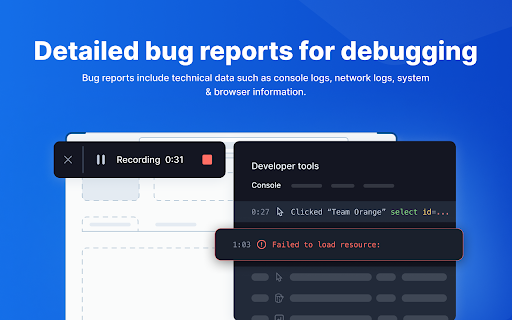


Bug reporting tool with shareable screen recordings & screenshots for faster debugging. ➤ BrowserStack Bug capture makes the process of reporting bugs easy and straightforward, even for non-technical users. Create data-rich bug reports quickly, saving time & improving communication between developers and other stakeholders. Install now and unlock seamless bug reporting! 𝐄𝐟𝐟𝐨𝐫𝐭𝐥𝐞𝐬𝐬 𝐁𝐮𝐠 𝐑𝐞𝐩𝐨𝐫𝐭𝐢𝐧𝐠: Simplify bug reporting by capturing screen recordings and logs with a single click, making it easy for anyone to report issues even without technical knowledge. 𝐄𝐧𝐡𝐚𝐧𝐜𝐞𝐝 𝐃𝐞𝐛𝐮𝐠𝐠𝐢𝐧𝐠: Quickly identify and resolve bugs with comprehensive insights and logs, reducing the time spent on debugging and improving overall software quality. 𝐃𝐞𝐯𝐞𝐥𝐨𝐩𝐞𝐫 & 𝐭𝐞𝐬𝐭𝐞𝐫 𝐟𝐫𝐢𝐞𝐧𝐝𝐥𝐲: Tailored for everyone, our user-friendly extension simplifies bug reporting, reducing the learning curve and streamlining your workflow. 𝐕𝐢𝐝𝐞𝐨 & 𝐒𝐜𝐫𝐞𝐞𝐧𝐬𝐡𝐨𝐭 𝐂𝐚𝐩𝐭𝐮𝐫𝐞: Create bug reports by recording your screen & capturing screenshots, providing visual context for the bugs encountered. 𝐀𝐮𝐭𝐨𝐦𝐚𝐭𝐢𝐜 𝐃𝐚𝐭𝐚 𝐂𝐚𝐩𝐭𝐮𝐫𝐞: Automatically capture essential technical data, including console logs, network requests, and browser information, streamlining the debugging process. 𝐈𝐧𝐬𝐭𝐚𝐧𝐭 𝐫𝐞𝐩𝐥𝐚𝐲𝐬: Continuously record your interactions on the webpage in the background and watch the replay instantly as soon as a bug happens, allowing quicker resolution. 𝐈𝐧𝐭𝐞𝐠𝐫𝐚𝐭𝐢𝐨𝐧 𝐰𝐢𝐭𝐡 𝐏𝐫𝐨𝐣𝐞𝐜𝐭 𝐌𝐚𝐧𝐚𝐠𝐞𝐦𝐞𝐧𝐭 𝐓𝐨𝐨𝐥𝐬: The software integrates with platforms like JIRA, enabling users to create bug tickets directly from the reports, facilitating better workflow management & collaboration among teams. 𝐒𝐚𝐯𝐞 𝐓𝐢𝐦𝐞: Reduces the time spent on bug reporting by createing comprehensive bug reports in just 1-3 clicks. 𝐃𝐚𝐭𝐚-𝐑𝐢𝐜𝐡 𝐑𝐞𝐩𝐨𝐫𝐭𝐬: The wealth of information helps you to quickly diagnose and resolve issues without needing extensive back-and-forth communication. 𝐔𝐬𝐞𝐫-𝐅𝐫𝐢𝐞𝐧𝐝𝐥𝐲 𝐈𝐧𝐭𝐞𝐫𝐟𝐚𝐜𝐞: Enjoy an intuitive and easy-to-use interface that makes bug reporting accessible to all team members, regardless of their technical expertise. 𝐈𝐦𝐩𝐫𝐨𝐯𝐞𝐝 𝐂𝐨𝐥𝐥𝐚𝐛𝐨𝐫𝐚𝐭𝐢𝐨𝐧: With integrations, streamline workflow and improves communication between support and engineering teams.

Testing Daily | The Tester's Home Page
Get the feed of the latest testing news. Testing Daily is the Tester's home page which list down all the latest trending blogs, tutorials and news related to testing in the blank new tab. How to use Testing Daily plugin? 1- Add to Browser. 2- Now open new tab to get the Latest Testing Updates. Wow!! You are all set, Enjoy using the Testing Daily and keep yourself updated with all the latest testing news. If you don't want to see it every time in new tab, you can pause it as well. Why give it a try? Stay up-to-date with zero effort. Free forever. No sign up needed. Active Testing community To learn more about Testing Daily, please checkout product page- https://www.selectorshub.com/testing-daily/ If you have any query, please write us at support@selectorshub.com

BetterBugs: Create precise bug reports with 1-click
One-click bug reports with all the context devs need Create precise bug reports in one-click, share, and debug using AI Take screenshots, record screens, or just hit Rewind (to get the last 2-min screen recording) to create visual bug reports — instantly. BetterBugs.io auto-attaches technical details of the issue with every bug report, for all the context devs need to debug. BetterBugs.io is PERFECT FOR Technical and Non-technical users; QA, Developers, Project Managers, Support Teams, Stakeholders ~ Screenshots, Screen Recording, and 2-min Rewind video sessions Capture bugs as screenshots or screen recordings or Rewind video sessions; Rewind gives you the last 2-mins screen recording for all browser activities at any time; perfect for unexpected or intermittent bugs; Rewind runs only on sites you allow. ~ Add bug details manually or using AI, in seconds Add details for bugs manually or just use AI to auto-generate bug title, summary, and steps to reproduce. ~ Technical info auto-attached to every bug report System info, console (warnings, logs, errors), network requests, backend event logs from Sentry, page navigation steps, custom metadata, backend event logs (via Sentry), application state info. ~ Quickly share to your project tools that you already work with Connect your project tools and issue trackers, such as Jira, Asana, GitHub, webhooks, and many others. Share bug reports manually or using automation workflows — right from your browser. ~ Chat-style AI-Debugger for instant RCA, solutions, and more Use the integrated AI-Debugger for all BetterBugs reports for AI-assisted debugging sessions; get possible RC, solutions, reproducibility, test cases, and more. ~ Recording Links for gathering end user feedback Generate and share Recording Links via emails, chats, or directly — to gather feedback as technical bug reports — no setup or account required by end users to share feedback; Support for Intercom ~ Other advanced features (that you can use along with extension) SDK Widget for Website Feedback, BetterBugs MCP Server, and many more. For complete info, check out: https://docs.betterbugs.io/ REPORT YOUR FIRST BUG, TODAY! Install BetterBugs Chrome extension to cut-back on endless back-and-forth and faster turnaround times for bug fixes.

BrowserStack
Instantly test your webpage on any desktop or mobile browser. Launch a new test session in any browser using the BrowserStack Quick Launch Extension. Select any combination from "All Devices" dropdown OR set up to 12 browsers for quick access under favourites and minimise the time spent in switching browsers. Review changes immediately and make cross-browser testing an integral part of development. To use the integration: 1. Install the extension. 2. Open the webpage you want to test and click on the BrowserStack logo on your extension toolbar. 3. Select the browser & device combination you want to test on. Your webpage will be launched in the combination selected. Test this webpage using BrowserStack’s Dev Tools, check page behavior in real user conditions and file bugs directly. NOTE: You need to have a BrowserStack account to use this Chrome extension. You can sign up from the extension or use this link: www.browserstack.com/users/sign_up

TestCraft
Introducing TestCraft, a free and open-source browser extension with the power OpenAI LLMs, designed to be a companion to your software testing. AI-Powered Test Idea Generation: Leverage the power of OpenAI to generate comprehensive test ideas based on webpage elements. Automated Test Creation: Generate ready-to-run test scripts for popular automation frameworks, Playwright, Selenium, and Cypress, in your preferred programming language: JavaScript, TypeScript, Python, C#, and Java. TestCraft eases your test creation process and saves time. Accessibility Checks: Empower your web applications to be inclusive for all users. TestCraft identifies accessibility issues and provides actionable insights to improve. Test Idea to Automated Tests: Seamlessly convert your AI-generated test ideas into automated test scripts. Additionally, you can edit the test ideas to improve them before generating automation tests. Unlock the full potential of your testing process with TestCraft. Download it now and experience the future of software testing!
