
jaemdkifbanjcbchakllpngalackncfb


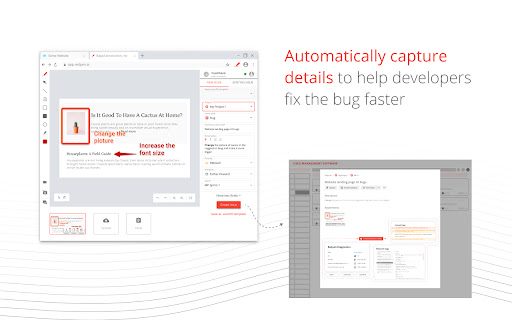
Capture screenshot and record screen to report bugs and visual feedback. The easiest way to send feedback and report bugs is, take screenshots or record screens of any website or desktop application, highlight issues using annotation tools, and submit them to your favorite issues tracking service. 💁 Helpful for • Quality analysts, developers, designers, product managers, web agencies, consulting companies, product companies, and many more… • All-in-one feedback and bug reporting tool useful in customer support, UAT & Beta testing, and product development. 🔑 Key Benefits • Faster time to market - By reducing product development time by eliminating back-and-forth communication between teams. • Increase customer satisfaction - By faster turnaround of bugs or feedback submitted by customers. • Save Cost - By minimizing the development and support costs. 📋 Features ✪ Screenshot & Annotation tools • Take screenshots of any web page of a website or desktop screen and highlight issues using annotation tools. ✪ Screen recording & Voice comments • Record and explain issues visually on the web page or desktop screen with voice comments and annotation tools. • Double click the Redpen extension to start recording the screen. ✪ Auto-capture technical details • Minimize troubleshooting time with auto-collected browser or desktop-specific metadata. • Collect technical metadata like OS details, browser details, screen size, console logs, network logs, cookies, local storage, IndexedDB, etc. ✪ Auto-fill templates • Report bugs faster with pre-defined templates. While reporting bugs, auto-populate the common form fields to eliminate field selection every time. ✪ Widget • Add Redpen Widget to your website to capture unlimited feedback. $ Pricing & Plan • Our individual plan is FREE FOREVER. . Free Video recording • Visit Customer Support Request and Bug Capture Platform - Redpen to start your 14-days free trial (no credit card required).

Prism - Redline Tool
Prism is a redline tool for the web. Effortlessly extract redline specifications from a webpage, encompassing properties such as size, color, spacing, typography, and additional relevant attributes. Users can effortlessly hover and click on objects within the webpage to obtain comprehensive details about them. How to use: - Just click the Δ icon - Then click anywhere on the web page to redline item - Press Esc to pause redlining or 'Close' to turn off

BrowserStack Bug Capture: Report & resolve bugs faster
Bug reporting tool with shareable screen recordings & screenshots for faster debugging. ➤ BrowserStack Bug capture makes the process of reporting bugs easy and straightforward, even for non-technical users. Create data-rich bug reports quickly, saving time & improving communication between developers and other stakeholders. Install now and unlock seamless bug reporting! 𝐄𝐟𝐟𝐨𝐫𝐭𝐥𝐞𝐬𝐬 𝐁𝐮𝐠 𝐑𝐞𝐩𝐨𝐫𝐭𝐢𝐧𝐠: Simplify bug reporting by capturing screen recordings and logs with a single click, making it easy for anyone to report issues even without technical knowledge. 𝐄𝐧𝐡𝐚𝐧𝐜𝐞𝐝 𝐃𝐞𝐛𝐮𝐠𝐠𝐢𝐧𝐠: Quickly identify and resolve bugs with comprehensive insights and logs, reducing the time spent on debugging and improving overall software quality. 𝐃𝐞𝐯𝐞𝐥𝐨𝐩𝐞𝐫 & 𝐭𝐞𝐬𝐭𝐞𝐫 𝐟𝐫𝐢𝐞𝐧𝐝𝐥𝐲: Tailored for everyone, our user-friendly extension simplifies bug reporting, reducing the learning curve and streamlining your workflow. 𝐕𝐢𝐝𝐞𝐨 & 𝐒𝐜𝐫𝐞𝐞𝐧𝐬𝐡𝐨𝐭 𝐂𝐚𝐩𝐭𝐮𝐫𝐞: Create bug reports by recording your screen & capturing screenshots, providing visual context for the bugs encountered. 𝐀𝐮𝐭𝐨𝐦𝐚𝐭𝐢𝐜 𝐃𝐚𝐭𝐚 𝐂𝐚𝐩𝐭𝐮𝐫𝐞: Automatically capture essential technical data, including console logs, network requests, and browser information, streamlining the debugging process. 𝐈𝐧𝐬𝐭𝐚𝐧𝐭 𝐫𝐞𝐩𝐥𝐚𝐲𝐬: Continuously record your interactions on the webpage in the background and watch the replay instantly as soon as a bug happens, allowing quicker resolution. 𝐈𝐧𝐭𝐞𝐠𝐫𝐚𝐭𝐢𝐨𝐧 𝐰𝐢𝐭𝐡 𝐏𝐫𝐨𝐣𝐞𝐜𝐭 𝐌𝐚𝐧𝐚𝐠𝐞𝐦𝐞𝐧𝐭 𝐓𝐨𝐨𝐥𝐬: The software integrates with platforms like JIRA, enabling users to create bug tickets directly from the reports, facilitating better workflow management & collaboration among teams. 𝐒𝐚𝐯𝐞 𝐓𝐢𝐦𝐞: Reduces the time spent on bug reporting by createing comprehensive bug reports in just 1-3 clicks. 𝐃𝐚𝐭𝐚-𝐑𝐢𝐜𝐡 𝐑𝐞𝐩𝐨𝐫𝐭𝐬: The wealth of information helps you to quickly diagnose and resolve issues without needing extensive back-and-forth communication. 𝐔𝐬𝐞𝐫-𝐅𝐫𝐢𝐞𝐧𝐝𝐥𝐲 𝐈𝐧𝐭𝐞𝐫𝐟𝐚𝐜𝐞: Enjoy an intuitive and easy-to-use interface that makes bug reporting accessible to all team members, regardless of their technical expertise. 𝐈𝐦𝐩𝐫𝐨𝐯𝐞𝐝 𝐂𝐨𝐥𝐥𝐚𝐛𝐨𝐫𝐚𝐭𝐢𝐨𝐧: With integrations, streamline workflow and improves communication between support and engineering teams.

Bugasura
Bugasura enables anyone who tests by automating test data and reporting. This is available for web, mobile web and native apps. Bugasura Chrome Extension is the easiest and most visual way to share website development and design feedback. Use this AI-enabled reporter that allows you to catch bugs super fast. ⚡ 📸 Automatic screenshot and video capture to explain steps to reproduce 🦾 Auto-generate bug descriptions, severity, and tags with integrated AI 👉 Built-in annotator to explain bugs and give more context to screenshots 📌 Designer mode to give pixel precise feedback to developers 📊 Collaborative test coverage reports so you know exactly what was tested 🤖 To push all bugs into an AI-powered issue tracker This is that one plugin that your developers, designers, and testers will all love. Catch bugs and close them faster with Bugasura Chrome Plugin. "Bugasura has made explaining bugs easy to our team and hence we close bugs faster" - Yash, Engineer at Stockal

Capture: Screen recording & sharing
Capture videos, screenshots, events and more to report bugs faster. Record the screen, take and annotate screenshots, capture events and technical details and file bugs faster for FREE!😎 🐞 Bugs are quite annoying, especially when you need to collect a lot of information before sending it to a tech team. Capture powers you up 💪 to create the most comprehensive bug reports for your developers in just one click. 🚀 It's faster than typing a message, more efficient than endless chain of distracting calls and much more fun! WITH CAPTURE YOU: ✅ save at least 10 hours per week on collecting all important technical details before reporting the defect; ✅ reduce the time spent on running your tests by 6X while all your actions are automatically documented and saved. HOW TO USE IT: 👉 Hit the Capture icon. 👉 Choose: record your screen or take a screenshot. 👉 Start capturing desktop, window or an app. 👉 Share it! Capture has an advantage of a native integration with one of the most powerful test management solutions - aqua! Where you can manage your test cases, runs and reported defects. WITH AQUA YOU CAN GET EVEN MORE: 👉 Create a test case 👉 Start a test run 👉 Hit the Capture icon and provide a URL. 👉 Start testing and reporting the captured data directly to the tool Note: aqua account is required 💙 Capture integrates seamlessly with Jira too, allowing you to report defects at lightning speed!
