
eheemiidlejngomipjjedefpohekhcic

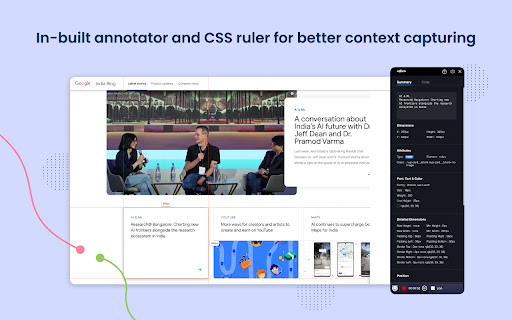
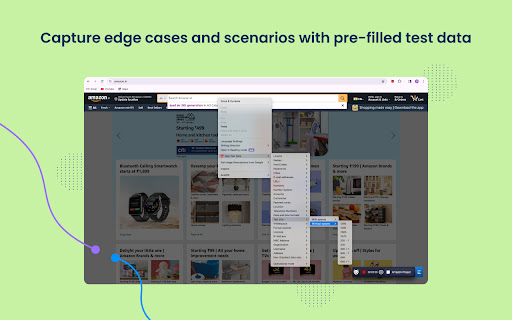


Bugasura enables anyone who tests by automating test data and reporting. This is available for web, mobile web and native apps. Bugasura Chrome Extension is the easiest and most visual way to share website development and design feedback. Use this AI-enabled reporter that allows you to catch bugs super fast. ⚡ 📸 Automatic screenshot and video capture to explain steps to reproduce 🦾 Auto-generate bug descriptions, severity, and tags with integrated AI 👉 Built-in annotator to explain bugs and give more context to screenshots 📌 Designer mode to give pixel precise feedback to developers 📊 Collaborative test coverage reports so you know exactly what was tested 🤖 To push all bugs into an AI-powered issue tracker This is that one plugin that your developers, designers, and testers will all love. Catch bugs and close them faster with Bugasura Chrome Plugin. "Bugasura has made explaining bugs easy to our team and hence we close bugs faster" - Yash, Engineer at Stockal

TestCase Studio - Selenium IDE
TestCase Studio record the user actions performed on a web application in English Sentences. Best alternative for Selenium IDE TestCase Studio is a platform to record and replay the user actions performed on a web application in English Sentences. This recorder plugin also records screenshots. It will also generate the XPath and Automation Code for every user action. User can save or copy these recorded steps as a Test case. Watch this video tutorial to make the best use of TestCase Studio. https://www.youtube.com/watch?v=Gcofn71bJdo New Features: Screen Recording, Customise Command, Record TestCase in any Language and BDD Format Support. Very simple steps to use the tool- 1. Click on the TestCase Studio logo in the tool bar. 2. It will open the TestCase Studio window. 3. Now keep performing your steps, it will automatically write english sentence for every user action. 4. You can download the written steps by clicking on download button. Upgrade to Pro version for more advanced features. Compare the Pro version features here- https://selectorshub.com/testcase-studio-pro/plans/

Exploratory Testing Extension
Chrome extension for exploratory testing A Chrome extension designed for making web exploratory testing easier Features: - 🐛 Quickly create and track bugs, notes, ideas and questions - 📸 Capture full page or custom cropped screenshots - 🔗 Automatically track URLs for each annotation created - 🔍 Advanced filtering of annotations by type in reports - 📊 Visualize testing data through interactive charts - 👁️ View screenshot previews instantly on hover - 💾 Export testing sessions to JSON, CSV or HTML formats - 🤝 Share and collaborate by importing/exporting sessions

CounterString
CounterString and text generation for Exploratory Testing - the string is a specific length e.g. 15 - the last character in the string is an * - the numbers before each * are the position of the * This can act as Test Data for helping test the length allowed in forms and other data fields. If the value is truncated then you can tell from the numbers and the '*' how long the string is e.g. `*3*5*7*9*12*15` is 14 characters long because the '*' after 15 is missing. This extension is a simple CounterString generator, which: - displays a dialog asking for the number of characters, - then generates a CounterString of that length - generated data can be copied directly to the clipboard (default) - the CounterString is logged to the dev console to allow later copy and pasting, - the extension can insert the CounterString into the value of the field that was selected when the right click context menu was displayed, the extension can also 'type' the values. - this supports supports testing online forms. - if a field has a maxlength, then this is used as the default for CounterString generation NOTE: human copy and paste data triggers the browsers default input validation and behaviour. Generate and Type can bypass some validation rules, making this suitable for edge case testing. - generate and type random data generated from Regex - generate and type ranges of characters - generate and type repeated text, characters or regex generated data - explore boundary chop ranges - useful for hunting down boundary length conditions Instructions for use: - right click on an input field - choose Generate CounterString - enter value of CounterString - CounterString will be logged to the console (use dev tools to see it) - CounterString will be inserted as the value of the WebElement you clicked on You can also choose to 'type' CounterStrings - this will issue keydown and keyup events to type the string character by character. - works with forms on the actual page - this extension does not work with forms embedded in frames This is open source and source can be found at GitHub:

TestCraft
Introducing TestCraft, a free and open-source browser extension with the power OpenAI LLMs, designed to be a companion to your software testing. AI-Powered Test Idea Generation: Leverage the power of OpenAI to generate comprehensive test ideas based on webpage elements. Automated Test Creation: Generate ready-to-run test scripts for popular automation frameworks, Playwright, Selenium, and Cypress, in your preferred programming language: JavaScript, TypeScript, Python, C#, and Java. TestCraft eases your test creation process and saves time. Accessibility Checks: Empower your web applications to be inclusive for all users. TestCraft identifies accessibility issues and provides actionable insights to improve. Test Idea to Automated Tests: Seamlessly convert your AI-generated test ideas into automated test scripts. Additionally, you can edit the test ideas to improve them before generating automation tests. Unlock the full potential of your testing process with TestCraft. Download it now and experience the future of software testing!
