
mpfdecfajdfcdbhjndaakpfggklckdbe


Transform your new tab into a focused space to write notes, plan tasks, and build better habits Turn your new tab into a fast, distraction free space for notes, note taking, task planning, and habit tracking. This extension is built around three principles: accessibility, simplicity, and high performance. Capture ideas, to dos, and meeting notes instantly in a new tab without switching between apps. Clean interface, minimal visual noise, and quick loading. Great for managers, students, writers, founders, researchers, designers and anyone working with text, meetings, and deadlines. Boost productivity with three core modes: - Notepad: quick notes in a new tab for lectures, meetings, and online calls - Planner: planning and task management for the day, week, month, or year (split view) - Habit Builder: mark and track completion and follow progress Features and benefits: - No sign up required - No ads, no hidden paid features, and no upsells (100% free) - Responsive UI for different screen sizes and adating for operating system - Light and dark theme with automatic switching - Basic text formatting with partial Markdown support - Character counter for typed and selected text - Weekly and monthly remaining time estimate - Full screen mode - 21 day habit tracker with workday customization Security, privacy, and data storage: Only you can access your content, including notes, plans, and habits. Your data is not stored on the developer’s remote servers. The extension does not run external code and does not load third party frameworks. Data is stored locally and via Chrome Sync mechanisms. More details are available in the Privacy Policy. ☎️ Fast support and feedback on X (Twitter): @k_shirshov

New Tab Notes
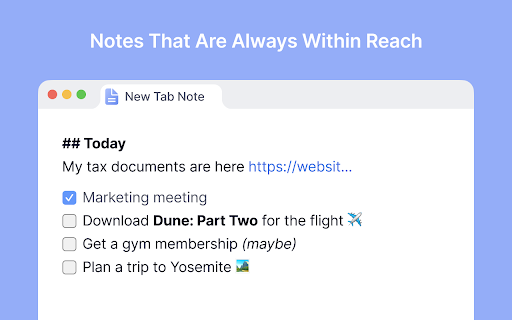
Turn your New Tab into a clean, distraction-free notepad with rich text formatting, task lists, shortcuts, auto-sync, and more. Capture your ideas instantly when you open a new tab! Your notes are saved and synced by your browser as you type—perfect for reminders, to-dos, or long-form writing, all on one page. ✨ Format text with markdown and shortcuts. ✅ Create and manage task lists with checkboxes. 🔄 Synced and auto-saved across devices. ✂️ Copied text is beautifully formatted. 📝 Export notes as Markdown, HTML, or plain text. 🖨️ Print your notes or save them as a PDF. 🔍 Customize fonts and zoom preferences. 🌓 Toggle between Dark and Light themes. 🛡️ Fully private, no third-party servers involved. Make the Most of It: 👉 In the settings, you can change the font type and size, set the writing area to full width or centered, and enable spelling suggestions. 👉 Use headings to quickly navigate through your notes. Got an idea... 💡 just open a new tab and write it down!

Notebook Sidebar
Notebook Sidebar is a handy tool for quick and easy note taking with advanced features. Chrome Note book Sidebar Extension📝✨ With this extension, you can have a light and fast notepad in the Chrome sidebar and it helps you to note and save ideas, notes, reminders and various tips in it. ✍️ Ability to record, edit and save notes 📌 Ability to pin important notes 🔒 Local storage of notes in a completely secure way 📥 Ability to export all notes 🔍 Ability to search for posts 📏 Ability to adjust the desired height for each note

MemoTab - New Tab Notes
Turn your new tab into a sticky note board Enable the persistence of your notes across all newly opened tabs. 🗂️ Multiple Boards Support – Switch between different boards for various projects or contexts. ✍️ Draggable and Resizable Notes – Move and scale your notes effortlessly 🎨 Customizable Note Colors – Color-code your notes to suit your workflow. 🔤 Tailored Font Styles – Apply custom fonts for a note-taking experience that fits your style. 🗃️ Archive Functionality – Keep your workspace tidy without losing past notes. ⌨️ Keyboard Shortcuts – Add new notes and navigate your board faster with handy shortcuts. 📁 Persistent Across Tabs – Notes stay in place no matter how many tabs you open. 📝 Markdown & Plaintext Support – Write notes in Markdown for rich formatting or stick to simple plaintext. 🔍 Search Within Notes and Boards – Instantly find the content you're looking for. 📤 Export and Import Notes – Backup your data or move your boards across devices effortlessly.

domainNote - website sticky notes in side panel
Take domain specific notes with live-preview markdown note editor in side panel. domainNote sync notes with local files, GDrive, Box 📢 Take Website specific notes in side panel with live preview markdown and local disk realtime sync. 📌 Why you should consider this: ✪ Live preview markdown editor ✪ Website specific (Domain-wise) sticky notes ✪ No signup required ✪ Fuzzy search ✪ Persistent Text Highlighter ✪ Take screenshot and insert into notes ✪ Dark mode and custom themes. ✪ Sync with desktop local file manager. ✪ Sync with cloud drive: GDrive, oneDrive, Dropbox,box,notion. ✪ Pure & clean code that powers fastest performance. ✪ Cloud & Cross-devices realtime sync . ✪ Export notes in three format: markdown,html and pdf ✪ All notes and media-files saved locally. Never touch our server ✪ No tracking & no Ads. ✪ Lightweight 80KB only ✪ No third-party library used. ✪ Negligible memory consumption (consume 400% less memory than new tab). 📌 == FEATURES == ✅ Markdown live preview editor You don't need to open separate panel to preview your markdown. domainNote provides a real live preview like WYSIWYG editor. you can update existing markdown's mark to change formatted text. ✅ Create Website specific sticky notes you can group multiple domains ✅ Remind todo you when you visit website(coming soon) ✅ Persistent text highlighter Highlight text by right click menu or (Alt + H when copy listener on). Fastest highlighter in chrome web store. domainNote highlight text without creating new DOM element. Read more: https://web.dev/dom-size-and-interactivity/ ✅ Time has come to forget ctrl+c and ctrl+v Drag and drop any web content e.g images,selected text. domainNote doesn't convert text into image like others do. domainNote format into markdown so that you can easily modify them selected text will auto-copied to domainNote when you press ctrl+c on any webpage keyboard shortcuts (work only when copy listener on) Ctrl+Z ⇒ undo Ctrl+Y ⇒ redo Alt+H ⇒ highlight Ctrl + Shift + H ⇒ remove highlight Ctrl+ Shift +Z ⇒ undo highlight Ctrl+ Shift +Y ⇒ redo highlight Shift + Space ⇒ extend selection 🖥️ Take screenshot Click on screenshot icon for capture and save screenshot Use Keyboard shortcut (Alt + S) 🖍️ Highlight text When you clip selected text, selected text will highlighted automatically Click on Save Highlight button on right bottom corner to save highlight. For remove highlight, Select again highlighted text and press Ctrl + Shift + H. For disable highlight, Go to options page ✅ No vendor locked in. domainNote realtime sync your notes with desktop local file manager in three format: markdown,html & pdf You can view and edit notes in any other markdown based note editor. ✅ Realtime sync notes with other cloud providers You can sync notes with cloud drive providers:GDrive, oneDrive, Dropbox,box. You can sync notes with cloud notes providers:Notion, onenote (coming soon). ✅ Private and secure All data saved locally. Your notes or media file e.g images, videos never touch our server. You can mail us: noderailhelp@gmail.com 🚀 Version 0.0.62 Added: Delete domain & its notes feature added ⇒ ADDED: Sync screenshot with local disk & cloud drives ⇒ FIXED: markdown paste issue fixed ⇒ FIXED: Search then click on note bug fixed 🚀 Version 0.0.60 ⇒ ADDED: Realtime sync feature added ⇒ ADDED: Markdown guide & sync notes option available on extension's right click ⇒ IMPROVED: Improved sync feature ⇒IMPROVED: Options page improved ⇒IMPROVED: domainNote now available in 20 languages
