
ipkihanjobiajblamocijadicanfagpj


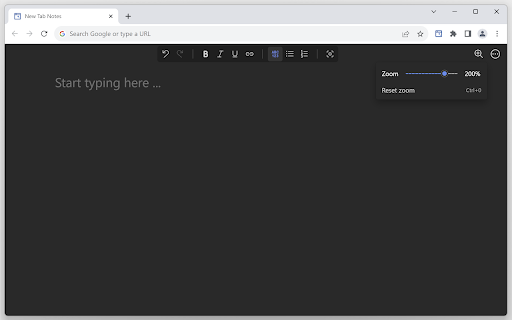
Turn your New Tab into a clean, distraction-free notepad with rich text formatting, task lists, shortcuts, auto-sync, and more. Capture your ideas instantly when you open a new tab! Your notes are saved and synced by your browser as you type—perfect for reminders, to-dos, or long-form writing, all on one page. ✨ Format text with markdown and shortcuts. ✅ Create and manage task lists with checkboxes. 🔄 Synced and auto-saved across devices. ✂️ Copied text is beautifully formatted. 📝 Export notes as Markdown, HTML, or plain text. 🖨️ Print your notes or save them as a PDF. 🔍 Customize fonts and zoom preferences. 🌓 Toggle between Dark and Light themes. 🛡️ Fully private, no third-party servers involved. Make the Most of It: 👉 In the settings, you can change the font type and size, set the writing area to full width or centered, and enable spelling suggestions. 👉 Use headings to quickly navigate through your notes. Got an idea... 💡 just open a new tab and write it down!

NEW TAB NOTE
This extension allows you to use your new tab as a notepad! 📚 Features ・Use a new tab as your notebook ・Supports Markdown syntax ・Notes are saved automatically, even after reloading ・Filter mode blurs your notes to prevent peeking ・Create and switch between multiple notes ・Customize with different color themes ・Notes with sync enabled are shared across devices signed in with the same Chrome account ⚠️ Notes ・The sync storage capacity is limited to roughly 100 KB in total by chrome.storage.sync. If you exceed the quota, syncing stops until you clean up notes. ・The administrator (developer) does not store or manage your memo data. In case data is lost due to browser behavior, sync limitations, or other environmental factors, recovery is not possible. Please make sure to back up important information yourself. For feedback or bug reports, please visit https://github.com/deren2525/new-tab-note/issues/new/choose

TabNotes
Take the notes in your new Tab. Press CMD + T (Mac) or Ctrl + T (Windows) to take a note. Let the new tab keep you focused on what you want to do. Increase your productivity. - Markdown Preview Take notes in markdown, and preview as HTML. Press esc key to toggle HTML Preview. - Dark mode Developer loves the dark mode. So we have the one. Default theme is white. - Auto Save You don't need to save your text note. When you open new tab start from where you were left. - Multiple notes. Chrome allows you to store up to 5MB. It's enough to save 5,000 notes of small size. - Offline Storage Notes are stored directly in your browser. So only you can access your notes.

Notes Tab
A fast notes editor on every new tab. Markdown, slash menu, checklists, dark mode. Keep notes local or share with an AI agent. Notes Tab replaces the New Tab page with a clean, fast notes editor, so the place you already open dozens of times a day becomes the place you capture ideas, todos, snippets, and rough drafts. WHY IT'S DIFFERENT • 100% local. Notes live in your browser. No accounts, no cloud, no telemetry. • Zero friction. Open a new tab → start typing. That's it. • Looks like a real editor, not a sticky note. Inter for prose, JetBrains Mono for code, light/dark themes that follow your OS. EDITOR • Live markdown. Type # for a heading, - for a list, > for a quote, and they render instantly without showing the raw syntax. • Slash menu. Press / to insert headings, bulleted/numbered lists, checklists, or a divider. • Bubble menu. Select text for bold, italic, strikethrough, inline code, or a link. • Checklists with the click of a box. • Paste markdown from anywhere, and it auto-formats. TABS • Multiple tabs across the top for separate notebooks, projects, or contexts. • Switch instantly with ⌘ + [ or ⌘ + ] (Ctrl on Windows/Linux). • Rename inline. Reorder by drag. KEYBOARD-FRIENDLY Block shortcuts in the slash menu PRIVACY Notes Tab does not collect, transmit, or sync any data. Everything is stored in your browser's local storage on your device.

Notebook: Quick and Simple Notes
A clean, distraction-free notebook with rich text, task lists, shortcuts, customizations, and themes to keep your ideas organized. Your words are saved as you type by your browser, so no account is needed! 🔄 ✨ Format text (bold, italics, lists, headings) with keyboard shortcuts. 📑 Multiple notes and drag and drop reordering of notes. ✂️ Copied text from websites and other sources will be neatly formatted. ✅ Create and manage task lists with checkboxes. 📝 Export your notes to HTML, Markdown or plain text. 🖨️ Print your notes or save them as a PDF. 🔍 Customize fonts and adjust zoom preferences. 🌓 Toggle between Dark and Light theme modes. Make the Most of It: 👉 In the settings, you can change the font type and size, set the writing area to full width or centered, and enable spelling suggestions. 👉 To import your existing notes, simply drag and drop text, markdown or HTML files into the app.
