
momnoloafkhgjijocjijnbbnojggicja
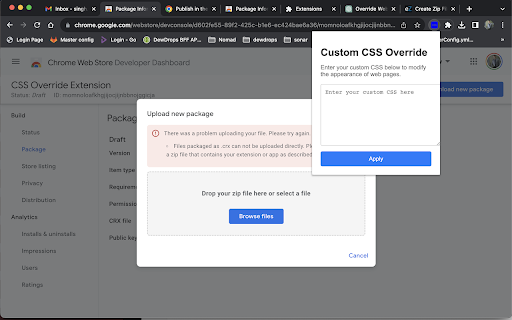
Override web page CSS with custom styles. Added extension to override the css temporary for the page the logo is used from https://www.flaticon.com/free-icons/sample

Easy Screenshot - a Web Clipper
all-in-on capturing tool for the visual part, the entire page, or a selective area with auto-scrolling and editing support You can capture screenshots from the active tab with just two clicks. It provides multiple options for capturing specific portions of the page, the visual viewport, or even the entire page if it extends beyond the screen with both vertical and horizontal scroll bars. The captured image can be saved to the default download directory, copied to the clipboard, or opened in an online paint editor. The extension currently integrates JSPaint, a web-based replica of MS Paint, which offers offline functionality, allowing you to edit your images without an internet connection. The extension adds a toolbar button to the browser's action area. Clicking on this button opens a popup window with three options: 1. Capture the Entire Screen (3 methods. Works even if the page contains fixed-position elements) 2. Capture Visual Part 3. Capture a Portion Supported formats: PNG, JPEG, Avif, and WebP These options are also accessible via the right-click context menu on any page, providing easy access to the screenshot functionality. Here are some additional notes about the extension: 1. When selecting the "Capture Entire Screen" option, and the page size exceeds the window size, the extension will automatically scroll through the entire page to capture different sections and merge them into a single image. This process may take a few seconds to complete. 2. The resolution of the captured image depends on the screen resolution. For instance, if you have a 4K display, such as a Retina display, the image resolution will be at least four times higher than a regular display. 3. To ensure compatibility across various devices, the extension saves all captured screenshots in the widely supported PNG format, which offers high-quality lossless images. 4. The extension does NOT add watermarks to the captured images. 5. If you prefer to customize the format of the filenames for downloaded images, you can visit the options page and utilize the "filename mask" option to make the desired changes.

CSS inject
Very simple chrome extension to inject CSS into websites

User JavaScript and CSS
User JavaScript and CSS on any website Userscript's and userstyle's — simple extension to inject own JavaScript or CSS rules to any page. Change log: Version 3.1.0 - Starting from Chrome version 138, the method for allowing user scripts in the browser has changed - Fixed a bug where styles weren't removed when a rule was deleted - Fixed a bug where not all rules applied to the page were shown in the rules popup Version 3.0.5 beta - the mode of injection of styles into the DOM has been returned - minor fixes Version 3.0.3 beta - modules are now in the same scope - CSS injection improvement - and other minor fixes Version 3.0.2 beta - hotfix: fixed bug with registration and deletion of scripts - added feature to change start scripts before page loading - added feature to strictly read URL patterns Version 3.0.0 beta - The extension has been moved to MV3 - Added option to inject scripts and styles in iframe - Added the feature of live CSS - Added the One Dark theme and a few other improvements Version 2.0.0 - 90% of the code has been rewritten; - Improved UI; - Added SASS support; - Added Prettier formatter - Other minor improvements Version 2.0.0 - 90% of the code has been rewritten; - Improved UI; - Added SASS support; - Added Prettier formatter - Other minor improvements Version 1.2.8 - Added function for naming rules - Updated translations Version 1.2.7 - Updated all extension libraries to current versions Version 1.2.6 - Fixed error in console "Unchecked runtime.lastError: The message port closed before a response was received" - Improved domain getter from URL - Updated Ace Editor and jQuery to latest Version 1.2.5 - Resolved bug with '@import' and "Auto-important css" feature - "Auto-important css" feature now disabled by default - Added feature to exclude URL's by '!' symbol at start - Updated jQuery and Ace editor to last versions - Other small fixes Version 1.1.5 - Returned old method injection and added option to toggle this. Alternative method has feature to avoid CORS issues, but has only DOM access to site (no JS context). Old and now primary method is injecting by tag on site bottom. - Added scroll past end in editor Version 1.0.0 - Full redesign of extension - Added more settings - Added toggleable counter on extension icon Version 0.96 - Full redesign of extension interface - 80% code of extension core has been rewritten - New feature: change URL field and mask with "*" symbol (eg *.expample.com) - Editor window opens in new tab in split layout - Disabled autosave feature - Configurable editor in settings - New icon Version 0.93 - Fixed a bug where JavaScript is not always inserted in a page - Outdated processes are disabled Beta test. If you find any problem or have a question contact me on email.

Stylebot
Change the appearance of the web instantly You pick an element and choose any changes you want to make from the editor. You can change the font, color, margins, visibility and a lot more. You can also code CSS manually. ★ Easy to use: Pick and style elements using UI actions ★ Simple & Quick: Changes are saved instantly ★ Code editor - Write your own CSS ★ Readability Mode - Make articles on any site readable by hiding non-essential page elements like sidebars, footers and ads. ★ Grayscale Mode - Turn on grayscale to reduce strain from websites Homepage: https://stylebot.dev/ Twitter: http://twitter.com/ahujaankit Bug reports and feature requests: https://github.com/ankit/stylebot/issues Stylebot has never collected and will never collect any personal data, browsing history etc. The permission to access websites is to only let you customize the CSS for any webpage and automatically apply your CSS when you visit the webpage in the future. In the future, Stylebot may collect browser version, platform name, user's settings (except website list or any other data which can help identify user). This information is needed for decision on implementing new features, removing unused features or suggesting default settings for new users. It will happen only with your permission.
