
oiaejidbmkiecgbjeifoejpgmdaleoha


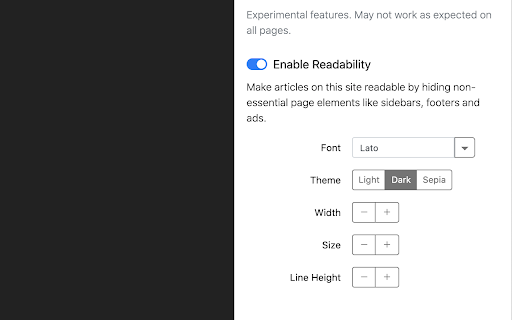

Change the appearance of the web instantly You pick an element and choose any changes you want to make from the editor. You can change the font, color, margins, visibility and a lot more. You can also code CSS manually. ★ Easy to use: Pick and style elements using UI actions ★ Simple & Quick: Changes are saved instantly ★ Code editor - Write your own CSS ★ Readability Mode - Make articles on any site readable by hiding non-essential page elements like sidebars, footers and ads. ★ Grayscale Mode - Turn on grayscale to reduce strain from websites Homepage: https://stylebot.dev/ Twitter: http://twitter.com/ahujaankit Bug reports and feature requests: https://github.com/ankit/stylebot/issues Stylebot has never collected and will never collect any personal data, browsing history etc. The permission to access websites is to only let you customize the CSS for any webpage and automatically apply your CSS when you visit the webpage in the future. In the future, Stylebot may collect browser version, platform name, user's settings (except website list or any other data which can help identify user). This information is needed for decision on implementing new features, removing unused features or suggesting default settings for new users. It will happen only with your permission.

CSS Used
Get all css rules used by the selected DOM and its descendants. One click to get all the css applied to the selected web element and its descendants. -- Recent Update -- 1. Migrated to Manifest V3. 2. Resources are read from local caches, making it much faster and solves the cross-origin issue. 3. Optimized style parsing in a more efficient way. 4. Dropped support for some outdated CSS, mostly -o- and -ms- prefixed properties. 5. Implemented a new UI powered by Svelte, with some visual tweaks. -- Known Limit -- 1. For CSS rules like ".wrap p{...}", if only " " is selected, the result ".wrap p{...}" will not apply to " ". Either change the rule to "p{...}" or add a ".wrap" parent in the final HTML. 2. CSS custom properties (variables) and all the style inherit related features are not supported currently.

Custom Style Script
Add Custom JavaScript (JS) Code or Styles (CSS) to any page. Custom Style Script customizes the way a webpage looks or behaves, by adding a small JavaScript or CSS code. You can also specify a URL to add the code or add it to all pages. Key features: 1. Add custom JavaScript codes or styles (CSS) to a specific page or all pages. 2. Clicking on the toolbar icon allows you to disable or enable the addon. 3. Each code item has several options to adjust (see options page for details). 4. You can add several code items and active or inactive them separately. 5. An example of how to add a code is available in the add-on's options page. 6. Before adding the code (JS or CSS) please make sure you have validated the code. 7. Online JS or CSS links (i.e. jQuery or bootstrap) can also be added to any page. See add-on's options page for details. Note: to report bugs, or request a feature, please visit the add-on's homepage (https://mybrowseraddon.com/custom-style-script.html) and fill the bug report form.

Calm Twitter
This extension hides trending information from twitter timelines to make your mind calm. - Hide unnecessary items from navigation - Hide numbers of replies, retweets, likes, bookmarks, and view counts - Hide trends, who to follow, subscribe prompts, and news from sidebar - Hide following and follower counts - Show "Calm" next to the logo This extension requires a permission to save the settings and only toggles hide or show. The source code is available on Github https://github.com/yusukesaitoh/calm-twitter

Visual CSS Editor
The extension lets you edit any website visually without coding. Click an element and start editing. Change colors, fonts, text, spacing, sizes, positions, and layout in real time. Take full control over your website's design with more than 60 style properties. Key Features: - No-code visual editing - Visual Inspector - Customize any website visually - Automatic CSS selectors - 60+ CSS properties - Visual Dragging - Visual margin and padding editing - Undo/redo history - Export CSS styles - Live preview while you edit - Works on most sites and popular platforms Design Assets: Reach many design assets with one click. Customize any website design to fit your needs. - 900+ Google Fonts - Unsplash background stock images - Material and flat color palettes Design Tools: The extension provides you advanced tools and ready-to-use libraries for styling websites effortlessly. - Flexible element inspector - Single element inspector - Responsive tool - Element search tool - Measuring tool - Wireframe view - Design information tool - Gradient generator Usage Examples: - Change text and colors on a page without coding - Fix spacing and alignment visually (no CSS required) - Apply Google Fonts to headings and buttons - Add or adjust background images from Unsplash - Tweak pages built with WordPress, Wix, Squarespace, or Webflow - Style GoHighLevel (GHL) admin panels (fonts, colors, spacing) - Preview edits live, then export CSS and paste into your theme - Inspect elements to learn which styles affect them Note: The free plan includes 100 visual edits per month. For more edits, a premium plan may be required. Premium plans help us keep improving the extension. Thank you for understanding!
