
nbhcbdghjpllgmfilhnhkllmkecfmpld
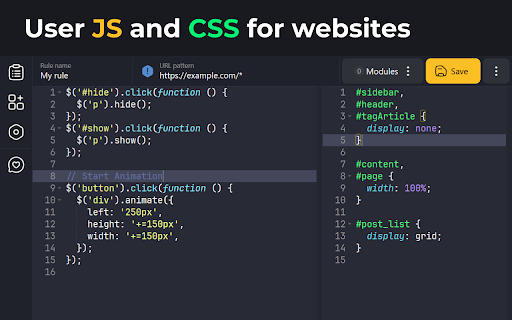


User JavaScript and CSS on any website Userscript's and userstyle's — simple extension to inject own JavaScript or CSS rules to any page. Change log: Version 3.1.0 - Starting from Chrome version 138, the method for allowing user scripts in the browser has changed - Fixed a bug where styles weren't removed when a rule was deleted - Fixed a bug where not all rules applied to the page were shown in the rules popup Version 3.0.5 beta - the mode of injection of styles into the DOM has been returned - minor fixes Version 3.0.3 beta - modules are now in the same scope - CSS injection improvement - and other minor fixes Version 3.0.2 beta - hotfix: fixed bug with registration and deletion of scripts - added feature to change start scripts before page loading - added feature to strictly read URL patterns Version 3.0.0 beta - The extension has been moved to MV3 - Added option to inject scripts and styles in iframe - Added the feature of live CSS - Added the One Dark theme and a few other improvements Version 2.0.0 - 90% of the code has been rewritten; - Improved UI; - Added SASS support; - Added Prettier formatter - Other minor improvements Version 2.0.0 - 90% of the code has been rewritten; - Improved UI; - Added SASS support; - Added Prettier formatter - Other minor improvements Version 1.2.8 - Added function for naming rules - Updated translations Version 1.2.7 - Updated all extension libraries to current versions Version 1.2.6 - Fixed error in console "Unchecked runtime.lastError: The message port closed before a response was received" - Improved domain getter from URL - Updated Ace Editor and jQuery to latest Version 1.2.5 - Resolved bug with '@import' and "Auto-important css" feature - "Auto-important css" feature now disabled by default - Added feature to exclude URL's by '!' symbol at start - Updated jQuery and Ace editor to last versions - Other small fixes Version 1.1.5 - Returned old method injection and added option to toggle this. Alternative method has feature to avoid CORS issues, but has only DOM access to site (no JS context). Old and now primary method is injecting by tag on site bottom. - Added scroll past end in editor Version 1.0.0 - Full redesign of extension - Added more settings - Added toggleable counter on extension icon Version 0.96 - Full redesign of extension interface - 80% code of extension core has been rewritten - New feature: change URL field and mask with "*" symbol (eg *.expample.com) - Editor window opens in new tab in split layout - Disabled autosave feature - Configurable editor in settings - New icon Version 0.93 - Fixed a bug where JavaScript is not always inserted in a page - Outdated processes are disabled Beta test. If you find any problem or have a question contact me on email.

Run Javascript
Run custom Javascript, each time you visit a website ⚡ Run custom JavaScript on any website — automatically, every time you visit. Save your scripts per domain. They execute on page load, every single time. No setup, no config files, no extra tools. Just your code running where you want it. 1. Visit any website 2. Click the Run JavaScript icon 3. Write or paste your custom JavaScript code 4. Save — your script auto-runs on every future visit to that domain Toggle scripts on/off per site with one click. Scripts persist across browser restarts. 🎯 WHAT YOU CAN DO ✅ Remove ads, popups, banners, cookie notices, and distracting elements ✅ Inject custom CSS — dark mode, custom themes, font changes, layout fixes ✅ Auto-fill forms, pre-select dropdowns, auto-click buttons ✅ Auto-run scripts on page load without manual intervention ✅ Extract data, scrape content, highlight information on any page ✅ Add features websites are missing — keyboard shortcuts, UI tweaks ✅ Automate repetitive tasks — clicks, form submissions, navigation ✅ Inject custom HTML elements, dashboards, or productivity widgets ✅ Test and prototype frontend code changes on live websites ✅ Debug and inspect page behavior with custom console scripts ✅ Modify DOM elements, rewrite page content, restructure layouts 💻 BUILT FOR DEVELOPERS ✅ Ace code editor with full syntax highlighting and auto-indent ✅ jQuery library included (1.12.4, 2.2.4, 3.3.1) — or use vanilla JavaScript ✅ Execute button for instant testing before saving ✅ Scripts stored per hostname using Chrome storage API ✅ One-click enable/disable toggle per domain ✅ Works on all http and https pages ✅ Manifest V3 — secure, fast, modern Chrome extension architecture ✅ Service worker background script — no performance overhead ✅ Sandboxed execution with duplicate run prevention → Web developers testing and debugging on production sites → Frontend engineers prototyping UI changes live → QA testers injecting test scripts and automation → Digital marketers running A/B tests and analytics scripts → Power users customizing websites to fit their workflow → Students learning JavaScript with real-world web pages → Automation enthusiasts replacing repetitive manual tasks → No data collection, no tracking, no analytics → No account required — works immediately after install → All scripts stored locally in your browser → Open source and transparent → Manifest V3 security standards → No external network requests Lightweight. Fast. Private. Just your JavaScript, running where you want it. Install now → click the icon → paste your code → done.

Custom Style Script
Add Custom JavaScript (JS) Code or Styles (CSS) to any page. Custom Style Script customizes the way a webpage looks or behaves, by adding a small JavaScript or CSS code. You can also specify a URL to add the code or add it to all pages. Key features: 1. Add custom JavaScript codes or styles (CSS) to a specific page or all pages. 2. Clicking on the toolbar icon allows you to disable or enable the addon. 3. Each code item has several options to adjust (see options page for details). 4. You can add several code items and active or inactive them separately. 5. An example of how to add a code is available in the add-on's options page. 6. Before adding the code (JS or CSS) please make sure you have validated the code. 7. Online JS or CSS links (i.e. jQuery or bootstrap) can also be added to any page. See add-on's options page for details. Note: to report bugs, or request a feature, please visit the add-on's homepage (https://mybrowseraddon.com/custom-style-script.html) and fill the bug report form.

Inject JS - Run JavaScript code
A powerful browser extension that allows you to instantly inject and execute JavaScript code on any website. Perfect for web developers, testers, and power users who need to customize web page behavior on the fly. Key features: Execute custom JavaScript code on any website with a single click Save and manage multiple scripts for different websites Automatic script injection based on domain rules Multiple injection methods to bypass various CSP restrictions Dark mode support for comfortable coding at night Import/export functionality for backing up your scripts Works across all websites with proper permissions Whether you need to test new features, automate repetitive tasks, modify website behavior, or enhance your browsing experience, this extension gives you the power to run custom JavaScript directly in any web page

CSS Scanly - Copy CSS | Tailwind & Bootstrap
Copy CSS properties from any web element with CSS Scanly. Supports Tailwind & Bootstrap, Helpful for developers and designers CSS Scanly: Inspect, Analyze, and Edit CSS in Real-Time Discover the power of advanced CSS inspection and editing with CSS Scanly, the must-have tool for web developers, designers, and CSS enthusiasts. This Chrome extension transforms how you interact with web page styles, providing an intuitive and feature-rich environment for exploring and manipulating CSS on any website. Hover over any element to instantly view its applied styles See computed styles, including those from stylesheets and inline CSS Explore pseudo-class styles etc. without leaving the page Edit CSS properties on-the-fly and see changes immediately Experiment with styles without affecting the original page Perfect for prototyping and troubleshooting design issues Automatically detects and highlights Bootstrap and Tailwind CSS classes Gain insights into how popular frameworks are used on different websites Pin multiple CSS information boxes for easy comparison Ideal for analyzing styles across different elements simultaneously 5. Copy-to-Clipboard Functionality Quickly copy any CSS styles with a single click Streamline your workflow by easily transferring styles to your projects View applied media queries for responsive design analysis Understand how styles change across different screen sizes Intuitive control bar for easy navigation and tool management Keyboard shortcuts for enhanced productivity Pause and resume the scanner as needed Move the control bar to your preferred location on the screen Perfect For: Web Developers seeking to debug CSS issues Designers looking to analyze and draw inspiration from other websites Students learning web design and CSS QA testers verifying style implementations Anyone curious about the styles behind their favorite websites Elevate your web development and design process with CSS Scanly. Download now and start scanning the world of CSS like never before!
