
ilihnlnookgcpkpnjafigbkdniceonip
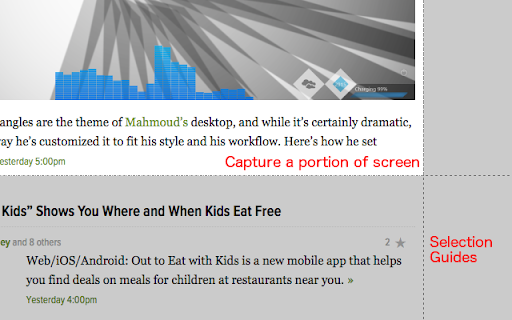
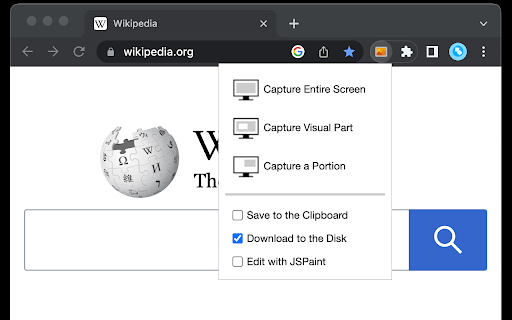
all-in-on capturing tool for the visual part, the entire page, or a selective area with auto-scrolling and editing support You can capture screenshots from the active tab with just two clicks. It provides multiple options for capturing specific portions of the page, the visual viewport, or even the entire page if it extends beyond the screen with both vertical and horizontal scroll bars. The captured image can be saved to the default download directory, copied to the clipboard, or opened in an online paint editor. The extension currently integrates JSPaint, a web-based replica of MS Paint, which offers offline functionality, allowing you to edit your images without an internet connection. The extension adds a toolbar button to the browser's action area. Clicking on this button opens a popup window with three options: 1. Capture the Entire Screen (3 methods. Works even if the page contains fixed-position elements) 2. Capture Visual Part 3. Capture a Portion Supported formats: PNG, JPEG, Avif, and WebP These options are also accessible via the right-click context menu on any page, providing easy access to the screenshot functionality. Here are some additional notes about the extension: 1. When selecting the "Capture Entire Screen" option, and the page size exceeds the window size, the extension will automatically scroll through the entire page to capture different sections and merge them into a single image. This process may take a few seconds to complete. 2. The resolution of the captured image depends on the screen resolution. For instance, if you have a 4K display, such as a Retina display, the image resolution will be at least four times higher than a regular display. 3. To ensure compatibility across various devices, the extension saves all captured screenshots in the widely supported PNG format, which offers high-quality lossless images. 4. The extension does NOT add watermarks to the captured images. 5. If you prefer to customize the format of the filenames for downloaded images, you can visit the options page and utilize the "filename mask" option to make the desired changes.

Shot Crop - Screen Capture & Editor
Capture parts of a page or entire sites and then edit and share your image! Shot Crop is a light weight screenshot tool, allowing you to screen capture parts of you page or entire sites and then edit and share your image! # v 1.3.3 - 2025/12/23 * Updated to manifest v3 * Fixed zoom dropdown * Fixed shape adding feature * Fixes issue where downloads and copies were sometimes blank * Improved download flow * Misc cleanup and bug fixes * Added Share to Imgur, Twitter, Facebook, Pinterest and Reddit Sharing support. * Added Adjustable Crop Resizer when selecting cropped image. * Improved and optimised javascript. * Fixed bug where jpeg format wasn't being saved properly. * Misc Fixes.

Web Clipper (Nimbus)
Web Clipper that works! The easiest way to clip text, pics, links, email and pdf from internet pages and save them. A Web Clipper that works! Grab all kinds of content from web pages. We have created a Nimbus Web Clipper, so you could save text, images, links, email addresses from the Internet. It is not just a pdf clipper! Nimbus Web Clipper is a Chrome extension that can help you save text, images, links, email addresses, and other content from web pages. Add your notes and save them to your Nimbus Note account for future references. You can easily organize your clutter with a Nimbus Note and a Web Clipper! Create a note or folder in your Nimbus Note account and save your web clipping there. Access content that you've made with a clipper even offline. Use any devices and read later files, documents, articles and so on. Do you want to save some web pages without any ads and links? Use a Web Clipper to clip the needed pages or their fragments and edit them before sending them to your Nimbus Note account. Easily delete any ads, images, or links from clipped content. Look at all you can do with Nimbus: - Capture the entire web page and store it for future use - Capture only a part of the web page - Highlight text before saving the web clipping - Add tasks to the clipping before sending it to a colleague - Clip images from a web page - Clip PDF files and annotate them before saving (a function that many PDF clippers lack) - Clip emails, including all responses and attachments (Gmail, Outlook, Mail.com, Yahoo) - Clip anything, with just one click!

EdShot
Screenshots, Cropped shots, Snap-shots, Videos and Screencasts taken with a single click. Capture screenshots, webcam snapshots, and cropped images with a single click. Whether you're gathering visuals for projects, forms, or documentation, EdShot keeps it fast and secure. Key Features One-click full-page screenshots Instantly crop and save only what you need Webcam photo capture — turn your device camera into a quick scanner Download directly to your device or save to Google Drive No external servers — your images stay with you What’s New Ez Cropper Screenshot: Quickly crop specific portions of PDFs or web pages — ideal for pulling images or content into digital forms. Enhanced Privacy: Images are stored only on your device — never on third-party servers. Why EdShot? No clutter. No learning curve. Just fast, reliable capture tools for everyday tasks. Whether you're building a form, saving a moment, or organizing visual notes, EdShot makes it effortless — and keeps your content private.

Screenshot
Users can select the screenshot format (PNG or JPEG) in Options. After capture, the extension saves the file automatically, with an optional setting to open it in a new tab. Extremely fast, light-weight and privacy friendly extension by BrowserNative. Visit homepage for user guide: https://browsernative.com/screenshot-chrome-extension/
