
mnlohknjofogcljbcknkakphddjpijak

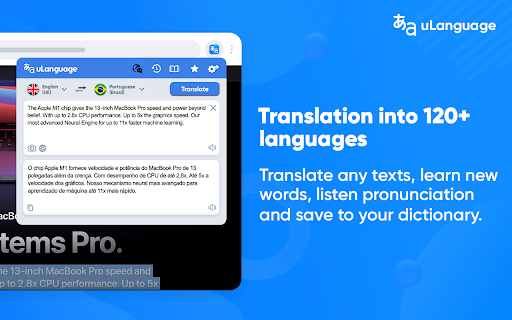


Accurate translate words, phrases and texts using Google Translate. Full page translator, dictionary and text to speech (TTS). Translator uLanguage the best and easiest way to quickly translate part of the content that you need, such as words, phrases, or even menu items. Highlight the word or text you want to translate and you will immediately see the translation into your language. All in one simple and understandable browser extension. ➖ Completely free. Doesn't require registration or any subscriptions; ➖ Supports over 120 languages; ➖ Automatic language detection; ➖ Text voice acting for 60 languages; ➖ Reverse translation; ➖ Works on all sites including Gmail, Facebook, Twitter and others; ➖ Convenient and intuitive user interface of the extension; ➖ Translating words using a dictionary (+ dictionary works offline). Translator reads and reproduces words, phrases and entire texts using quality human text-to-speech (TTS) translation. It shows transcription and transliteration, also knows how to reproduce words or texts with the correct accent and with correct stress. Learn the correct pronunciation words right away, without postponing it for later! Functionality: ✔️ Web page Translation - full web page translation with mouse hover translation ✔️ Dictionary - Word meaning, pronunciation, synonyms, hypernyms, hyponyms and more. ✔️ Bookmarks - Keeps track of all the changes you made to your bookmarks. Saving translation history. ✔️ Text to speech - correct pronunciation and play words and texts with correct accent. ✔️ Image translation (image recognition) - Just select the area on the monitor that you want to translate (the principle of work is as in the screenshot tool). In the new version of the extension, we have added the ability to select translators. Now you do not need to install additional programs or applications to use Google Translate, all in one convenient extension, with all the features that are available for the uLanguage. Text-to-speech Use TTS function that helps you learn how words sound as well as phonetic transcription. Full-page translations Translate entire web pages into your desired language with just one click. This is a new feature provided by Google Translate for free that we integrated into our translator. We really hope that our extension will be useful to you! We look forward to your feedback and ratings! Also write your suggestions for improving the functionality.

Translator
Translate words and phrases while browsing the web, using Google Translate. Language Translator is a Chrome extension that translates text and entire web pages. Highlight or right-click on any text and use the translation icon to see it in your language. To translate a full page, click the browser toolbar icon and select "Translate this page." Need to enter text manually? Open the extension pop-up next to the address bar and translate into 100+ languages. Built-in text-to-speech helps with pronunciation, showing phonetic transcription and transliteration. Full-page translation works in one click, converting entire web pages into your chosen language. Key Features: ► Translate selected text or use the context menu. ► Translate custom text in the browser pop-up. ► Text-to-speech with pronunciation, transcription, synonyms, antonyms, and definitions. ► Supports over 100 languages. ► Automatically saves translation history in local storage. ► Free real-time translation tool. Language Translator is a professional translation extension designed for reading, writing, and language learning. Download now and break language barriers.

Quick Translate: Reading & writing translator
Translate what you read or write with Google Translate, the best translator in the world. Translate while you read and write with Quick Translate, the world's most accurate translator. Enjoy Google translate unbeatable translation quality without leaving your browser. Translate instantly whatever you're reading or writing within in Chrome. Select and right-click on any text and choose to translate this selection. Download Quick Translate for Chrome for free to start translating today. Please note that this is a beta version, and we are continually improving. ➡️ You may be exposed to affiliate links on sites you visit while using this extension, and you may be encouraged to click on them, but you are never required to do so.

Inline Lingo Translator
Instantly Translate Words and Text Snippets on Web Pages with a Single Click with Inline Lingo Discover the Power of Inline Lingo: Effortlessly Translate Words and Text Snippets on Web Pages with One Click! Features: - One-click word and selection translation on web pages - Multiple languages - Powered by Google Translate Enhance your browsing experience with Inline Lingo. Translate words and text snippets effortlessly, empowering you to understand content in multiple languages with just one click. With the seamless integration of Google Translate, unlock a world of multilingual communication right at your fingertips. Download Inline Lingo now and explore the web like never before!

Lingvanex - Online Text and Voice Translator
Lingvanex online text and voice translator provides instant translations into the language of your choice. Over 108 languages. Lingvanex Translator helps you easily understand words, phrases, on any language! Just highlight a word or phrase, click on Translate icon next to it to translate it to your language. The extension reads words and whole phrases using human-quality text-to-speech. Listen to pronunciation and discover real-life examples of usage. AI-based machine translation will give you a fast and accurate translation on more than 108 languages almost instantly. Word meaning, pronunciation, synonyms, hypernyms, hyponyms and more. Find common expressions and see examples depending on the context. Lingvanex Translator teaches you how to pronounce correctly. It shows phonetic transcription, transliteration and can speak out words and texts with the correct accents. Select an area on any webpage, Lingvanex Translator will recognize text and automatically translate it to your language. ► FULL-PAGE TRANSLATION With only one account, you can get access to your saved words and the translation history in all Lingvanex apps across platforms. Available in 30+ more languages user interface. You can select your language in the settings. You can familiarize yourself with the list of supported languages by following this link https://lingvanex.com/language-features/ . The extension also includes a "More Apps" banner and other promotional banners that allow users to explore additional apps and products developed by us.
