
gpdfpljioapjogbnlpmganakfjcemifk

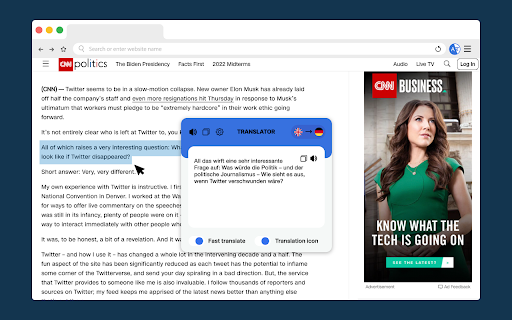

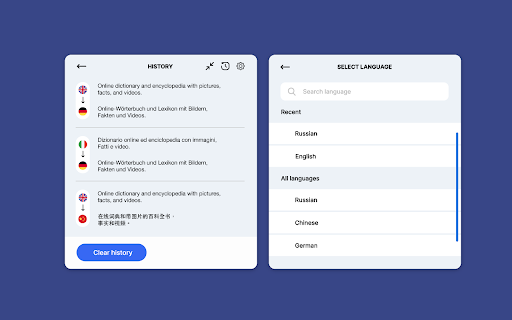
Translate what you read or write with Google Translate, the best translator in the world. Translate while you read and write with Quick Translate, the world's most accurate translator. Enjoy Google translate unbeatable translation quality without leaving your browser. Translate instantly whatever you're reading or writing within in Chrome. Select and right-click on any text and choose to translate this selection. Download Quick Translate for Chrome for free to start translating today. Please note that this is a beta version, and we are continually improving. ➡️ You may be exposed to affiliate links on sites you visit while using this extension, and you may be encouraged to click on them, but you are never required to do so.

DeepL: translate and write with AI
Translate while you read and write with DeepL Translate, the world’s most accurate translator. Stay informed, work smarter, and communicate globally without leaving your browser. Trusted by millions across the globe, DeepL’s Language AI delivers unmatched accuracy and fluency to help you scale faster and bring clarity and efficiency into your daily work. All of that, with the highest levels of data security. The DeepL extension integrates seamlessly into your workflows, eliminating manual and time-consuming tasks. No more losing context by switching tabs or apps! With just a few clicks or by using shortcuts you can customize, the DeepL extension helps you do the following: 🌍 Translate while browsing Do your research and stay up-to-date with information in the language of your choice. With the DeepL extension, you can: - Translate sections on the go - Translate entire pages (unlimited with DeepL Pro) - Automate page translation (only with DeepL Pro) ✍️ Get translation and writing assistance for emails and documents For your productivity, DeepL is integrated into Google Workspace with direct translation and writing assistance in Gmail, Google Docs, and Google Slides. Read and write emails, and create and edit various documents, including papers, presentations, and reports. Adapt your work instantly to your audience, objectives, and standards: - Translate where you work, with possible alternatives and a dictionary - Get text corrections and suggestions for more clarity and adapt your writing style - Apply your company, domain, or client glossaries to your documents (with DeepL Pro) 🚀 Translate and polish your comms on the spot DeepL is also integrated into content, messaging, and social media platforms—YouTube, WhatsApp, LinkedIn, and X. Stay in touch and exchange with your peers, partners and collaborators effectively, with instant translation and writing assistance: - Send clear replies tailored to your goals and audience - Engage with multilingual communities in a timely and relevant manner and extend your reach DeepL supports translation for 30+ languages and offers writing assistance for 5+ languages with an ever-growing language portfolio. 🤝 Plans The free version of the DeepL extension comes with character limitations. In addition, some of our features, such as the glossary or the automated page translation, are only available to DeepL Pro and DeepL Write Pro users. Learn more about all the advantages of DeepL Pro and DeepL Write Pro and find your plan: deepl.com/pro 🔐 Data security The security of your data is our top priority. Per our terms and conditions at deepl.com/en/pro-license, both DeepL Pro and DeepL Write Pro don’t store or use your content to enhance our service, unless you actively agree to it, allowing you to securely translate and refine content containing personal data. However, the free version of our service may use submitted content to improve the DeepL algorithms for all users. Therefore, users shouldn't process any confidential or personal data through the free version. Learn more about our robust security measures and commitment to privacy: deepl.com/pro-data-security Reimagine business communication with DeepL's Language AI platform Read more about our solutions: deepl.com/en/whydeepl

Translator, Dictionary - Accurate Translate
Uncover the boundless realm of worldwide digital content with Translator, your bespoke linguistic assistant integrated directly into your browser. As you traverse the expansive internet, it rapidly deciphers unfamiliar foreign words, sentences, and even entire articles, presenting them in a clear, understandable manner. Engage the swift efficiency of Translate, celebrated as the world's most exact online translator, and relish the unparalleled translate capability of Google Translate without navigating away from your current page. Translator effortlessly blends into your Chrome browser, ensuring a smooth translate experience as you read or write. Simply select any text, right-click, and opt to have it translated - it’s as simple as that. No more being restrained in your exploration and comprehension of the web's vast knowledge base due to language barriers. Translator is available for free on Chrome. Download now and enhance your browsing experience with the power of immediate translation.

Translator - Select to Translate
Translate words and phrases while browsing the web using the Google Translator. Full page translator. This extension offers a range of features to help you navigate different languages online. It allows you to effortlessly translate web pages, highlighted text, Netflix subtitles, and private messages. You can also have the text read aloud and save important translations to your personal dictionary for learning. Encountering unfamiliar words while reading an online article? No problem! Simply select the text you want to translate, and with a click of a button, you'll get the translation. You can also speak the translated text and save it directly to your dictionary. For text input and translation, just click the extension button to open a pop-up window. The extension's beautiful design makes it easy to use, allowing you to explore its functionality and choose your preferred color theme. When reading foreign articles, you can quickly understand every word with the full-page translation feature. With a simple click on the extension's button in the context menu or the pop-up, the entire page will be translated into your chosen language. With "Translator: Select to Translate," you can easily translate complete web pages with a single click. Just select "Translate page" from the context menu on any webpage, and it will be instantly translated into your preferred language. Extension relies on Google Translator to quickly translate individual words on the web page you are currently viewing.

Translator
Translate words and phrases while browsing the web, using Google translator. ✨🌐 The Extension That Transforms Your Language Experience 🌐✨ 🚀Introducing our quick and efficient translation plugin to help you navigate the world wide web without any language barriers! By prioritizing user convenience and reading experience, we've created a feature-rich extension that is bound to make browsing a breeze. 1️⃣ 🔁 Automatic Language Translation: Set your preferred language in the extension settings, and watch as everything gets translated instantly. The smart translator even detects the language of the website you're visiting! 2️⃣ 🔊 Listen to Translations: Hear the correct pronunciation of translated words and phrases in a new tab, making language learning even more fun. 3️⃣ 📌 Highlight & Right-Click: Simply highlight or right-click any text you want to translate, hit the translate icon, and voilà – the translation will appear in a new tab. 4️⃣ 🎯 Google Translate API: Enjoy the accuracy and reliability of Google's translation technology for all your language blunders and necessities. 5️⃣ 👌 User-Friendly Pop-Up: Your reading experience won't be hindered or blocked, thanks to our sleek pop-up display bar that keeps everything smooth and seamless. 6️⃣ 📈 Informative Display: Our clear and transparent display column presents all essential translation information, ensuring the user's focus remains on the content and not the display box. 7️⃣ 🔍 Customization: Tailor your translation results to your preferences. Pick and choose which elements should appear in your translation results – common meanings, detailed descriptions, sample sentences, or all of the above. 💡 So, what will it be – a friend or a foreign language dictionary? Enjoy easy access to Google's renowned translation services with our handy browser extension. Make the internet your linguistic playground and never again worry about language barriers! 📢 Updates: No more hidden style problems, upgraded to Manifest v3, and squashed small bugs.
