
kdamfjkjgaidaigdfelkpgdnbigclccc
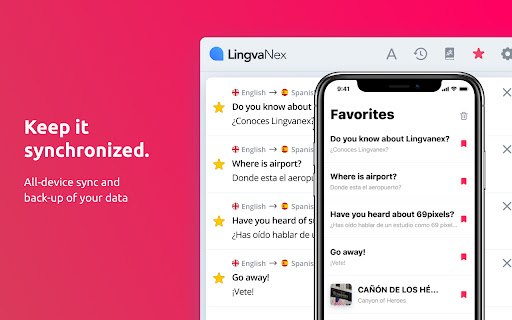


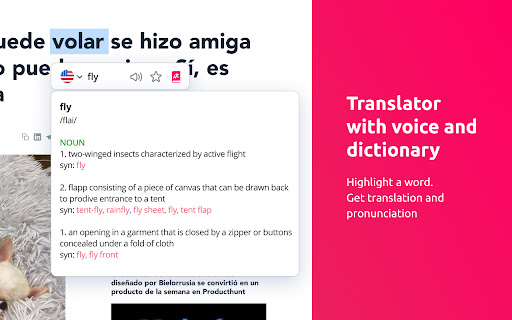
Lingvanex online text and voice translator provides instant translations into the language of your choice. Over 108 languages. Lingvanex Translator helps you easily understand words, phrases, on any language! Just highlight a word or phrase, click on Translate icon next to it to translate it to your language. The extension reads words and whole phrases using human-quality text-to-speech. Listen to pronunciation and discover real-life examples of usage. AI-based machine translation will give you a fast and accurate translation on more than 108 languages almost instantly. Word meaning, pronunciation, synonyms, hypernyms, hyponyms and more. Find common expressions and see examples depending on the context. Lingvanex Translator teaches you how to pronounce correctly. It shows phonetic transcription, transliteration and can speak out words and texts with the correct accents. Select an area on any webpage, Lingvanex Translator will recognize text and automatically translate it to your language. ► FULL-PAGE TRANSLATION With only one account, you can get access to your saved words and the translation history in all Lingvanex apps across platforms. Available in 30+ more languages user interface. You can select your language in the settings. You can familiarize yourself with the list of supported languages by following this link https://lingvanex.com/language-features/ . The extension also includes a "More Apps" banner and other promotional banners that allow users to explore additional apps and products developed by us.

Video Translator - Translate Video & Voice online
AI (Translate, TTS) based Video and Voice Translator for easy and fast translation of videos into 100+ languages. Do you want to reach a wider audience with your videos? or language barriers holding you back? If so, you're not alone. Many businesses and content creators struggle to expand their reach due to linguistic limitations. But there's good news: We has the solution. Our AI-powered video translation technology allows you to easily and accurately translate your video content into any 100+ languages with 99% accuracy. No need to search for qualified translators or spend time and money on voice-over artists - our innovative AI studio has got you covered. With Video Translator, you can break through language barriers and connect with a global audience. Whether you're a business owner, marketer, or content creator, our multilingual translation option provides the most user-friendly, convenient, and efficient way to expand your reach. Say goodbye to the frustration and expense of traditional translation methods. It's useful for e-learning courses, instructional videos, sales videos(product demonstrations ,customer testimonials, promotional campaigns, sales pitch videos), education videos, employee & customers training videos, international marketing videos, and more. You can paste the video url, chose the target language, then you will get translation in seconds. We will transcribe your video to text(Speech to text) by AI, tranlate it by our audio translator, video synthesis finally. By design, your data stays at all times on your Google account, never saved in our database. Your data aren’t shared with anyone, including the add-on owner. We complies with privacy laws (especially GDPR & California Privacy Act) to protect your data.

Quick Translate
This extension provides quick translation of selected texts Important notes: - The shortcut for in page translate is shift button. - The default shortcut for browseraction is CTRL + Q (you can change that later on "chrome://extensions/configureCommands") - If there were opened tabs before you install the extension, you must refresh those tabs in order to activate extension. This extensions allows you to translate the text selection using Google Translate whenever you want. When the extension is installed select some text from a website, then press "shift" button to show translation. This extension is lightweight and does what it says. Translates texts quickly. There is two options in options page. One for source language, and another for destination language. You just have to set the destination language and feel free to use it. There is another option which can you use to force translation source language. Changing source language from auto detect to something is not recommended. ------2.5----- bugfix, background page converted persistent ------2.3----- New feature : memorize words. ------2.0----- Option to keyboard shortcuts on inputs (textarea, input). Defaults to true ------1.9----- added text to speech for spelling ------1.8----- added ctrl+q shortcut for browser action ------1.7----- added browser action button ------1.5----- bugfix about options ------1.4----- improved content html ------1.3----- positioning improved ------1.2----- positioning bugfix

Rememberry - Translate and Memorize with Flashcards
Translate words while browsing and turn them into spaced repetition flashcards to build foreign language vocabulary. Never forget a word again. Rememberry is the smart tool for effortless language learning. Simply translate a word or phrase while browsing and turn it into a study card with a single click. Using a scientifically-proven spaced repetition system, Rememberry adapts to your memory. You'll review words just when you need to, maximizing long-term retention while saving study time. 🌐 Instant Translation - Translate any word or phrase on websites, in PDFs, or in a dedicated popup - Supports 100+ languages - Translation results are categorized by parts of speech - See reverse translations to gain deeper context - Listen to audio pronunciations for both original and translated words - Learn words in context with real-world examples - Get detailed definitions and expand vocabulary with synonyms and antonyms - Master phonetics with transcription 🎯 Efficient Learning - Spaced repetition for optimal efficiency - Optionally, practice cards anytime with manual repetition, bypassing the schedule - Choose your study mode: Text-based, Audio-based, or Typing practice - Practice cards in a forward or reverse direction ✨ In-page Highlights - See your saved flashcards highlighted directly on the web pages you visit - Review cards in-place with mini-repetition sessions to stay focused on the page content 📱 Mobile Application - Use it on any device with a browser, or install it on your phone for a seamless, standalone app experience - Study anywhere, anytime: translate words and learn new vocabulary on the go - AI Tools: instantly generate custom decks, practice through dialogues and dynamic exercises in chat, and receive personalized tips - Works offline: your learning continues even without an internet connection - Always up to date: your progress and flashcards are instantly synchronized across all your devices 💾 Sync & Control - Organize vocabulary into custom decks - Sync your cards, decks, and progress across devices, including the mobile app - Import and export decks (JSON/CSV) for easy sharing 🔔 Smart Reminders - Push notifications help you stay consistent - A visual badge on the extension icon shows pending cards Whether you're a beginner, an advanced learner, or a professional, Rememberry adapts to your style and schedule, making vocabulary acquisition efficient and enjoyable.

Dictionary for Google Chrome™
Access the Google Translate dashboard and translate anywhere on the web Are you always looking up the definitions/meanings of a word when you are on a website? Simply install our software Dictionary for Google Chrome™ and you can find the definition of any word using the right click button Install the software Dictionary for Google Chrome™ highlight the word you want to look up the definition for - and right click and choose Our software will return the definition of this word instantly Its simple to use, and takes less then a minute to find out the definition of any word. Best of all, this software is 100% free. Disclaimer: Please note this extension is NOT made by Google and is made by an independent development team. All copyrights belong to their respective owners. Google doesn’t endorse or sponsor this Chrome extension. Dictionary for Google Chrome™ is not owned by, is not licensed by and is not a subsidiary of Google Inc.
