
gobpkdmjnhpopmpddhmhmbhkiienpfdo
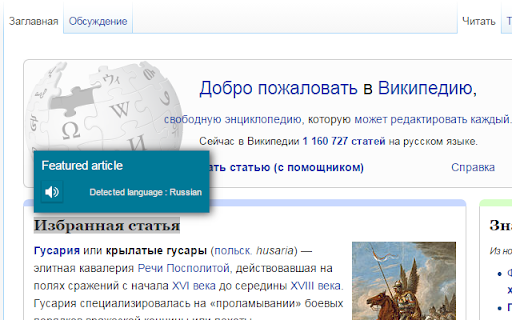

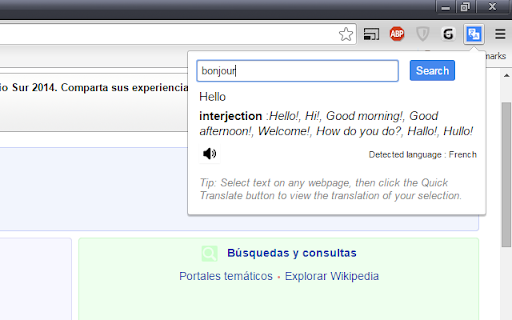

This extension provides quick translation of selected texts Important notes: - The shortcut for in page translate is shift button. - The default shortcut for browseraction is CTRL + Q (you can change that later on "chrome://extensions/configureCommands") - If there were opened tabs before you install the extension, you must refresh those tabs in order to activate extension. This extensions allows you to translate the text selection using Google Translate whenever you want. When the extension is installed select some text from a website, then press "shift" button to show translation. This extension is lightweight and does what it says. Translates texts quickly. There is two options in options page. One for source language, and another for destination language. You just have to set the destination language and feel free to use it. There is another option which can you use to force translation source language. Changing source language from auto detect to something is not recommended. ------2.5----- bugfix, background page converted persistent ------2.3----- New feature : memorize words. ------2.0----- Option to keyboard shortcuts on inputs (textarea, input). Defaults to true ------1.9----- added text to speech for spelling ------1.8----- added ctrl+q shortcut for browser action ------1.7----- added browser action button ------1.5----- bugfix about options ------1.4----- improved content html ------1.3----- positioning improved ------1.2----- positioning bugfix

Simple Translate
Quickly translate selected or typed text on web pages. Supports Google Translate and DeepL API. When you select text, the translation button pops up and the translation is displayed instantly. If you enable "Do not display the button if translation is not required" option, you will not get frustrated by the button appearing when it is not necessary. In the toolbar popup, translate the input text in real time. If you enable "Automatically switch to the second language" option, you can do : When English is input, it is translated into Japanese, and when Japanese is input, it is translated into English. You can also translate from the context menu. You can select "Translate this page", "Translate selected text", and "Translate selected link" from the menu on the page or tab. Supports Google Translate and DeepL API.

Translator - translation of selected text
Translate selected text with Google Translate Translate selected text with Google Translate on any webpage. - Select-and-translate: highlight text and click the button to get a translation - Quick pop-up translation via keyboard shortcut or browser-bar button - Support for 100+ languages and alternative translations - Dictionary: definitions and examples for single words or phrases - One-click reverse translation, plus history with quick navigation - Text-to-speech with selectable voices (if supported by browser) - Light and dark themes

Remove Selection
This extension removes selected text. After selecting some text, you can click the icon on the browser Toolbar, or choose 'Remove Selection' in the right-click Menu. I wrote it because it was one of the feature in FastestFox for Firefox and I love it, but did not find a good alternative in Chrome.

Speech to Text
Convert speech to text instantly with this voice dictation extension. Transcribe audio,voice memos files to text with high accuracy 🎙️ Turn Your Voice into Text Instantly with the Speech to Text Chrome Extension 🧾🖱️ Need to transcribe audio to text quickly and accurately? This powerful speech to text Chrome extension is your ultimate tool for effortless voice to text conversion, voice typing, and dictation. Whether it's a quick voice memo, a podcast, or a meeting — we've got you covered 🔥 🚀 Key Benefits of Our Speech to Text Tool 1️⃣ Fast and accurate voice to text transcription 2️⃣ Real-time speech recognition with just one click 3️⃣ Upload audio files for instant audio to text conversion 4️⃣ Full integration with google docs voice typing 5️⃣ Lightweight, fast, and secure — no sign-up needed 🔐 Use your voice to write faster, smarter, and without distractions 🎯 🎧 How It Works – Simple & Efficient ➤ Click the mic icon to start speaking 🎙️ ➤ Watch your words turn into text in real-time 📝 ➤ Upload an audio file to text converter for longer recordings ➤ Copy, export, or edit your content on the spot ➤ Use voice typing in Google Docs like a pro 💼 It’s that simple. No clutter, no confusion — just powerful speech to text software 💪 💡 Use Cases That Make Life Easier • Take hands-free notes with speech to text • Record interviews and transcribe audio recording to text • Create blogs, emails, or books using only your voice 🧠 • Use as a dictation app while multitasking • Turn audio into text for reports, captions, and study notes Whether you’re a student, a journalist, or a busy entrepreneur, this tool saves hours every week ⏳ 🌐 Supported File Formats for Upload You can easily upload and transcribe speech to text using: The audio to text converter processes your files with incredible accuracy using automatic speech recognition 🤖 🗣️ Multiple Languages & Accents Speak your native language with confidence! This speech to text tool supports: ▸ English 🇺🇸 ▸ Spanish 🇪🇸 ▸ French 🇫🇷 ▸ German 🇩🇪 ▸ Portuguese 🇧🇷 ▸ Italian 🇮🇹 ▸ And more 🌍 Perfect for multilingual teams, global meetings, and international content creators 🌐 📓 Compatible With Google Docs and More Unlock the power of google docs voice typing with a single click 🖱️ Just open a doc, activate the mic, and enjoy smooth voice typing ✍️ Great for writing essays, reports, or planning your next big project 📑 📱 Who Is This Extension For? 1️⃣ Content creators needing fast transcribe audio to text 2️⃣ Students who want to transcribe audio to text from lectures 📚 3️⃣ Professionals using dictation software during work 💼 4️⃣ Podcasters and YouTubers who need quick captions 🎙️ 5️⃣ Anyone who wants to save time and boost productivity 🧠 🛠️ Tools All in One: Record, Dictate, Transcribe This isn’t just a voice to text app — it's a complete transcription app: Record with your mic 🎤 Use it as a voice recorder with transcription Store your drafts safely Copy and paste anywhere 📋 🔒 Private, Secure, Reliable We care about your privacy. All data and voice transcription are handled locally or through encrypted channels 🔐 No data is stored or shared — your content stays yours 🛡️ 💼 Perfect for Business, Study, and Everyday Life Whether you’re creating a to-do list, responding to emails, or writing chapters of a book — voice to text software gives you full control, faster than typing ⌨️ ➤ Draft ideas with transcribe audio to text ➤ Create transcripts for meetings ➤ Generate searchable content from audio files to text ⚙️ Why You’ll Love This Extension ✅ 100% Free ✅ Easy to use ✅ High-accuracy speech recognition voice ✅ Full support for audio to text converter needs ✅ Ideal for dictation, transcription, and note-taking ✅ Functions as a reliable text to speech converter if needed 🔥 Start Using Voice to Text Now Don't let your ideas fade — capture them instantly using your voice 🔥 Install our speech to text today and turn your microphone into a productivity superpower ⚡ 📌 Speak. Convert. Save. Repeat. 📌 Your go-to tool for audio into text, anywhere, anytime 📌 Join thousands of users loving this smart voice to text app 🎯 Ready to boost your productivity and eliminate typing fatigue? Install the ultimate speech to text software now and take control of your time ⏱️
