
ibplnjkanclpjokhdolnendpplpjiace


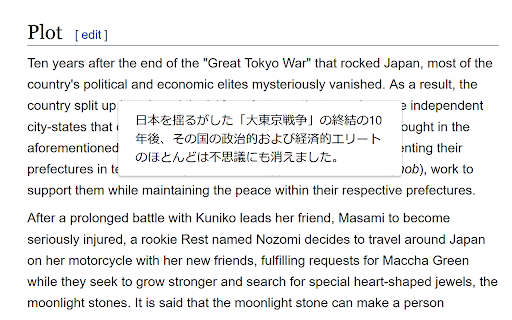


Quickly translate selected or typed text on web pages. Supports Google Translate and DeepL API. When you select text, the translation button pops up and the translation is displayed instantly. If you enable "Do not display the button if translation is not required" option, you will not get frustrated by the button appearing when it is not necessary. In the toolbar popup, translate the input text in real time. If you enable "Automatically switch to the second language" option, you can do : When English is input, it is translated into Japanese, and when Japanese is input, it is translated into English. You can also translate from the context menu. You can select "Translate this page", "Translate selected text", and "Translate selected link" from the menu on the page or tab. Supports Google Translate and DeepL API.

Web Translate
Web Translate is easy to use translator for your Web browser / Thunderbird! ️️⭐ Features: - Translate selected text (from context menu) - Whole page translation - Dark mode! ✔️ Supported translation providers: - DeepL - Google Translate - Microsoft Translator - and others

Popup View for Google™ Translate
"Popup View for Google™ Translate" add-on lets you have access to the beloved Google Translate on any websites. Upon selecting a word or sentence, a bubble appears near the selected area, allow you to load Google™ Translate inside the page instead of switching to a new tab and load it there. This view automatically hides when it losses focus, so there is no need to close this window manually. Features: 1. Panel view of Google Translate on any website 2. Right-click context menu to open selected text in Google Translate 3. Links on the panel to open Google Define or Google Translate. For bug reports please visit: https://github.com/schomery/dictionary/ *** Please note that the sole purpose of this add-on is to provide an easier way to access the official Google Translate. There is NO intention of misleading users that this product is offered by Google. It is just a small tool to help you have access to the beloved translator easier. *** Change Logs: 0.3.5 1. There is a new option to use right-click instead of the bubble mode. Activating the right-click menu-item disables the bubble selection mode. 2. It is now possible to translate the entire page using the toolbar button. If it is not needed, hide the button 3. It is now possible to remove the right-click context-menu items for page and links actions (Bing translation and Google translation)

Translate
Easily translate words and sentences into 249 languages directly on your web page. Translate - Your Gateway to 249 Languages! Stuck on a tricky word or sentence while browsing? With Translate, you can instantly decode any text into your preferred language. Powered by Google Translate, this sleek, lightweight extension ensures seamless understanding without leaving your page. ⭐ Why Choose Translate? ✅ Simple – No account needed. ✅ Instant Translations – Select, right-click, and see the magic! ✅ On-Page Results – No switching tabs! ✅ Privacy First – Zero background data collection. ✅ Global Reach – 249 languages supported. ✅ Simple & Free – Translation made effortless. Empower your browsing with Translate—because language should never be a barrier! 🚀

Translator - translation of selected text
Translate selected text with Google Translate Translate selected text with Google Translate on any webpage. - Select-and-translate: highlight text and click the button to get a translation - Quick pop-up translation via keyboard shortcut or browser-bar button - Support for 100+ languages and alternative translations - Dictionary: definitions and examples for single words or phrases - One-click reverse translation, plus history with quick navigation - Text-to-speech with selectable voices (if supported by browser) - Light and dark themes
