
bcefgmhpbmghjcenbklchobmogjhaagl
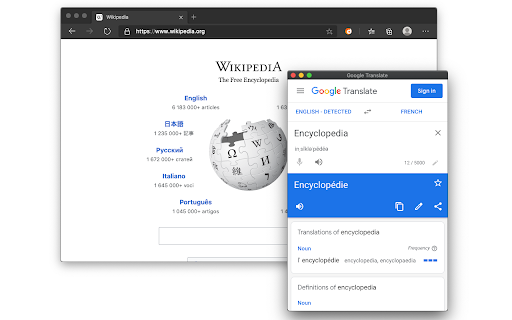
"Popup View for Google™ Translate" add-on lets you have access to the beloved Google Translate on any websites. Upon selecting a word or sentence, a bubble appears near the selected area, allow you to load Google™ Translate inside the page instead of switching to a new tab and load it there. This view automatically hides when it losses focus, so there is no need to close this window manually. Features: 1. Panel view of Google Translate on any website 2. Right-click context menu to open selected text in Google Translate 3. Links on the panel to open Google Define or Google Translate. For bug reports please visit: https://github.com/schomery/dictionary/ *** Please note that the sole purpose of this add-on is to provide an easier way to access the official Google Translate. There is NO intention of misleading users that this product is offered by Google. It is just a small tool to help you have access to the beloved translator easier. *** Change Logs: 0.3.5 1. There is a new option to use right-click instead of the bubble mode. Activating the right-click menu-item disables the bubble selection mode. 2. It is now possible to translate the entire page using the toolbar button. If it is not needed, hide the button 3. It is now possible to remove the right-click context-menu items for page and links actions (Bing translation and Google translation)

Translation Comparison
Translation Comparison translates text and compares translations between Google, Microsoft and other translators. Added new languagies Added back translation Added the option to to synchronize translation windows Added the possibility to change the priority order of translation providers in Options. The Translation Comparison extension translates words, phrases and texts, and compares the translation results between various online translation providers: Google Translate, Microsoft Bing Translator, and Translator. The Translation Comparison tool translates between more than 150 languages and displays the translations side-by-side. * customizable side-by-side view: one, two or three translation services * interchangeable translation providers * complete synchronization of the source text and language pairs between translation providers * automatic language detection * text-to-speech in 30 languages * shortcut keys implementation and customization * comparison features customization using Options * text editing * user interface localization in 22 languages

Extentie - extension manager
A simple and elegant Chrome extension manager allows you manage your extensions in a popup window. Extentie is a simple and beautiful tool that allows you to toggle and manage Chrome extensions in a popup. Latest update: - Now you can create your own groups to manage your extensions - Revamped from ground up, added more features

The Easy Translator
The very easy in use translator. The Easy Translator is very easy in use translator from any language supported by the Google Translator to your language. On the options page you can choose either autodetect or particular language from which you would like a selected on a page word or text be translated and select the language to which to translate. Enjoy the Easy Translator!

Awesome Button Bar
Button bar, combining downloads, bookmarks, extensions, history, view source, print, and more from a single button. Awesome! Extensions, history, downloads, bookmarks, view source, options, new window, and print are all here. Recently added buttons are duplicate tab, second home, and refresh all tabs. Showing each button on the bar is optional so you don’t have to have them all if you don’t want them all. Also, each button can be configured to open either in the current window or in a new window. Note: print to a new window now works too!
