
bcmfandagknmpnambbppcpgclkccgigb

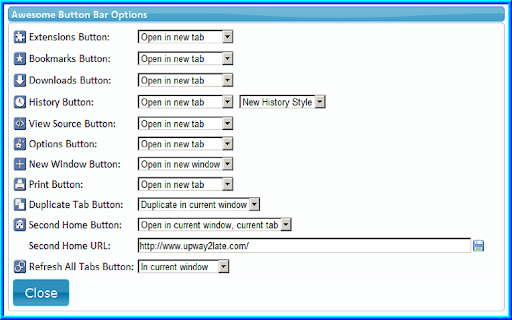
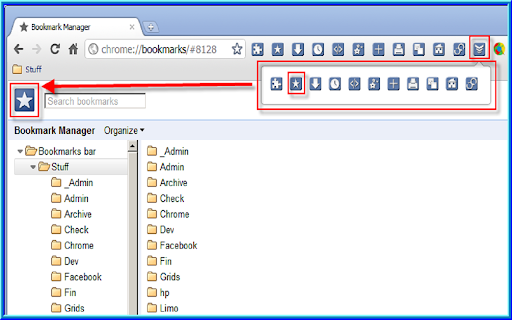
Button bar, combining downloads, bookmarks, extensions, history, view source, print, and more from a single button. Awesome! Extensions, history, downloads, bookmarks, view source, options, new window, and print are all here. Recently added buttons are duplicate tab, second home, and refresh all tabs. Showing each button on the bar is optional so you don’t have to have them all if you don’t want them all. Also, each button can be configured to open either in the current window or in a new window. Note: print to a new window now works too!

Extension List
Extension List

GLaunch
GLaunch is a simple tool which provides a popup panel linking to various Google services - Chrome Extension. GLaunch is a simple extension that provide a popup link panel to numerous Google services. Services can be quickly filtered by typing the name of the desired service name. GLaunch can be used as your new tab page, opened as a new tab or standalone window along side the Chrome extension panel. Features: - Improved Material based Design. - Quickly search and find Google Services (+ Quick actions to common functions). - Ability to add custom links. - Filters services as you type. - Links open in a new tab (+ Incognito window support). - Open with Key binding (CTRL + SHIFT + Y) or customise to your own preference. - Discover Google Services you did not know existed! - Right click context menu based quick searches for Google Maps and YouTube. - Select & Search; you can use GLaunch to highlight an address and right click to search Google Maps. - Select & Search; You can also highlight sentences and search Youtube for videos. Please note that the icons used to represent each service are the official icons by Google they were sourced from the service itself. Any of the trademarks, service marks, collective marks, design rights or similar rights that are shown, mentioned or cited on the extension are the property of their respective owners and not of Integrated Brands, its contributors or visitors. The word mark, "Google" and the logo, and any associated service logos are copyright. The copyright is held by Google.

Super Focus Tabs
Quickly find out tab/page. Reduce much more time while working with multiple tabs/pages. + Quickly find out tabs. + Quickly closing current tab by pressing double esc + Quickly find the page in your bookmark/history. + Quickly save the page by using shortcut key. + Quickly go back to previous active tabs by shortcut key. + Quickly go to latest created tab. + Support auto close unused tabs. + Support real time update. + Support page screenshots. + Support list view, thumbnail view and tree view, preview. + Support tabs, bookmarks, history, saved pages. + Support sorting, filtering, grouping, etc. + Support many functions such as saving and closing all tabs, merging windows, closing the duplicated pages, etc. + Many options for you to customize. Reduce much more time while working with chrome. Let try and experience.

TabMate
TabMate helps you manage the tab clutter. Easily switch between tabs, save & restore set of tabs or windows, and more. TabMate helps you manage tab clutter and be more productive. Stash a set of tab/windows that you want to save for later and easily restore them when needed. Use quick switcher to search among open tabs and stashes and switch to them. Drag and drop the tabs to rearrange them with in windows or stashes. Name stashes so you can easily remember the purpose for each set of tabs. Easily send tabs to named stashes through right click context menu. Common usages: - Quickly search and switch between all the open tabs and stashes - Save the pages you've visited during your research session and restore all of them later. - Logically group all the pages you visit often and load each group when needed. - Easily manage existing open tabs by saving unnecessary tabs as a session.
