
mkolgglinidleboplbnjhokgkffhnefa
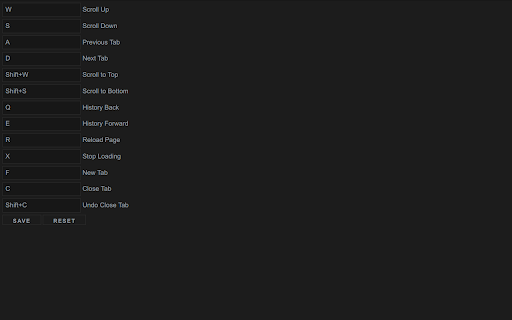
Custom keyboard shortcuts for your browser Customisable hotkeys for basic browser actions.

Custom Scrollbars
Give your browser a personal touch with customized scrollbars! Give your browser a personalized touch with custom scrollbar colors! You can select from any range of colors and toggle between the default width and thin scrollbar... or hide it altogether if that's what floats your boat.

Quickeys - Custom Keyboard Shortcuts
Create and configure custom keyboard shortcuts for your browser Quickeys gives you full control over your browser's keyboard shortcuts, allowing you to create custom shortcuts for any action you regularly perform. • Create Custom Shortcuts – Easily set up keyboard combinations for common actions like opening specific websites, navigating pages, or controlling media. • Site-Specific Shortcuts – Configure shortcuts that work only on specific websites – perfect for your most-used web applications. • Advanced Browser Controls – Access hard-to-reach browser functions with simple keyboard combinations, including tab management, window controls, and navigation tools. • Clipboard & Media Actions – Copy URLs, page titles, or selected text with a single keystroke. Control media playback across any website. • Dark Mode & Accessibility – Toggle dark mode on any site, adjust font sizes, and use other accessibility features with custom shortcuts. • Custom JavaScript Execution – For power users, run custom JavaScript on any page with a keyboard shortcut. • Clean, User-Friendly Interface – Manage all your shortcuts from an intuitive dashboard with search and filtering capabilities. • Seamless Integration – Works alongside Chrome's native shortcuts system, giving you the best of both worlds. Navigation • Go Back • Go Forward • Reload Page • Clear Cache & Reload • Scroll to Top • Scroll to Bottom • Scroll Down • Scroll Up • Open Website 1 • Open Website 2 • Open Website 3 • Open Website 4 • Navigate to Path Tabs • New Tab • Close Current Tab • Close All Tabs to the Right • Next Tab • Previous Tab • First Tab • Last Tab • Duplicate Tab • Pin/Unpin Tab • Mute/Unmute Tab • Open in Incognito Clipboard • Copy Current URL • Copy Page Title • Copy Selected Text • Copy All Links on Page • Paste and Navigate Quickeys respects your privacy and only requests permissions for the specific features you choose to use. Always adding new shortcuts, feel free to leave suggestions for shortcuts you'd like to see.

Keyboard Shortcuts for Websites
Define keyboard shortcuts for actions of websites you use frequently With Keyboard Shortcuts for Websites, you can define custom keyboard shortcuts for certain actions of websites you use frequently. You can also export your custom shortcuts and share them with your friends or your teammates. Version 1.7 - Name changed from "In-site Shortkeys" to "Keyboard Shortcuts for Websites" - Script shortcuts functionality removed - Prevent on input focus option added for individual shortcuts too. Notice: - It works only on websites. - Shortcuts would trigger just when the focus is on the site itself. - You need to trigger shortcuts on which page you define otherwise it will not find the target elements of its steps. - You can't override some browser-reserved keyboard shortcuts. - Because of new policies, it's impossible to inject Javascript codes and run it on a website, so I decided to remove the functionality of adding shortcuts for executing scripts that was available on the previous version. - The name of the extension changed from "In-site Shortcuts" to "Keyboard Shortcuts for Websites" since v1.7 Because of the special event handling in some sites, This extension may not work properly, but we will continue to improve features and fix bugs. For keyboard lovers and mouse haters 😄

My Web Shortcuts
Click buttons in websites with keyboard shortcuts to navigate faster Introducing My Web Shortcuts 🌏💻by browsergadgets.io — Navigate the web ! A useful extension that lets you create your own keyboard shortcuts to click on stuff in websites. No more endless clicking around; now you can do that using simple keyboard strokes. 😉 You can set up shortcuts for your most used elements, making browsing faster and way more convenient. Skip the hassle, forget hunting for elements and jump straight to what you need with just a tap of a key. ⚡ Get ready to take control of your browsing with My Web Shortcuts—it's all about making your online journey smoother and simpler. 🌾🎐 Join our Discord for Live Support and more: https://browsergadgets.io/discord
