
dgigbgdgmhhncfgaidcbmafkcmagkool

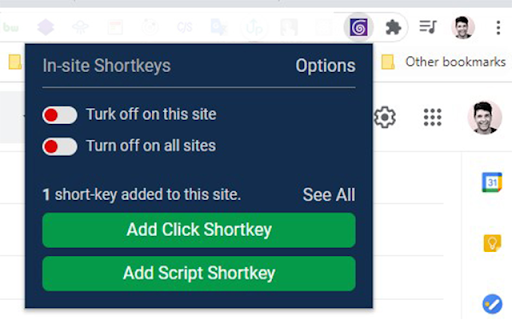
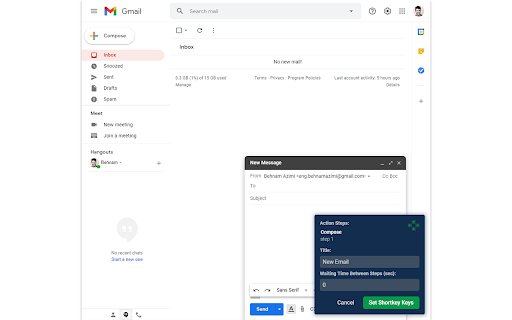

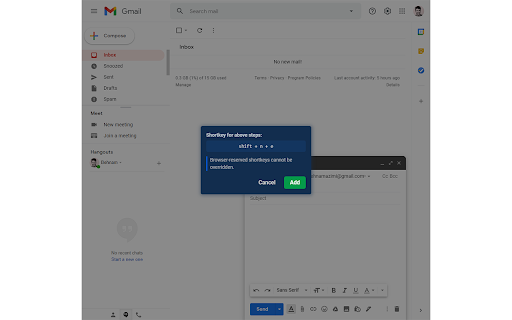
Define keyboard shortcuts for actions of websites you use frequently With Keyboard Shortcuts for Websites, you can define custom keyboard shortcuts for certain actions of websites you use frequently. You can also export your custom shortcuts and share them with your friends or your teammates. Version 1.7 - Name changed from "In-site Shortkeys" to "Keyboard Shortcuts for Websites" - Script shortcuts functionality removed - Prevent on input focus option added for individual shortcuts too. Notice: - It works only on websites. - Shortcuts would trigger just when the focus is on the site itself. - You need to trigger shortcuts on which page you define otherwise it will not find the target elements of its steps. - You can't override some browser-reserved keyboard shortcuts. - Because of new policies, it's impossible to inject Javascript codes and run it on a website, so I decided to remove the functionality of adding shortcuts for executing scripts that was available on the previous version. - The name of the extension changed from "In-site Shortcuts" to "Keyboard Shortcuts for Websites" since v1.7 Because of the special event handling in some sites, This extension may not work properly, but we will continue to improve features and fix bugs. For keyboard lovers and mouse haters 😄

Disable keyboard shortcuts
Lets you set browser keyboard shortcuts containing Ctrl and Alt keys (Ctrl+S, Ctrl+P, Ctrl+Shift+C, etc.) to do nothing. Just head on over to chrome://extensions/shortcuts and assign away! Small, simple, and requires no permissions. Licensed under the Apache License, version 2.0. Source: https://git.benjamin.barenblat.name/disable-keyboard-shortcuts

Keyboard Shortcuts
25 keyboard shortcut shortcuts for browser. Save time and mouse clicks by using keyboard shortcuts in the Google Chrome browser. There are 25 pre-set keyboard shortcuts which you can modify. You can also add in more keyboard shortcuts for features/functions you use on a constant basis. Try using this free keyboard shortcut software today to save time when you are browsing the Internet. These keyboard shortcuts work for both windows and mac. Try this free chrome keyboard shortcuts app today.

Bookmark Shortcuts Extension
Add keyboard shortcuts for 10 of your bookmarks. This extension allows you to add 10 keyboard shortcuts for 10 of your bookmarks. When a shortcut is pressed the url for your bookmark (assigned to that shortcut) is opened in your browser. The first 10 bookmarks in your bookmarks list are the bookmarks assigned to the 10 shortcuts you've specified. Go to chrome://extensions/shortcuts and scroll down to "Bookmark Shortcuts Extension" to choose your shortcut key combinations. A better explanation of how to use this extension: (originally written by Miguel Garza in a review of this extension, so all credits for this great explanation goes to Miguel) You get up to 10 bookmarks that you can load by keyboard shortcut. The bookmarks *must* be in your bookmarks bar. The first bookmark in your bookmarks bar is the first bookmark you can assign a keyboard shortcut to, the 2nd bookmark in your bookmarks bar is the 2nd bookmark you can assign a keyboard shortcut to, etc. To assign the keyboard shortcuts to the bookmarks, depending on your browser, type one or the other of the following web addresses in your browser's address bar--for Chrome, type "chrome://extensions/shortcuts" and press Enter. For Microsoft Edge, type "edge://extensions/shortcuts" and press Enter. Scroll down to "Bookmark Shortcuts Extension." There will be 10 slots there for 10 bookmarks, labeled "Bookmark 1" to "Bookmark 10." Click in the box next to any label, and then press the keyboard shortcut you want that bookmark to have (such as Alt-1 for Bookmark 1, Alt-2 for Bookmark 2, etc.). The combination you typed will be listed in the box. That's it! Now if you press the keyboard shortcut you assigned to a bookmark (such as Alt-1), that bookmark will be opened in a new tab.

Extensions shortcut
Lets you create a keyboard shortcut to the extensions page An extremely lightweight extension (only runs when used) which lets you specify a custom keyboard shortcut which opens the extensions page. If turned on in the options, this extension will check if you already have an extension page open and switch to that one instead of opening a new. Because it is an option you don't have to trust this extension with a dangerous permission if you don't want to. Extension icon by Ganeshk (derived from "Wiki puzzle.svg") and Mysid (derived from "Insertpad.svg") both licensed under GFDL (http://www.gnu.org/copyleft/fdl.html) or CC-BY-SA-3.0 (http://creativecommons.org/licenses/by-sa/3.0/), via Wikimedia Commons.
