
mkjdcoeddifgnbbafjppfcabiggcfhmo
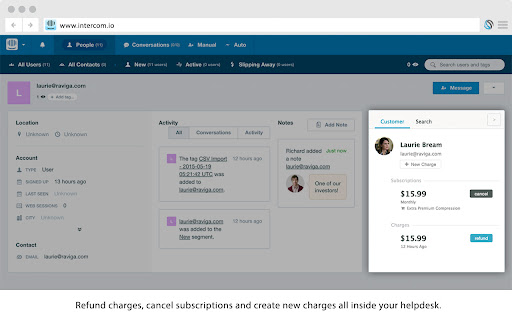


Manage payments inside tickets and emails. Works with all your favourite helpdesks and CRMs. The ChargeDesk extension allows you to view and update your customers no matter where you are on the web. You can refund charges, cancel subscription, create new charges and more. Customers matched based on their email address which allows our extension to work on any web page which contains email addresses. When a customer is found, a tag showing the customer's latest or total payments is added next to their email address. If you do not have a ChargeDesk account, one will be created for you when you connect your payment gateway after installing the extension. This only takes a few seconds. Many helpdesks and web-based email programs will work by default. The ChargeDesk extension will also work with your internal web-based dashboards where you display email addresses. If the system you use does not work with ChargeDesk, please email us at contact@chargedesk.com and we'll take a look. This extension has been optimised to use only the minimum resources required to operate. When not needed it will unload and will not continue running in the background. We've used some clever algorithms to allow us to really quickly scan your pages for customers. We only send the bare minimum information back to our servers and use caching to wherever possible. The ChargeDesk extension has been built with security as a core feature. All communication to our servers is performed using the latest encryption algorithms. When looking up customers on web pages you visit, the data is secured using a one-way hash. This means that no information about your browsing behaviour is ever accessible from our servers. We offer 2 factor authentication as an additional security measure. You can require this for accessing any customer information, or only when performing updates (such as refunding a charge). By using revokable access tokens, even if your personal computer is attacked, your underlying payment gateway will not be compromised. Pricing that scales with your business Your first 14 days of using ChargeDesk are free of charge! This allows you to test the service and in the (incredibly unlikely) case you find it's not for you, you pay nothing. Plans start at $29/mo. Further information can be found at https://chargedesk.com/pricing Release notes: 17 April 2026 - Updated integration with multiple helpdesks including Hubspot and Intercom 21 April 2025 - Updated support for Hubspot 6 February 2025 - Added support for new Intercom design 28 January 2025 - Hubspot bug fixes 24 January 2025 - Updated support for Hubspot 12 December 2024 - Updated support for Intercom 8 July 2024 - Updated support for Hubspot Help Desk workspace 19 June 2024 - Added support for Hubspot Help Desk workspace 13 June 2024 - Bug fixes 12 June 2024 - Upgraded to manifest V3 7 December 2023 - Updated Hubspot integration 30 November 2023 - Updated support for new Help Scout Inbox 8 April 2023 - Updated support for new Intercom Inbox 10 July 2022 - Added support for new Intercom Inbox 12 May 2022 - Fixed issue with Hubspot integration 2 September 2021 - Added support for Shopify, Improved support for Zendesk Workspaces 23 Feb 2021 - Updated several integrations, added support for multiple email & phone matches at once 4 June 2020 - Updated Intercom Integration 14 April 2020 - Bug fixes 28 February 2020 - Big fixes, Upgraded HubSpot support 20 July 2019 - Added HubSpot support 16 March 2019 - Upgraded extension for Chrome 73 site isolation compatibility 18 December 2018 - Added more information to customer tags 13 December 2018 - Even more Freshdesk fixes 11 December 2018 - Further Freshdesk upgrades and other bug fixes 5 December 2018 - Upgraded Freshdesk support 26 November 2018 - Upgraded Help Scout support 29 October 2018 - Bug fixes and performance tweaks 17 October 2018 - Bug fixes and performance tweaks 22 September 2018 - Bug fix for processing email tags with dots in them 15 August 2018 - Compatibility with new Freshdesk Mint apps 6 July 2018 - More Help Scout upgrades 15 June 2018 - Help Scout upgrades 24 April 2018 - Performance upgrades 2 April 2018 - App now matches Intercom's redesign 21 January 2018 - Improved email charge tagging 20 December 2017 - Support for new Help Scout design 15 November 2017 - Added support for Freshdesk Mint UI 13 November 2017 - Intercom & general bug fixes 29 July 2017 - Intercom and Desk fixes 29 May 2017 - Added support for tagging exact charge related to support tickets 26 May 2017 - Zendesk upgrades 5 May 2017 - Even more support for Intercom upgrades! 1 April 2017 - More support for Intercom upgrades 28 March 2017 - More support for Intercom upgrades 25 March 2017 - Support for Intercom upgrades 22 March 2017 - Fixed issue matching Desk.com support emails 4 February 2017 - Fixed customer tag styling and an issue with 3rd party script conflicts 14 December 2016 - Fixed Help Scout rendering issue 7 December 2016 - Support for Intercom domain change 6 November 2016 - Major update! Find out what's new: https://chargedesk.com/docs/whats-new 28 October 2016 - Improved Zendesk support 18 October 2016 - Bug fixes for domain matching 5 October 2016 - Updated Zendesk support & improved agent logging 30 September 2016 - General performance and reliability updates 17 September 2016 - Improved Desk support 2 September 2016 - Improved Help Scout support 1 September 2016 - Improved Freshdesk support 29 August 2016 - Intercom layout improvement 18 August 2016 - Performance improvements, particularly for Intercom 13 August 2016 - Improved Freshdesk compatibility 21 July 2016 - Collapsed/expanded state is now maintained when you return to a page 14 July 2016 - Improved Intercom & Desk.com UI, various bug fixes 16 May 2016 - Fixed a critical bug causing the ChargeDesk panel not to show 14 May 2016 - Added full functionality to Help Scout including searching 16 April 2016 - Fixed Intercom & Gmail rendering issues 26 March 2016 - Limited size for embedded panels 5 March 2016 - Bug fixes, improved Zendesk compatibility 24 February 2016 - Bug fixes, improved Help Scout compatibility 9 February 2016 - Front support, additional settings 22 January 2016 - Bug fixes, improved frontapp.com compatibility 29 December 2015 - Performance updates, improved Intercom compatibility 5 December 2015 - Improved Intercom compatibility 26 November 2015 - Improved Zendesk compatibility 16 November 2015 - Removed some bugs from Help Scout integration 6 October 2015 - Improved customer support pages (added self invoice editing and billing history) 1 September 2015 - Added the ability to send invoices to new customers 23 June 2015 - Bug fixes and added support for Salesforce Desk.com 8 June 2015 - Fixed a problem with the panel not showing in Zendesk in some situations. 7 June 2015 - Added Freshdesk support. 1 June 2015 - Added Help Scout & Intercom support. 25 May 2015 - Added Zendesk support. 24 May 2015 - Added the ability to see billing and shipping addresses for customers. 20 May 2015 - Launched!

GroupKit Cloud
GroupKit allows you to make more money from your group with less time and effort. "Transform your group into a high powered, revenue-generating machine..." With just 1-click GroupKit collects emails from your group members & helps you convert them into paying customers with our group technology. Why Does Your Group Need GroupKit? 3 reasons why you should add GroupKit to Your group today... #1- No more copy/pasting, Google Sheets, or clunky tech needed. In a single click, GroupKit automatically collects & uploads new member email addresses into the autoresponder of your choice. #2- GroupKit is the first group CRM technology to track each group member’s pre approval questions, manage their data for follow up, & 1-click engage members directly inside their Messenger on demand. #3- Take your profits to the next level with precise re-targeting. GroupKit creates *accurate*, custom, & lookalike audiences based on each group member giving you the best ROI with paid ads. GroupKit was created by top marketers who have mastered the art of making millions from groups, by combining technology & direct response strategy. The ultimate mission behind GroupKit is to simplify your life, save you hours per week in tedious work, & help you make a lot more money per new member who joins your group. Which is why GroupKit is created on the backbone of our proprietary group CRM technology allowing you to easily track & manage exactly where each group member is inside your sales process - including tools like member bios, ‘keyword’ tagging specific members, adding personal notes , 1-click shortcut to Messenger chats, & more. As group owners ourselves, we know GroupKit is so good, that once you begin using it, you'll never want to stop using it! So start your free 14-day trial today. Disclaimer: GroupKit has no affiliations with the popular social network website Facebook™. All copyrights belong to their respective owners. Facebook™ doesn’t endorse or sponsor this Chrome extension. This Chrome extension is not owned by, is not licensed by and is not a subsidiary of Facebook Inc. Facebook, the Facebook and F Logos, FB, Face, Poke, Book, Messenger and Wall are trademark of Facebook Inc. The content of this Chrome extension is not supplied or reviewed by Facebook Inc. All articles, images, logos and trademarks in this Chrome extension are property of their respective owners.

FUNNELBOT CF Page Copier
Easiest and fastest way to copy CF pages or turn any page into a Clickfunnels page CF Editor page cloner. 4.5! Clone any page sneak preview... FREE (FOREVER) Version: Use this for pages YOU OWN that you need to copy from one funnel to another or from one page type to another. IE: You have used an OPTIN form for an ORDER by mistake, just use this to move ALL your content in seconds. PRO Version: If you want a version that can copy LIVE pages from the internet for you to Funnel Hack, you can upgrade within the extension at https://funnelhacking.app/package **NOTE: All images will be blurred and text replaced to lorem ipsum to protect users IP. Find a great looking funnel or web page on the net and it's not in Clickfunnels yet? No sweat, hit the extension and submit it as a MANUAL HACK and within 1 week we will create the page in Clickfunnels for you...no way!! Yes way. (This is also a paid feature...obviously) **COMING SOON** - Auto Hacks for other major platforms (Highlevel, Wordpress pages, etc) - Powered by AI! - Convert CF 1.0 > CF 2.0 in 1 click! What's new in 4.0? ** REGISTER WITHOUT CF ACCOUNT ** - Improved GHL Import integration - One of the most requested new features this year!! - No need for CF 1.0 Classic account anymore! - No need for a CF account at all (CF > GHL direct) - Credits on initial sign up Recent Changes GHL Integration!! Directly clone from a live/editor CF page to GHL even if the link isn't working (a well known bug in the internal integration) - Clone your MANUAL HACKS or anything from the hack library to your Highlevel account. - No more need for a CF account to run the extension! - Chrome Fix!! Manual hacks working again properly. -AI Content Creator - YES! We have a connection with OpenAI (ChatGPT) and you can create unlimited content on our premium plan. Amazing!! - Headlines - Page Copy - Reviews/Testimonials ..and more! - LIVE Hack Browser now live!! You can browse our extensive library of over 5000 popular hacks. Just use one of your live hack credits to add to the extension from the dashboard. - Clone Database Explorer (visually explore and instantly grab any of the 1000's of previously cloned pages into your account) NOW LIVE!! - Manual Hacks Database Marketplace (search, and purchase instantly high converting funnel pages hacked from other sites - 1-time fee for members!) - Cloudflare and Bitbucket o-auth login issue resolved (finally! you can leave the extension on all the time now) - Speed enhancements - Fix for some anti-hack pages - Fixes for some "Add to extension" pages not working 100% - Dashboard re-adding NOW FREE FOR ALL! Add hacks from your history Bug Fixes (2.85) - CF subdomain update fix - Wordpress Plugin CF Pages Now Clone correctly! - Dashboard hack listing speed improvements - Manual hack speed improvements (dashboard) - Minor UI and UX updates - Minimized Branding - Custom CSS bug fixed - Custom CSS cloning re-added to extension - Paypal API keys rolled - Internal refactoring - Minor UI bugs - Internal manual hack error - Minor speed enhancements - Minor bug fix for Manual Hacks - Updates to Manual Hack process including better messaging and alerts when ready - Updates to Package visibility on extension - Increased speed of extension - Add visibility of your CF Account ID on Clone button - Addition of Multi-Account Add Feature from within the Extension, now you can purchase additional Clickfunnels accounts to add pages to - 3 Free Hacks for New Accounts - Minor Fixes to functionality and blurring feature - Minor Updates to the Manual Hacks feature - Minor Fixes to AUTOSAVE function - Minor Fixes to Obfuscation to remove text update on Input Fields and Order Form elements - Minor Updates to clone function, some pages weren't saving due to invalid source pages. These pages are now working ok. - Manual hacks! Submit ANY landing page on the web to our team and within 48hrs or less, we will recreate it as a Clickfunnels page for you - Autosave: 1 less click for you :D - Improvements to dashboard functions and history - Purchase membership or one-time hack packages is now live! - Updated Chrome permissions for faster access - Bug fix for recent Google permission update FREE VERSION USAGE: 1) Open the Clickfunnels editor to the page you want to copy 2) Click the extension icon 3) Select COPY button 4) Open the Clickfunnels editor to a new page you want to clone to 5) Click the extension icon again and now click the CLONE button 6) Wait for the SAVE button to appear in the extension, then click it 7) Wait for EXIT EDITOR / CONTINUE buttons to appear and select one 8) Page will reload or close *Register for Paid Version* 1) Open the Clickfunnels editor 2) Click the extension icon 3) Click REGISTER button 4) Fill out your details and create your account 5) Close dashboard PAID VERSION USAGE: 1) Open ANY live Clickfunnels page 2) Click the extension icon 3) Select COPY button 4) Open the Clickfunnels editor to a new page you want to clone to 5) Click the extension icon again and now click the CLONE button 6) Wait for the SAVE button to appear in the extension, then click it 7) Wait for EXIT EDITOR / CONTINUE buttons to appear and select one 8) Page will reload or close For any issues, please contact Nathan@funnelfixit.com

Zendesk Dark Mode Theme
Take care of your eyes day and night using dark theme for Zendesk tools and services. ZENDESK DARK MODE Take care of your eyes day and night using dark theme for Zendesk tools and services. Set up this eye-care extension on the fly for your night and daily browsing. The theme inverts bright colors into high contrast ones and makes them easy to read at night. NIGHTSHIFT When we are exposed to blue light produced by electronic devices, our body suppresses sleep-inducing hormones. As a result, our biological clocks are thrown off which can lead to harmful consequences for our health.

Freshmarketer-A/B Testing & Heatmap Software
Freshmarketer is industry’s first ever helper extension to optimize your website. Change all your intuitions on your website to insights in one place. With the new-age web optimization tool - Freshmarketer, you can instantly optimize your website and gain valuable insights. Freshmarketer is quick, easy and has totally evolved to fit modern users. Why you’ll love optimizing websites with Freshmarketer's chrome extension ★ Freshmarketer instantly loads your website with our live editor. ★ Better than your traditional CRO software, Freshmarketer lets you avoid page loading. ★ Generate reports for all your visitors swiftly- We don’t sample your data. ★ Track your visitors on dynamic elements- Say ‘no’ to screenshots. ★ A/B Testing - Create, Compare and Win Freshmarketer's intuitive editor allows you to create variations of your website in just a click. Well, you don’t require any technical know-hows to find the right fit for your website. Not just that, it’s integrated with Google Universal Analytics. ★ Split URL Testing - Revamp your entire site Compare various pre-designed variation of your website with Split URL test. Use Freshmarketer's regex targeting option to compare multiple pages with a common pattern, like never before. ★ Heatmaps and Scrollmaps - Visualize user behavior Freshmarketer tracks visitors interactions even on dynamic elements of your website. Take unlimited screenshots of your heatmap reports and is absolutely device specific. Get actionable insights and find where visitor gets stalled in your website. Start your 30-day free trial (no credit card required) with unlimited experiments!
