
ndneacmpkcghablknbeiiopilgeomhon

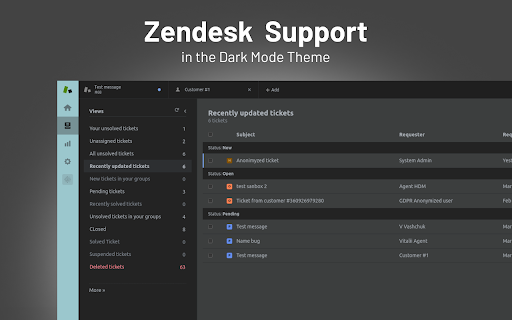


Take care of your eyes day and night using dark theme for Zendesk tools and services. ZENDESK DARK MODE Take care of your eyes day and night using dark theme for Zendesk tools and services. Set up this eye-care extension on the fly for your night and daily browsing. The theme inverts bright colors into high contrast ones and makes them easy to read at night. NIGHTSHIFT When we are exposed to blue light produced by electronic devices, our body suppresses sleep-inducing hormones. As a result, our biological clocks are thrown off which can lead to harmful consequences for our health.

Dark Reader
Dark mode for every website. Take care of your eyes, use dark theme for night and daily browsing. This eye-care extension enables night mode by creating dark themes for websites on the fly. Dark Reader inverts bright colors to make web pages high contrast and easier to read. Adjust brightness, contrast, the sepia filter, font preferences. Enable dark mode on every web page or give websites a sepia tone. Enable or disable Dark Reader for specific websites, automatically sync with system dark mode, or detect already dark websites and leave them unchanged. This is the original Dark Reader extension. Since 2014, we continuously evolve alongside modern web technologies to deliver fast and reliable dark mode support for people sensitive to bright light. By installing the extension you agree to these terms of use https://darkreader.org/terms/

Dark Mode for Intercom
Take care of your eyes day and night using dark theme for Intercom tools and services. The white design of Intercom can be harmful to your eyes if you’re working in dimly-lit conditions. We care about your health, therefore, we introduce an extension for adding a dark theme to your Intercom interface. DARK MODE You can easily switch between light and dark modes and even adjust the contrast and brightness. The theme works across all functions of Intercom, allowing you to concentrate on what matters - your customers. NIGHT SHIFT FEATURE The screen of your computer or laptop emits blue light and when exposed for a long time can increase the risk of insomnia. But worse than that, extended exposure to blue light hurts your eyesight. Turn on Night Shift to switch cold tones to warm and reduce the probability of health problems caused by electronic devices.

Pinterest Dark Mode & Theme
Enjoy Pinterest with a stylish dark mode. Protect your eyes and browse comfortably at night. Transform your Pinterest browsing experience with the ultimate Dark Mode & Theme extension! Pinterest Dark Mode & Theme is a meticulously designed extension that brings a sleek, modern, and eye-friendly dark interface to Pinterest. Whether you are a late-night pinner, a designer looking for better contrast, or simply someone who prefers a darker aesthetic, this extension is the perfect companion for your creative journey. We have engineered this extension to be lightweight, fast, and incredibly stylish. It doesn't just invert colors; it intelligently applies a custom dark theme to every element of the page, ensuring that images remain vibrant while the background stays comfortably dark. 🌙 True Dark Mode Say goodbye to blinding white screens. Our advanced dark mode engine forces a deep, restful dark background across the entire Pinterest experience, including the home feed, pin details, boards, and settings pages. 🎨 Modern Design & Icons Enjoy a user interface that feels premium and up-to-date. The extension features a beautifully crafted popup menu with modern icons, smooth animations, and a clean layout that matches the aesthetics of 2025. 🎛️ Advanced Customization Take control of your viewing experience with our built-in control panel: - **Brightness Control**: Adjust the brightness level to suit your room's lighting. - **Contrast Adjustment**: Fine-tune the contrast to make text pop or soften the look for reading. - **One-Click Toggle**: Instantly switch between Light and Dark modes with a single click. ⚡ Blazing Fast Performance Optimized for speed, this extension adds zero lag to your browsing. It loads instantly and works seamlessly with Pinterest's dynamic layout. 👁️ Eye Protection Reduce eye strain and fatigue, especially when browsing at night. The dark palette reduces blue light emission and screen glare, allowing you to pin for hours without discomfort. 🌍 Global Support Works perfectly on all regional versions of Pinterest (pinterest.com, pinterest.co.uk, pinterest.fr, pinterest.de, pinterest.jp, and more). 🔒 Privacy Focused We respect your privacy. This extension does not collect any personal data, browsing history, or login information. It runs entirely locally on your browser.

Lunar Reader: Dark Theme & Night Shift Mode
Dark theme and night shift mode for every website. Care your eyes, use Lunar Dark Reader for night and daily web browsing. Lunar Dark Reader extension will put dark theme on all websites, suitable for those work at night and dark reader for online news or book reading. ★ What will you get from Lunar Dark Reader extension: 1) An easy way to create dark mode on every website. In addition, you can customize your dark theme visual from Brightness, Contrast, to Saturation. 2) A night shift mode which changes the website's color to warmer, making it much more pleasing to watch. You can choose to use either dark theme or night shift mode, or both. You can also quickly activate these modes with simple keyboard shortcuts. 3) You can set up schedule for each dark theme and night shift mode, and decide when you want to auto-activate dark theme. ★ Our Lunar Dark Reader extension is safe to use, as it complies with Google's policy: https://lunarreader.com/privacy/ ★ Note: Remember to disable any similar dark theme or night shift mode extension to prevent compatibility issues. UPDATE 2026.4.4: Lunar Reader updated to manifest v3 with improvements and bugfixes.
