
pifalnbglchfojkfmechjalgbjoodlpg
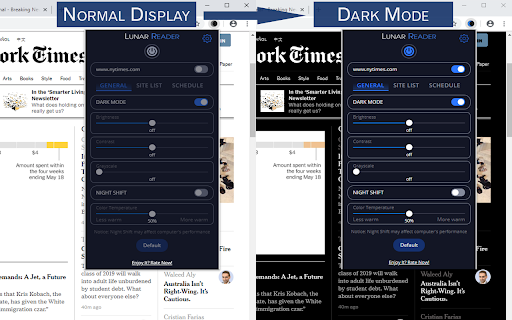
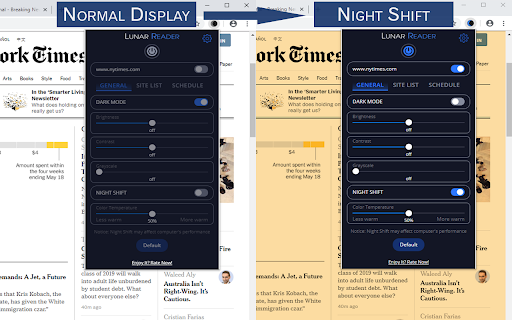
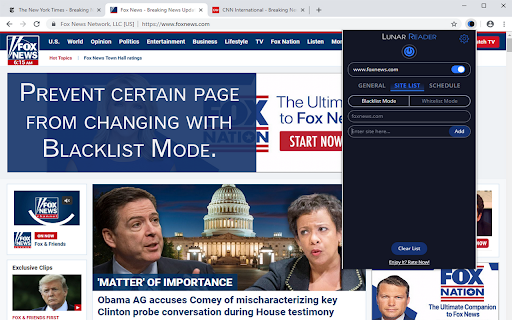

Dark theme and night shift mode for every website. Care your eyes, use Lunar Dark Reader for night and daily web browsing. Lunar Dark Reader extension will put dark theme on all websites, suitable for those work at night and dark reader for online news or book reading. ★ What will you get from Lunar Dark Reader extension: 1) An easy way to create dark mode on every website. In addition, you can customize your dark theme visual from Brightness, Contrast, to Saturation. 2) A night shift mode which changes the website's color to warmer, making it much more pleasing to watch. You can choose to use either dark theme or night shift mode, or both. You can also quickly activate these modes with simple keyboard shortcuts. 3) You can set up schedule for each dark theme and night shift mode, and decide when you want to auto-activate dark theme. ★ Our Lunar Dark Reader extension is safe to use, as it complies with Google's policy: https://lunarreader.com/privacy/ ★ Note: Remember to disable any similar dark theme or night shift mode extension to prevent compatibility issues. UPDATE 2026.4.4: Lunar Reader updated to manifest v3 with improvements and bugfixes.

Dark Theme - Dark mode for Chrome
Dark mode switch any websites to dark theme. Take care of your eyes day using a classic dark reader or change screen brightness. Dark Theme - Dark Reader for Chrome enables night mode on nearly all websites and gives you the ability to control the built-in dark themes on those that have it. If the website has built-in night theme, you can control it directly from extension and if it doesn't (like Gmail, Google Docs, Office Online, Github and millions others), we will convert the colors to provide you with smooth transition on dark mode. There is also a white-list feature which enables you to exclude a desired domain from mode. Simply add a domain(s) to the designated area (comma separated) in the options page and the websites will be excluded. Night Shift Activate Night Shift mode to invert the usual light from the screen to a warmer tone, thus, preventing your eyes from harm. You can turn the tool on and off in a single click when you need it. Night shift automatically shifts the colors of your browser content to warmer end of the color spectrum after dark. Screen Shader Mode is a pleasure for your eyes! Dark Reader This eye-care extension enables night mode by creating dark themes for websites on the fly. Dark Reader inverts bright colors, making them high contrast and easy to read at night. Extension will put dark theme on all websites, suitable for those work at night and dark reader for online news or book reading. This extension changes the style of Google Docs to a dark theme that is easier on the eyes and looks cooler :) You need to refresh all the tabs, which were opened BEFORE the Dark mode and Night Shift was installed. You can also restart the Chrome to refresh all the tabs at once. Otherwise, Night Shift will work only with the newly opened tabs. Dark Theme for YouTube extension converts YouTube theme to a highly customizable dark charcoal/blue theme. This extension is built on top of the default YouTube theme, so it is very light-weighted compare to using themes injected by stylish or stylus extensions. Feel free to ask any questions and leave comments. Your feedback is very important for our product!

Dark Mode for Google Chrome™
It is a dark mode for all the browse. It darkens all the websites you visit so you can browse without straining your eyes. Want to rest your eyes from the glare of a computer screen? The best way to protect your eyes when you are using the computer at night is to have white font and a black background color for the website. If you want to continue using the computer for a long period of time and not have strained eyes, simply install our software Dark Mode for Google Chrome™ Our software allows you to turn the website into dark mode status where it uses white font and a black background. Simply press the software icon to turn dark mode on/off for the web page you are on. Disclaimer: Please note this extension is NOT made by Google and is made by an independent development team. All copyrights belong to their respective owners. Google doesn’t endorse or sponsor this Chrome extension. Dark Mode for Google Chrome™ is not owned by, is not licensed by and is not a subsidiary of Google Inc.

Custom Dark Mode
Customize your dark mode for the web! Custom Dark Mode is a browser add-on that helps you design your own dark style for the web. Simply open toolbar popup UI and then adjust the color settings. There are a variety of options available to choose from. From document body's "background-color" to "font-color", "header-color" and etc. Moreover, you can adjust the opacity for all HTML elements. All the settings in the toolbar popup are auto saved to the memory. There is also a (+/-) button with you can use to whitelist desired domain(s) from dark mode. Please note that, at the current version of the add-on, there is no option to see the whitelist table. You can only add or remove websites from toolbar popup UI. In order to turn the add-on ON/OFF, you can use the big "torch" button at the top center in popup. Moreover, to switch the popup interface theme to dark, please press the moon icon in the top-right toolbar. If you found a bug to report, or have a feature request, please fill out the bug report form in the add-on's homepage (https://mybrowseraddon.com/custom-dark-mode.html).

Night Shift Mode
Take care of your eyes. Change screen brightness to special eye-protective colors from the list or to a color that you prefer. Night shift changes the colors of the screen to warm and eye-protective shades. You can automatically change screen mode by scheduling or selecting a color theme for a certain website. Our extension suggests a palette of colors that are good for eyes in a dark time and also you can pick any color and add it to the settings page. Working on a computer at night time may affect your eyes or can disturb other people in the same room. Night Shift Mode is a good opportunity to reduce screen brightening to take care of your eyes. Dark Mode isn't suitable for all websites, so applying warm colors to all websites will be the best alternative for screen tinting. Our extension offers several benefits for users of notebooks or PCs by reducing the blue light emitted by screens. Here's how it can help: 1. Reduces Eye Strain - excessive blue light can strain your eyes during extended screen use, especially in low-light conditions. Night shift mode adjusts the screen's color temperature to warmer tones, which are gentler on the eyes. 2. Improves Sleep Quality - blue light suppresses the production of melatonin, a hormone responsible for regulating sleep. By reducing blue light exposure in the evening, night shift mode can help you fall asleep more easily and maintain a healthy sleep cycle. 3. Minimizes Digital Fatigue - spending long hours in front of a screen can lead to digital fatigue, causing discomfort and difficulty focusing. Warmer screen tones may help alleviate this, enabling more comfortable extended use. 4. Helps in Low-Light Environments - Night Shift Mode dims harsh light, making it easier to work in dimly lit or dark environments without causing discomfort or disrupting the ambient lighting balance. 5. Potential Long-Term Eye Health Benefits - although research is ongoing, reducing exposure to high-energy blue light may help mitigate risks associated with long-term eye health issues like macular degeneration. 6. Customizable and Easy to Use - most devices allow users to schedule night mode automatically (e.g., sunset to sunrise) or adjust settings manually to suit individual preferences. While Night Shift Mode can be beneficial, it’s not a substitute for regular breaks from screen use, proper lighting, or comprehensive measures like blue light-blocking glasses or ergonomic screen settings.
