
mkaclpipmcbnleaiaicbcnoojineiloi


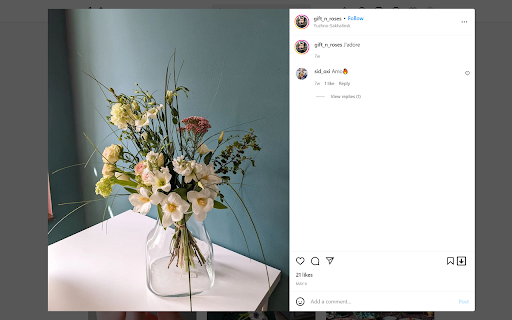
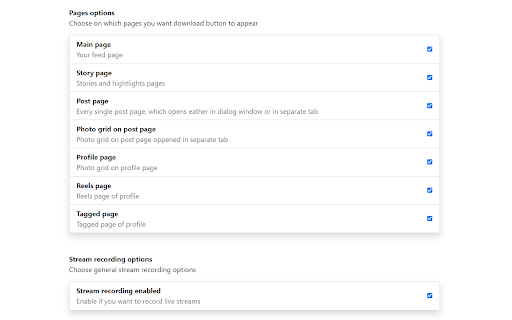
Extension for saving media from Instagram's web version Easy Saver will help you to easily download photos, videos and live streams from your or your friend's account. It adds download button on all media of web version of Instagram. Using this extension, you can download photos and videos from your feed, from your friend's profile, or from your own profile with one click. You can download reels, stories, and even whole carousel posts. Easy Saver creates "easy-saver-folder" in your Download folder. All videos and photos will be saved in subfolders like this: "%Downloads_folder%\easy-saver-folder\%friends_username%\", so it will be very easy to sort photos from different accounts. After the download is finished download button will blink green, if it was successful, or red if it wasn't. (usually because it's a private video or because you cancel the download yourself) New feature🔥🔥🔥: now you can record Instagrams live stream which is currently online. Open streams page, find record panel, click "Start recording" button. That's it. The stream will be recorded and saved automatically at the end. Or you can click "Stop and save" button and currently recorded part of a live stream will be saved right away. While the stream is being recorded you can minimize the recording panel and continue to browse the Instagram. Yes, you can leave live stream page and browse your feed, stream will be recorded anyway (But don't reload Instagram page with browser reload button, it would stop the recording. Basically, if you see a recording panel then the stream is being recorded) You can record 🔥several streams simultaneously🔥 in one tab. Just open the other stream you want to record and another record panel will be added. At the end of the stream you will receive two files: one with video .m4v, one with audio .m4a. Extension can't merge these files by itself, but you can use video player (VLC for example) to open video and add an audio track. Or you can use "ffmpeg" program to merge these files into one video file (I prefer this way) Or you can find some online service to merge it, it's up to you. Note, that if you want Chrome to automatically download photos, you need 'Ask where to save each file before downloading' option to be turned off, otherwise it will ask you where to save every single photo. It's not bad, but it's not as convenient as originally intended. And don't forget, that all videos and photos belong to their creators. Don't download it without the owner's permission.

Image Downloader
Right click on images to save on your computer. Supports posts with multiple images. Visit homepage for more: https://browsernative.com/instagram-downloader/ Extension by BrowserNative, forked from InstaSee by Chris Panayotoff. Not created by or affiliated with Instagram.com.

Story Saver
Simply Download & Save stories from Facebook, Instagram, and WhatsApp. Jun 16 2025 Update fix bug Mon 7 Apr 2025 : Update download all in instagram profile Browser Extension for Downloading Videos and Photos from Facebook and Instagram with One Click Looking for a quick and easy way to download videos, stories, and photos from Facebook and Instagram? Our browser extension is the perfect solution for you. With its powerful features, you can download any video or photo from these popular social platforms in just one click. One of the standout features of our extension is its ability to download videos from Facebook with just one click. No need for complicated websites or bulky software anymore! You can download any video you like directly from Facebook while browsing, and it will be saved on your device in the highest possible quality. Facebook stories capture fleeting yet memorable moments from your friends or favorite pages. With this extension, you can easily download Facebook stories in seconds. Simply click the download button, and your favorite stories will be saved instantly for you to view anytime. Download Photos and Videos from Instagram Instagram is known for its high-quality photos and videos, and our extension makes it super simple to download Instagram photos and videos. Whether it’s an artistic photo or an inspiring short video, you can grab them all with a single click, making it easier than ever to keep the content you love. • User-friendly interface. • Fast downloads with high-quality results. • Completely free and secure. This browser extension helps you save amazing moments from Facebook and Instagram with a single, effortless click. Install it today and start enjoying the convenience of instant downloads! Update 3nd March: Fix Instagram issues for non-english. Story Saver allows you to save photos and videos stories. All you have to do is installing this extension, an icon will appear at the top-left corner of the browser, Click on that icon and whoosh the story will be downloaded, Oh and another thing the extension will rename the story to something readable ;) If there's anything wrong with the extension contact me on my email: storysaverex@gmail.com

Exta: Pro downloader for Instagram
Download Instagram Stories, Photos, Videos & Reels in one click. Fast, secure & easy-to-use Instagram downloader extension Download Instagram Stories, Photos, Videos & Reels in One Click! The most powerful and easy-to-use Instagram downloader for Chrome. Save any photo, video, Story, Reel, or IGTV in high quality. No watermark, no login, 100% free! 📌 Key Features & Benefits: • 📷 Download Instagram Photos & Videos – Save Instagram content directly to your device in HD & 4K quality. • 🎥 One-Click Instagram Reels Downloader – Quickly grab and download Reels from any Instagram account. • 📌 Save Instagram Stories Before They Disappear – Never lose important moments again! Download Stories with just one click. • 📂 Mass Download Support – Download multiple posts, videos, and Stories at once as a ZIP file. Save content from an entire profile instantly. • 🚀 Fast & Secure Downloader – No login required, completely private and ad-free. No tracking, no hidden fees! • 🔄 Supports Multiple Formats – Download Instagram content in MP4, JPEG, ZIP, and other formats for offline access. 🎯 Why You Need This Instagram Downloader? Instagram does not allow direct downloads of Stories, Reels, and videos. Our extension makes it simple to save any Instagram content to your computer in seconds. Whether you’re a content creator, marketer, or just want to store your favorite Instagram moments, this tool makes it quick and effortless. 🖱️ How It Works? • Open Instagram and navigate to the photo, video, Story, or Reel you want to download. • Click the Exta Downloader button in the Instagram navigation menu. • Select: Download single post (for individual downloads) or Download all Stories/posts (for mass downloads). • The file is instantly saved to your device in HD or 4K quality. 💡 Why Choose This Instagram Downloader Over Others? • 🔥 Faster than any other Instagram downloader – Save content in just seconds! • 🔒 No login required – Works directly in your browser without needing your Instagram account. • 📷 Supports HD & 4K downloads – Download photos and videos in their original quality. • ❌ No watermark & no ads – Get clean, high-quality media with no branding. • 📂 Bulk & batch downloads – Save an entire Story series or multiple posts with one click. • 💯 100% free & safe – We do not track, store, or collect any data from your downloads. 📌 Start Downloading Now! Don’t let your favorite Instagram content disappear! Install Exta Downloader now and start saving Instagram Stories, Photos, Videos, and Reels instantly. Works for public & private accounts (from users you follow). 🚀 Click "Add to Chrome" and start downloading today! 🚀 Exta: Pro Downloader for Instagram may occasionally open a separate tab with promotional content to help keep the extension free. No personal data is used for advertising, and browsing history is never sold or shared. Promotional content can be disabled at any time in the extension settings.

Turbo Downloader for Instagram
Download photos, videos and Reels from Instagram. Turbo Downloader for Instagram adds a button to every Instagram post, Reel, and Story so you can quickly and easily download anything while browsing Instagram. The “Download All” button added to Instagram accounts lets you bulk download all their posts in one click. NOTE: Please reload your Instagram tabs after installing or updating to load the extension. While browsing Instagram, just hover over a post preview and click the download button to save it. If there are multiple images/videos in the post, they’ll all be saved. If you’re looking at a post or Reel, check next to the bookmark and share icons for the download button, or try the hotkey Ctrl + Shift + D or Cmd + Shift + D. A story can be saved with the download button in the top right corner. When downloading an entire Instagram account, you’ll be prompted to choose a folder. A new folder will be created inside that folder with the name of the account being downloaded. Images and videos will appear in that folder as soon as they get downloaded. For future account downloads, files with the same name in that folder will be skipped. As of February 21, 2026, version 4.12.16 of Turbo Downloader is up and running. Feel free to reach out to igdownload2023@gmail.com if you have questions. Version 4.12.16 changes: -Fixed download icon not appearing on posts with multiple images/videos. Version 4.12.15 changes: -Fixed download icon not appearing on stories from the home page Version 4.12.14 changes: -Added a download all button for stories and highlights -Fixed "Could not find post" for stories and highlights -Fixed "Download all" button not appearing on profiles Version 4.12.11 changes: -Fixed "Could not find post" in some cases -Fixed download icon not appearing beside the bookmark icon on some posts -Fixed download icon not appearing in some places when not signed in -Fixed some images being cropped or downloaded in a lower resolution than available Version 4.12.9 changes: -Fixed download icon not appearing while hovering Instagram posts in a grid -Added a tip for Brave users who are unable to select an accounts download folder Version 4.12.5 changes: -Account download folder is now saved. -Added option to change your account download folder -Fixed "Could not find post" for some users. Version 4.12.4 changes: -Added options page. -Posts with multiple images/videos now show a download icon by default. Please use the options page if you would like to change this behavior. -Fixed download icon sometimes appearing in places it shouldn't. -Fixed "Could not find post" for some users. Version 4.12.1 changes: -Fixed download icon over carousel media for some users -Fixed “Could not find post” for most users Version 4.11.2 changes: -Download icon on posts with multiple images/videos now downloads everything -Added a download icon when hovering the image/video of a carousel for only that item -Fixed “Could not find account” for some users Version 4.11.1 changes: -Fixed download icon for some users with dark mode off -Fixed “Could not find post” for some users Version 4.11.0 changes: -New bulk account download now saves files as they're downloaded instead of all at the end -Fixes bulk account downloads sometimes failing to start -Fixes bulk account downloads sometimes failing to complete Version 4.10.5 changes: -Fixes Reels downloads sometimes downloading a profile picture -Fixes for smaller screen sizes Version 4.10.4 changes: -Fixes "Cannot find post" for some users -Fixes for some Stories Version 4.10.0 changes: -Adds hover downloader -Fixes for feed downloads Version 4.9.0 changes: -Migrated to MV3 -Fixed Feed post downloads -Updated progress bar for bulk downloads -Added progress bar for reel/video post downloads
