
mafcolokinicfdmlidhaebadidhdehpk

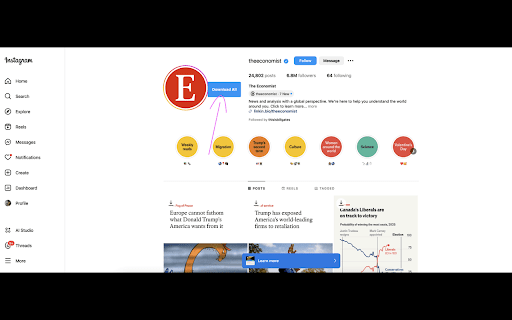
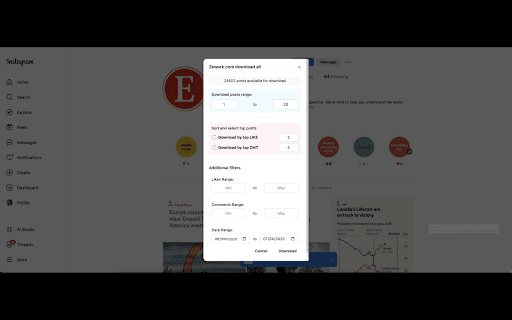
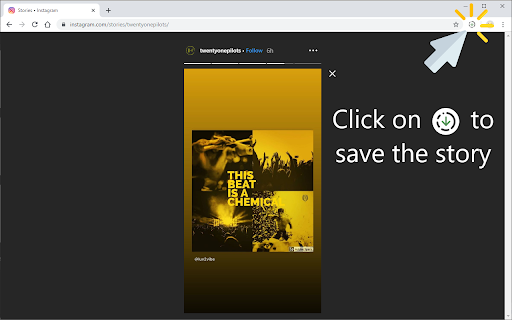

Simply Download & Save stories from Facebook, Instagram, and WhatsApp. Jun 16 2025 Update fix bug Mon 7 Apr 2025 : Update download all in instagram profile Browser Extension for Downloading Videos and Photos from Facebook and Instagram with One Click Looking for a quick and easy way to download videos, stories, and photos from Facebook and Instagram? Our browser extension is the perfect solution for you. With its powerful features, you can download any video or photo from these popular social platforms in just one click. One of the standout features of our extension is its ability to download videos from Facebook with just one click. No need for complicated websites or bulky software anymore! You can download any video you like directly from Facebook while browsing, and it will be saved on your device in the highest possible quality. Facebook stories capture fleeting yet memorable moments from your friends or favorite pages. With this extension, you can easily download Facebook stories in seconds. Simply click the download button, and your favorite stories will be saved instantly for you to view anytime. Download Photos and Videos from Instagram Instagram is known for its high-quality photos and videos, and our extension makes it super simple to download Instagram photos and videos. Whether it’s an artistic photo or an inspiring short video, you can grab them all with a single click, making it easier than ever to keep the content you love. • User-friendly interface. • Fast downloads with high-quality results. • Completely free and secure. This browser extension helps you save amazing moments from Facebook and Instagram with a single, effortless click. Install it today and start enjoying the convenience of instant downloads! Update 3nd March: Fix Instagram issues for non-english. Story Saver allows you to save photos and videos stories. All you have to do is installing this extension, an icon will appear at the top-left corner of the browser, Click on that icon and whoosh the story will be downloaded, Oh and another thing the extension will rename the story to something readable ;) If there's anything wrong with the extension contact me on my email: storysaverex@gmail.com

Save Story for Instagram
Download stories from Instagram, Facebook and also save videos or photos. Run desktop version Instagram with all functions. This very simple Chrome extension for downloading videos and photos or stories from Facebook and Instagram with one click and also allows you to access to the Instagram mobile website like you can do on your smartphone but on your computer! Just click on the extension icon in the toolbar (in the upper right corner of the browser) and get all the functions like in the mobile app. ☑️ Download videos and stories from Facebook One of the key highlights of our extension is its seamless one-click video download feature for Facebook. Whether it's a fleeting yet memorable story from your friends or a favorite page, this extension allows you to save Facebook stories effortlessly in just seconds. ☑️ Download videos and stories from Instagram Instagram is renowned for its stunning photos and videos, and our extension makes downloading them effortless. Whether it's a captivating image or an inspiring short clip, you can save them all with just one click, ensuring you always have access to the content you love. - Upload your photos or videos - Direct Messages are fully supported - Open / Download photos and videos in full HD - Everything you can do normally on your phone on the Instagram mobile website (like, follow, comment, browse, ..) - Comfortable layout for a better experience This app requires only the minimal permissions required to work to improve your security. 📌 Important! Instagram™ is a trademark of Instagram Inc., registered in the U.S. and other countries. This is an independent project and has no relationship to Instagram™ or Instagram Inc. Save Story does not belong or related to the official Instagram application / website in any ways. It is an unofficial app that is developed and maintained independently. ⭐ Please, rate us! We work hard to provide you with the best experience for Instagram. If you like our extension, please provide us with a 5 star rating! If you have any questions, remarks or suggestions, we’d be happy to hear them! Please refer to our contact details below.

Download Facebook videos
1️⃣ You need to log in to Facebook to download videos. 2️⃣ If you don't see the download button, reload the Facebook page you're viewing. 😎 HOW DOES THIS TOOL WORK? After you open this tool, a piece of code will be executed in the current tab. This code is responsible for analyzing the json code and finding the id of the video currently displayed on the screen. Videos that do not appear in the screen frame will be ignored. After finding the video id, the tool continued to send a request to Facebook to get the mp4 link. Then a download button will float above the video and inside the tool window. 🧐 HOW TO USE 1. Open the Facebook website. 2. Play a video on Facebook. 3. Open this extension. 4. Wait a few moments. 5. Click on the quality you want to download. 6. On the new tab, the file will automatically download and then save to your device. ☀ Download videos, audio, subtitles (closed caption), images (gif and thumbnail) from Facebook timeline, groups (include secret groups), profile, reel. ☀ Automatically download and save the file according to the title of the video and the selected quality. ☀ Multi language. ☀ Suggest queries. ☀ Generate random keywords.

IMDownloader | Download story reels highlight image and video
Download original (high resolution) image, video, reels, story and highlight for Instagram™ with one click, free and unlimited. IMDownloader is an extension to help you to download original image, video, reels, story and highlight for Instagram™ with one click, free and unlimited. ▣ You can download by using this extension: ● Image ● Video ● Story ● Highlights ● Reels ▣ The extension adds a download button to a suitable place on instagram interface. You can find the button; ● Under the image/video on homepage page. ● Top-right corner on story/highlight page. ● Hover image/video on profile detail page. ● Under the comments on post/reels detail page. ● Right side of reels page. ▣ Besides; if you right click over any image/video, You will see a menu item "Download | Downloader for Instagram™". You can start downloading by clicking this menu item. To see how you can download, please take a look the extension images and video. ▣ After installing, please reload all tabs for the extension to take effect. For issues/suggestions

IG Story Downloader
Use ig story downloader to effortlessly save instagram stories. Download instagram videos from stories and posts with one click! IG Story Downloader is a user-friendly Chrome extension designed to help you save Instagram stories, reels, and videos directly to your device. Whether you want to back up content, collect media for research, or save memorable moments, this tool provides a seamless and efficient solution. 🔹 Key Features: ✅ Download Instagram Stories & Reels: Save Instagram stories, reels, and videos in high quality. ✅ Bulk Downloading: Download multiple photos and videos from a profile or feed with a single click. ✅ Most Liked & Most Watched Content: Easily save popular content based on engagement. ✅ Single Download Option: Select and download specific media as needed. ✅ One-Click Media Backup: Quickly save all current media from a user’s profile. 📥 How to Use IG Story Downloader 1️⃣ Install the extension from the Chrome Web Store. 2️⃣ Open Instagram in your browser. 3️⃣ Click the download button to save Instagram videos, reels, and stories instantly. 🔑 Why Choose IG Story Downloader? ✔ Simple & Fast: Download content with minimal effort. ✔ No Notifications: Instagram users are not notified when you save their content. ✔ Safe & Secure: No login required; we do not collect personal data. ✔ High-Quality Downloads: Media is saved in its original resolution. ✔ Works with Public & Followed Private Accounts: Only content from accounts you follow can be saved. 🌍 Who Can Benefit from IG Story Downloader? 📌 Content Creators & Marketers – Archive Instagram content for future use. 📌 Researchers & Educators – Collect and organize visual information. 📌 Social Media Users – Save personal memories without relying on Instagram’s archive. ❓ Frequently Asked Questions 🔹 Does Instagram notify users when I download their story? No, downloads are private. 🔹 Can I download private Instagram stories? Only if you follow the account. 🔹 Where are the files saved? In your browser’s default Downloads folder. 🔹 Does the extension affect browser performance? No, it is lightweight and optimized for efficiency. 🔹 Is there a download limit? No, there are no restrictions on the number of downloads. ⚠️ Disclaimer IG Story Downloader is an independent tool and is not affiliated with Instagram™ or Meta™. Users should respect copyright and content ownership rights. ⏬ Install IG Story Downloader today and start saving Instagram content effortlessly!
