
cpgaheeihidjmolbakklolchdplenjai
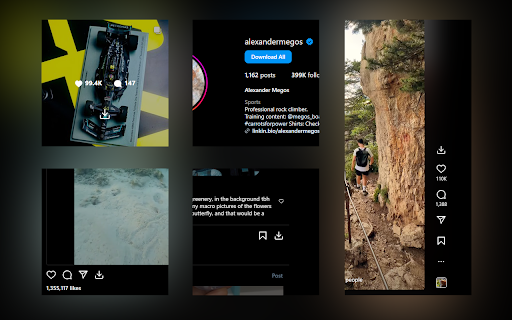

Download photos, videos and Reels from Instagram. Turbo Downloader for Instagram adds a button to every Instagram post, Reel, and Story so you can quickly and easily download anything while browsing Instagram. The “Download All” button added to Instagram accounts lets you bulk download all their posts in one click. NOTE: Please reload your Instagram tabs after installing or updating to load the extension. While browsing Instagram, just hover over a post preview and click the download button to save it. If there are multiple images/videos in the post, they’ll all be saved. If you’re looking at a post or Reel, check next to the bookmark and share icons for the download button, or try the hotkey Ctrl + Shift + D or Cmd + Shift + D. A story can be saved with the download button in the top right corner. When downloading an entire Instagram account, you’ll be prompted to choose a folder. A new folder will be created inside that folder with the name of the account being downloaded. Images and videos will appear in that folder as soon as they get downloaded. For future account downloads, files with the same name in that folder will be skipped. As of February 21, 2026, version 4.12.16 of Turbo Downloader is up and running. Feel free to reach out to igdownload2023@gmail.com if you have questions. Version 4.12.16 changes: -Fixed download icon not appearing on posts with multiple images/videos. Version 4.12.15 changes: -Fixed download icon not appearing on stories from the home page Version 4.12.14 changes: -Added a download all button for stories and highlights -Fixed "Could not find post" for stories and highlights -Fixed "Download all" button not appearing on profiles Version 4.12.11 changes: -Fixed "Could not find post" in some cases -Fixed download icon not appearing beside the bookmark icon on some posts -Fixed download icon not appearing in some places when not signed in -Fixed some images being cropped or downloaded in a lower resolution than available Version 4.12.9 changes: -Fixed download icon not appearing while hovering Instagram posts in a grid -Added a tip for Brave users who are unable to select an accounts download folder Version 4.12.5 changes: -Account download folder is now saved. -Added option to change your account download folder -Fixed "Could not find post" for some users. Version 4.12.4 changes: -Added options page. -Posts with multiple images/videos now show a download icon by default. Please use the options page if you would like to change this behavior. -Fixed download icon sometimes appearing in places it shouldn't. -Fixed "Could not find post" for some users. Version 4.12.1 changes: -Fixed download icon over carousel media for some users -Fixed “Could not find post” for most users Version 4.11.2 changes: -Download icon on posts with multiple images/videos now downloads everything -Added a download icon when hovering the image/video of a carousel for only that item -Fixed “Could not find account” for some users Version 4.11.1 changes: -Fixed download icon for some users with dark mode off -Fixed “Could not find post” for some users Version 4.11.0 changes: -New bulk account download now saves files as they're downloaded instead of all at the end -Fixes bulk account downloads sometimes failing to start -Fixes bulk account downloads sometimes failing to complete Version 4.10.5 changes: -Fixes Reels downloads sometimes downloading a profile picture -Fixes for smaller screen sizes Version 4.10.4 changes: -Fixes "Cannot find post" for some users -Fixes for some Stories Version 4.10.0 changes: -Adds hover downloader -Fixes for feed downloads Version 4.9.0 changes: -Migrated to MV3 -Fixed Feed post downloads -Updated progress bar for bulk downloads -Added progress bar for reel/video post downloads

I.G Downloader
I.G Downloader is a tool that helps you download Videos, Photos, Reels, Stories, Profile and audio from IG easily and quickly. I.G Downloader is a tool that helps you download Videos, Photos, Reels, Stories, Profile and audio from I.G easily and quickly. "I.G Downloader" extension is a great tool to download I.G photos and videos directly on the web browser. Main Features: - Video Downloader: Download I.G Videos in HD 1080P quality. - Photo Downloader: Download photos from I.G full size. - Story Downloader: Download Stories and Highlights on I.G quickly. - Audio Downloader: Download sounds and background music from I.G with just one click. - Reels Downloader: Download Reels & I.GTV videos in best quality. Instructions for using I.G Downloader on Chrome browser? 1. Open the Chrome browser and go to Instagram.com. 2. Navigate to the photo or video you want to download. 3. Click the "Download" icon at the bottom of the video. 4. Your Photo or Video will appear in a new tab. Click the Download button to save them to your device. Note: After installing the extension, please reload the tab where you want to download the video so that the extension can recognize the video file! We'd love to see your feedback or suggestions to improve the extension's performance! Please contact us with any problems or suggestions.

Downloader for Instagram - Promaster
Download Instagram photos, videos, Reels, and Stories in one click. Fast Chrome tool with single and bulk download options Downloader for Instagram – Promaster is a powerful Chrome tool that lets you save Instagram content directly to your device. Whether you're a content creator, social media manager, or just want to archive your favorite posts, this tool makes downloading Instagram photos, videos, Stories, and Reels fast and effortless. • Download Photos and Videos – Save any Instagram post with a single click. • Reels Downloader – Capture Reels from public profiles without quality loss. • Stories Downloader – Save Stories manually or in bulk, including video clips and images. • Bulk Download Mode – Select multiple items from a profile and download them all at once. • Smart Chrome Integration – Access download buttons directly inside the Instagram interface. This tool is designed to be simple, effective, and reliable. Whether you're downloading one image or an entire feed, Promaster keeps the process quick and intuitive. With full support for multiple media formats, it fits seamlessly into your Chrome browser workflow. - Content Creators – Quickly archive or repurpose your own content. - SMM Professionals – Collect user-generated content or client materials. - Everyday Users – Save favorite posts, inspirational Reels, or time-limited Stories. This Chrome tool is an independent extension and is not affiliated with Instagram or Meta Inc. It is intended for personal use only. Please respect copyright laws and do not download content without permission from the original creator. Get Promaster – the all-in-one Instagram download tool built for speed, flexibility, and simplicity.

ESUIT | Photos Downloader for Instagram™
Bulk-download all photos from user's profile page ESUIT | Photos Downloader for Instagram™ — The most powerful tool to batch download photos, videos, Stories, Highlights, Reels, and audio from Instagram. ━━━━━━━━━━━━━━━━━━━━━━━━━━━━━━━ 🚀 HOW TO USE ━━━━━━━━━━━━━━━━━━━━━━━━━━━━━━━ 1. Navigate to any Instagram profile, post, reel, hashtag, or saved collection page. 2. Click the download button that appears on the page — or right-click any post/reel and choose "Download". 3. Configure your download options (type, format, quantity, etc.) and start downloading. 4. Keyboard shortcut: Press Ctrl+Shift+D (Cmd+Shift+D on Mac) to quickly download the current post or reel. 📥 Batch Download • Download all posts, reels, tagged posts, and saved collections from any user profile • Download from hashtag and explore pages • Download entire Stories and Highlights (or individual items) • Download saved collections (all saved posts or specific collections) • Select specific posts to download — pick exactly what you want 🖼️ Single Post Download • One-click download button on every post and reel • Right-click context menu to download any post or reel • Keyboard shortcut (Ctrl+Shift+D / Cmd+Shift+D) for instant download • Download HD profile avatars 🎵 Audio Extraction • Extract and download audio tracks from Reels 🎬 Video Options • HD Auto-Merge — automatically merges video segments for the highest quality (HD) • Download video thumbnails alongside videos 📁 File Output & Organization • Image format conversion: Original, JPG, PNG, or WebP • Flexible filename rules with 18+ variables (date, username, shortcode, index, etc.) • Gen-Folder: Automatically organize downloads into folders by author name • Split-Folder: Separate downloads into folders by type (posts, reels, tagged, saved) ⚡ Performance & Control • Concurrent downloads (1–5 simultaneous) • Full-Speed mode for maximum download speed • Adjustable request delay to avoid rate limiting • Resume downloading — pick up where you left off if interrupted • Skip already downloaded files — avoid duplicates ━━━━━━━━━━━━━━━━━━━━━━━━━━━━━━━ 📌 ADDITIONAL FEATURES ━━━━━━━━━━━━━━━━━━━━━━━━━━━━━━━ In the Popup, we provide the following additional features: • Function Description: A brief description accompanied by a video tutorial demonstrating how to use this extension. • Login Button: Use when you need to subscribe to premium features or log in with an existing subscription. • Relevant-Ext: We provide brief recommendations and introductions to relevant extensions in a small section. • Encountering an issue? Report it to us 💪: If you encounter any issues, you can get in touch with us through this link, and we will assist you in fixing it. ━━━━━━━━━━━━━━━━━━━━━━━━━━━━━━━ ⚠️ NOTICE & TRADEMARK ━━━━━━━━━━━━━━━━━━━━━━━━━━━━━━━ Instagram™ is a trademark of Instagram Inc., registered in the U.S. and other countries. This is an independent project developed by ESUIT. and has no relationship to Instagram™ or Instagram Inc. This extension is not officially developed by Instagram™. The author is ESUIT.DEV. Notice: This extension has In-App Purchases. This extension includes features that require payment to unlock unlimited usage. Please refer to our pricing page for more details. https://esuit.dev/pricing/download-albums-for-instagram Warning: Please use this extension responsibly and respect the rights of content creators. Only download content that you have permission to use.

Image Downloader for IW
Easily download and save desired images for instagram web with just one click. Image Downloader for IW is a lite addon that lets you easily download desired images from the Instagram website. Simply add the add-on to your browser and open the Instagram page. Once the add-on is active (the toolbar icon is dark grey) you will see a download icon next to any image (on the top left corner side). Please click on the icon to download the image to your machine. Please note that the download location is the default location for download in your browser. This add-on tries to capture and download the highest-resolution image to your machine. To report bugs, please fill out the bug report form on the add-on's homepage (https://mybrowseraddon.com/image-downloader-for-instagram.html).
