
mjkkdbmdflkcjmonelmlokplkgnjcnji
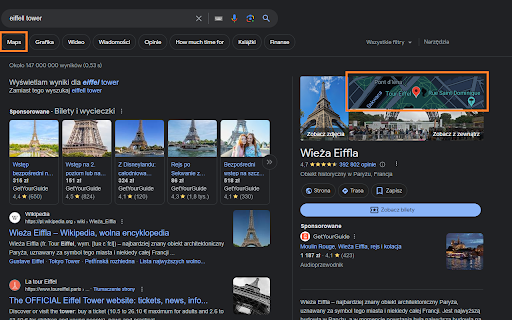
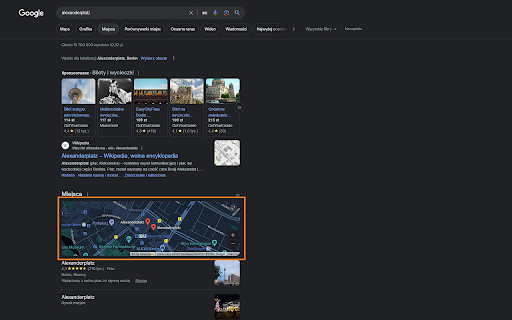
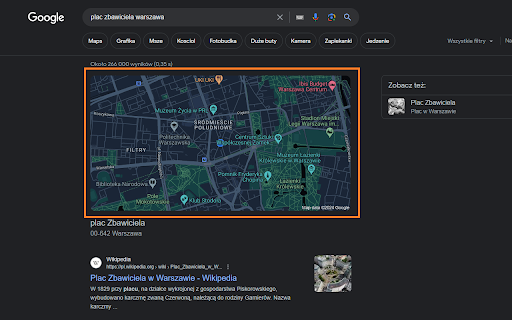
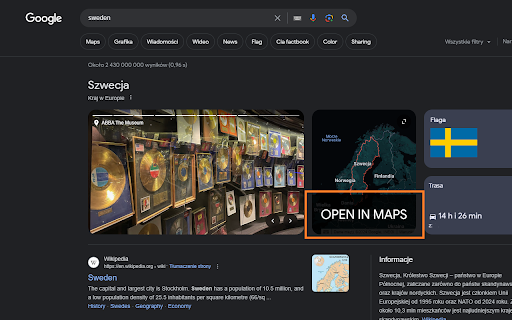
Readds google maps link to the search page and makes map thumbnail clickable. Code of this extension is open source, you can see it here: https://github.com/mrakowski0/readd-gmaps-links-chrome-extension Supported views: - tab navigation (under search field) - address maps - google places maps - country maps - small map thumbnail on the right side (part of gallery) This functionality has been removed by default for European Union countries (https://commission.europa.eu/strategy-and-policy/priorities-2019-2024/europe-fit-digital-age/digital-markets-act-ensuring-fair-and-open-digital-markets_en) FOR OPERA USERS: You need to go to your extension settings in Opera, find this extension and tick the "Allow access to search page results" then refresh the page. 1.0.11 - Update Google UI selectors, this should cause the extension to work properly again. - Small UI adjustments ------ 1.0.10 - Improve documentation for Opera users - Improve styling of the tabs variant - Add MIT license ------ 1.0.9 - Add support for more complex domains such as co.uk and com.mt - Move 'Open in maps' button to the right so that the UI does not jump causing accidental unintended clicks for some users - Add safety nets to avoid displaying an extra redundant 'open in maps' button for domains where google provided the button themselves - Improve styling ------ 1.0.8 - Improve design of the extension 'open in maps' button in top navigation - Make sure only one 'open in maps' button is displayed regardless of google UI variant currently active (this fixes issues with double navigation screens such as google images) ------ 1.0.6 - Align "Open in Maps" button design with google search page design, improve usability - Fix a bug where media articles using the same UI container as country maps UI would cause "Open in Maps" to be displayed when unnecessary. - Code cleanup ------ 1.0.5 - Updated extension description, removed redundant inline image to reduce extension size - Fixed an issue where specific map thumbnail UI variant would not be clickable ------ 1.0.4 - Delayed script execution until UI is loaded to avoid issues - Added basic support for Google's A/B testing UI changes so that both round buttons and tab navigation is supported - Added icons for extension ------ 1.0.3 Add missing support for google addresses, google countries and google places map UI. ------ 1.0.2 Extension will now work on non .com domains (i.e www.google.de, www.google.pl etc)

Google Maps Button Everywhere
Clickable mini maps, maps menu is back, open maps buttons everywhere in Google search. Right click search and map links history. This extension designed to enhance your Google Search experience. For OPERA users: After installing this extension, you need to enable the "Allow access to search page results" option in the extension settings. It restores the clickable functionality to mini maps within search results and reinstates the top Maps menu for easy access. Moreover, it introduces convenient Open Map buttons, ensuring a user-friendly pathway to explore maps. With the added feature of searching in Google Maps directly from selected text via a right-click menu, navigating through maps has never been easier. 1.1.5 - Duplicated and rotated random button fixed. 1.1.4 - Map menu button position fixed. - Map button fixed on the collapsible minimap. 1.1.3 - Maps link fixed in the top bar on google.ru and other sites. 1.1.2 - Map button icon fixed under the minimap. 1.1.0 - Extra open map icon added to the scalable map. - Some minor bug fixes.

Allow me to click Google Maps
Allows user to go to maps from search results in google since it is impossible and has to be explicitly done by searching maps AllowMeToClickGoogleMap is an addon designed to streamline your browsing experience by adding a convenient "Open map" button to search results. With a single click, you can seamlessly redirect to Google Maps to view the location corresponding to the search result. As Google has removed the functionality to comply with UE regulations.

Google Maps Button
A browser extension that re-adds the Google Maps link to searches. Since EU passed the The Digital Markets Act (DMA), Google Search is no longer allowed to redirect the user (in the EU) to locations on Google Maps. This extension adds that functionality back. Find stores, restaurants, cities, countries etc. on the map by searching for them, just like you were able to do before the law change.

Return Google Maps Search
restores the google maps button to google search Restore the seamless integration of Google Maps with your Google Search experience using the 'Return Google Maps Search' extension. This lightweight extension brings back the familiar Google Maps button to your Google Search results, providing you with quick and direct access to location information. Never miss a beat when searching for places, businesses, or addresses. With the 'Google Maps Search Restorer,' effortlessly navigate from your search results directly to Google Maps, gaining instant access to detailed maps and directions. Reintroduces the Google Maps button to Google Search results. Simplify your online navigation and exploration by adding the Google Maps Search Restorer extension to your browser. Save time and enjoy the convenience of having Google Maps readily available whenever you perform a search.
