
ooamoppajkmfeleakifpegaenneechnh
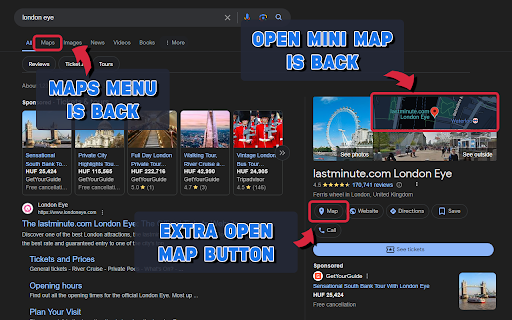
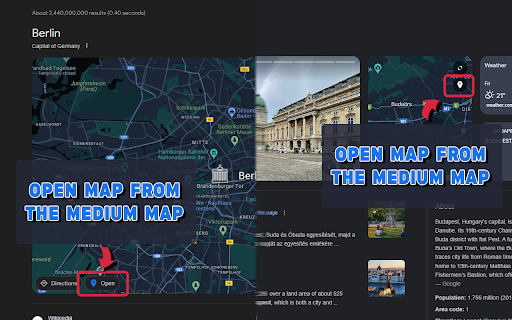
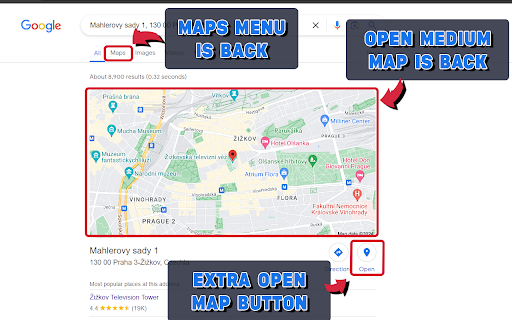
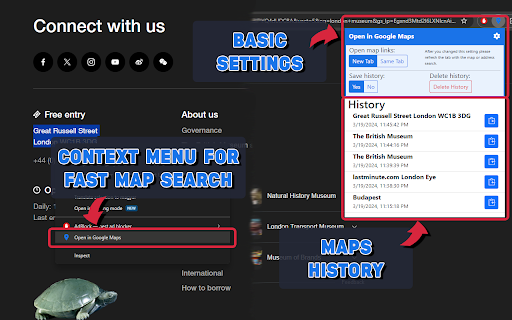
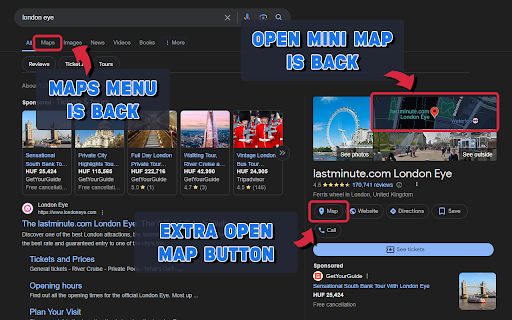
Clickable mini maps, maps menu is back, open maps buttons everywhere in Google search. Right click search and map links history. This extension designed to enhance your Google Search experience. For OPERA users: After installing this extension, you need to enable the "Allow access to search page results" option in the extension settings. It restores the clickable functionality to mini maps within search results and reinstates the top Maps menu for easy access. Moreover, it introduces convenient Open Map buttons, ensuring a user-friendly pathway to explore maps. With the added feature of searching in Google Maps directly from selected text via a right-click menu, navigating through maps has never been easier. 1.1.5 - Duplicated and rotated random button fixed. 1.1.4 - Map menu button position fixed. - Map button fixed on the collapsible minimap. 1.1.3 - Maps link fixed in the top bar on google.ru and other sites. 1.1.2 - Map button icon fixed under the minimap. 1.1.0 - Extra open map icon added to the scalable map. - Some minor bug fixes.

Google Maps QuickClick - Search to Maps
Instantly open Google Maps from the Search page by clicking on a map image or the Maps tab. Revive the direct Google Maps access with this simple extension. Click on Maps tab re-integrated below the search bar or on any static or interactive map in your Google search results to open Google Maps instantly. Key Features: - The Maps tab displays instantly without layout shift and remains reliably positioned - Multilingual support: The Maps tab is localized for 52 languages - All map images (static and dynamic) within search results are clickable, navigating directly to Google Maps Customization Options: - Toggle the display of the Maps tab on or off - Select whether maps open in a new tab - Enable or disable localization for the Maps tab Additional Features: - Precise location mapping, even for incomplete or misspelled address searches - Accurately handles searches for distant locations, ensuring the correct place is shown on Google Maps - Multi-map Support: Multiple map images on a search results page are all clickable and accurately linked to their respective locations - Supports dark mode Opera Compatibility: Opera users can also enjoy full functionality by enabling the "Allow access to search page results" option in the Opera extension settings. v1.5.6 - Restore the correct order of tabs after Google added "AI Mode" v1.5.5 - Restores the Maps tab after Google’s latest Search UI update v1.5.4 - Fixed extension startup issues in Opera GX - Improved extension initialization and stability across different browsers - Added support for Google's new dynamic map previews in search results v1.5.3 - Add support for all Google domains v1.5.2 - The Maps tab is displayed with the correct style across all variations of the tab bar - The Maps tab remains stably placed, regardless of the active tab - There is no desynchronization of Maps tab styles when switching between dark and light modes

Google Maps Buttons in Google Search
Shows Google Maps links in your search results & makes maps clickable. Designed for EU residents after the Digital Markets Act. In today's digital world, efficiency is crucial, especially when navigating between tools. The EU's Digital Markets Act (DMA) has complicated the once-simple task of moving from Google Search to Maps. This extension solves this by restoring seamless integration. Why Choose This Extension? Key Frustrations Addressed: 1. Missing Direct Links: The extension adds a Google Maps link back to the navigation bar on Google Search pages, eliminating the need to manually open Maps and re-enter queries. 2. Static Map Images: It makes map previews clickable again, allowing users to quickly access detailed maps and directions. Features • Seamless Integration: Automatically adds a Maps link to Google Search pages for one-click access. • Clickable Map Previews: Restores the ability to click on map images in search results. • Intuitive Design: Incorporates search queries into the Maps URL and works automatically without complex setup. • Compliance: Adheres to EU regulations, being an external extension installed manually. Benefits • Enhanced Productivity: Saves time by removing extra navigation steps. • Improved User Experience: Restores lost functionalities for a smoother interaction with Google services. • Accessibility: Designed for all users, regardless of technical skill. Use Cases • Travel Planning: Quick access to route planning from search results. • Business Exploration: Efficient map queries for faster decision-making. • Everyday Navigation: Simplifies commuting and exploring local amenities. Getting Started 1. Installation: Available on the Chrome Web Store; simply click “Add to Chrome.” 2. Set and Forget: Starts working immediately without further setup. 3. Updates and Support: Regularly updated for compatibility and compliance, with support available as needed.

Restore Google Search Maps Button
Adds back the Maps button to Google search pages and makes the search result map images clickable again for seamless navigation. The "Google Search Maps Button" Chrome extension brings the Google Maps button back to the Google Search navigation bar for users in Europe. If you've found the Google Maps button gone or missing from your search experience, this extension is designed to address exactly that. What it Does: This extension ensures you can access Google Maps with just one click from the Google Search page. It also makes map images clickable within search results, significantly improving your navigation experience. Why it's Needed: In response to the Digital Markets Act (DMA), which is aimed at fostering fair competition and innovation, the Google Maps shortcut was removed for European users. This tool effectively restores that lost convenience. The position among the All, Images, News, Videos, Places, etc that the Maps apears is editable in the extension settings. Privacy and Security: Operating without saving any user data, the extension ensures your privacy and security are protected. For anyone who's noticed the Google Maps button gone from the Google Search navigation bar in Europe, this extension provides a straightforward and effective solution, seamlessly reintegrating this essential feature into your browsing routine.

Maps Link Back
The European Union recently removed the ability to open Google Maps links directly from Google Search. This extension brings back that functionality, so you can easily find your way to your destination. * Open Google Maps links with a single click * Get directions, see traffic conditions, and find nearby businesses * Explore different map views, including satellite and street view * Save your favorite locations for easy access **This extension is for you if:** * You live in the European Union and miss the convenience of opening Google Maps links from Google Search * You frequently use Google Maps to find your way around * You want to explore different map views and find nearby businesses 1. Install the extension from the Chrome Web Store 2. Search for a location on Google 3. Click on the "Open in Google Maps" link This extension requires the following permissions to function: * "tabs" permission to access the current web page * "webNavigation" permission to listen for changes to the web page This extension does not collect any personal data. If you have any questions or problems with this extension, please contact the developer.
