
lgjpodcefhkcimjlidbebbjnjafhjcfm
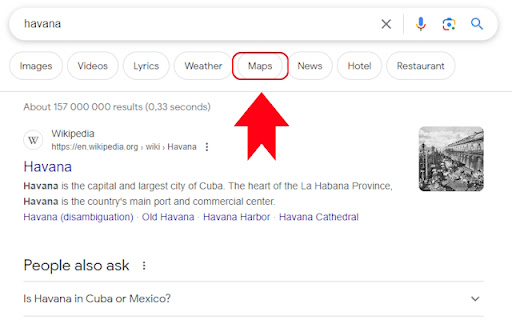
A browser extension that re-adds the Google Maps link to searches. Since EU passed the The Digital Markets Act (DMA), Google Search is no longer allowed to redirect the user (in the EU) to locations on Google Maps. This extension adds that functionality back. Find stores, restaurants, cities, countries etc. on the map by searching for them, just like you were able to do before the law change.

Google Scholar Button
Lookup scholarly articles as you browse the web. This extension adds a browser button for easy access to Google Scholar from any web page. Click the Scholar button to: - Find full text on the web or in your university library. Select the title of the paper on the page you're reading, and click the Scholar button to find it. - Transfer your query from web search to Scholar. Press the Scholar button to see top three results; click "full screen" at the bottom of the popup to see them all. - Format references in widely used citation styles. Press the quote button below the result to see a formatted reference and copy it into the paper you're writing. - Save the article to your Scholar library, so you can read it or cite it later. Press the blue star below the result to save it, or the gray star at the bottom to see all saved articles. Library links work best when you're on campus. To configure them for off-campus use, visit Google Scholar Settings at https://scholar.google.com/scholar_settings (you may need to login with your library password or to set up your browser to use a library proxy; please visit your library's website or ask a local librarian for assistance). To search the US case law, click the gear icon at the bottom of the popup, and configure your preferred collection in Google Scholar Settings. By installing this extension, you agree to the Google Terms of Service and Privacy Policy at https://www.google.com/intl/en/policies/.

Calendar 2026
Calendar 2026 is a browser extension that gives you quick access to google calendar With this extension, you will be able to: 🚀 Open the calendar with just one click on the extension icon, without leaving your current tab. 🌟 Enjoy a minimalist design that doesn't distract you from your tasks. 📆 See the current day at a glance, so you can check your schedule and plans. 🌎 Use the calendar in the language and format that is convenient for you, depending on your browser settings. Calendar 2026 is an extension for anyone who wants to have their personal calendar at hand. This extension is suitable for those who: 💻 Spend a lot of time in the browser, working, studying, entertaining, or exploring the internet. 🗓 Follow a schedule and want to be organized and productive. 🕊 Love minimalism and simplicity in everything. 🗂 Want to remember what day of the week it is or what the date is. Calendar 2026 is not just a calendar, but your personal assistant that will always remind you of what and when needs to be done. In the future, we plan to add even more features and capabilities to this extension, such as: 📝 Todo list, so you can add your tasks and reminders to the calendar and mark them as completed. 📲 Integration with Google Calendar and Apple Calendar, so you can sync your calendar with other apps and services you use. 🎂 Ability to add birthdays and reminders for them, so you never forget important events and holidays. 🌙 Night mode that automatically changes the calendar colors based on the time of day to reduce eye strain. 🌐 Calendar synchronization with other devices and services, so you always have access to your schedule no matter where you are. 📊 Statistics and analytics that show how you allocate your time, which tasks you complete or skip more often, and what goals you achieve. 🎁 Bonuses and rewards that motivate you to accomplish your plans and lift your mood. For example, you can earn points, medals, badges, or discounts for completing a certain number of tasks or goals. In addition, in the future, we want to make the calendar even more interesting and useful by adding integrations with various apps and services, such as: 📧 Gmail, so you can receive notifications about new emails, events, and tasks right in the calendar. 📚 Wikipedia, so you can learn interesting facts and events related to the selected date. 🎮 Steam, so you can see which games you and your friends played on a specific day. 🌤 Weather services, so you can see the weather forecast for the selected date and location. 🎫 Booking services, so you can plan your trips, hotels, tickets, and other services. 📰 News websites, so you can stay up to date with current events and topics that interest you. 🎨 Design services, so you can get inspiration and ideas for your creative projects. Calendar 2026 is not just a calendar, but a whole world of possibilities waiting for you. Install this extension today!

Search the current site
Search any site you're on by the simple click of a button. The search is done not only on the 1 page you are viewing as [Ctrl]+[F] does but instead Google is used to "site search" within ALL pages of the site. How to customize: Right-click the 🔍 "Search this site" button, then click "Options". See second screenshot above for what options are available. If you find the extension useful, you can leave me a tip if you want: ko-fi.com/tschmidbauer Want the same functionality for searching websites in Firefox? Install the "Site Searcher" add-on from https://addons.mozilla.org/addon/site-searcher/

Award Travel Finder - Points & Miles on Google Flights
Award Travel Finder is a browser extension that displays the miles & points needed for flights searched on Google Flights. Smart Redemptions: Your Ultimate Flight Reward Companion Smart Redemptions is a powerful Chrome extension designed for savvy travelers, frequent flyers, and points enthusiasts. This must-have tool revolutionizes your flight search experience on Google Flights by instantly displaying miles and points information for a wide range of airline loyalty programs and their partners. Comprehensive Miles & Points Display: View redemption rates for multiple loyalty programs directly on Google Flights results, including: - Partner Airline Coverage: Access redemption information for oneworld, SkyTeam, and Star Alliance partners, maximizing your reward options. - Smart Recommendations: Receive instant advice on whether to use points or cash for your flight, helping you make informed decisions. - Taxes and Fees Breakdown: See the full cost of your redemption, including taxes and carrier-imposed surcharges. - Earning Potential: Discover how many points and tier points you'll earn when purchasing flights with cash. - Peak/Off-Peak Calendar: Easily identify peak and off-peak travel dates to optimize your redemptions. - Multi-Airline Support: Compatible with 70+ airlines across major alliances and independent carriers. Whether you're a points collector, a frequent business traveler, or planning your dream vacation, Smart Redemptions is your go-to tool for maximizing the value of your miles and points. Say goodbye to the hassle of cross-referencing multiple websites and award charts – Smart Redemptions brings all the information you need right to your Google Flights search results. Download Smart Redemptions today and unlock the full potential of your travel rewards!
