
ldipcbpaocekfooobnbcddclnhejkcpn
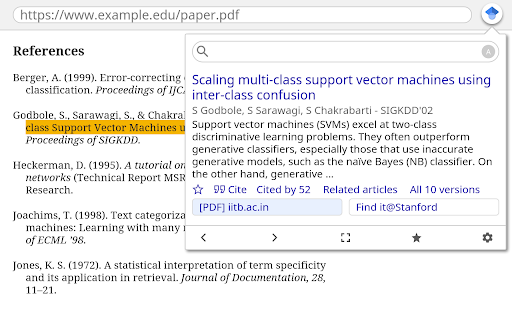
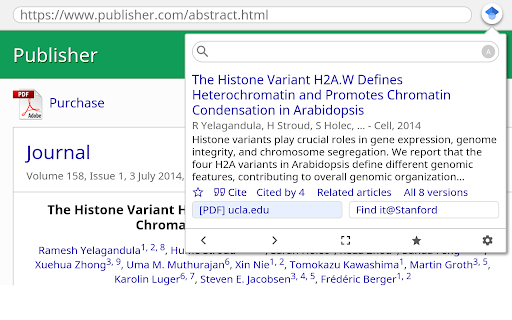

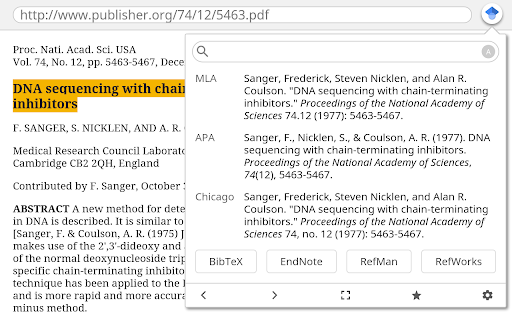
Lookup scholarly articles as you browse the web. This extension adds a browser button for easy access to Google Scholar from any web page. Click the Scholar button to: - Find full text on the web or in your university library. Select the title of the paper on the page you're reading, and click the Scholar button to find it. - Transfer your query from web search to Scholar. Press the Scholar button to see top three results; click "full screen" at the bottom of the popup to see them all. - Format references in widely used citation styles. Press the quote button below the result to see a formatted reference and copy it into the paper you're writing. - Save the article to your Scholar library, so you can read it or cite it later. Press the blue star below the result to save it, or the gray star at the bottom to see all saved articles. Library links work best when you're on campus. To configure them for off-campus use, visit Google Scholar Settings at https://scholar.google.com/scholar_settings (you may need to login with your library password or to set up your browser to use a library proxy; please visit your library's website or ask a local librarian for assistance). To search the US case law, click the gear icon at the bottom of the popup, and configure your preferred collection in Google Scholar Settings. By installing this extension, you agree to the Google Terms of Service and Privacy Policy at https://www.google.com/intl/en/policies/.

OneScholar
【OneScholar】超级好用的学术科研插件,全方位提高科研工作者的科研效率,支持显示详细文章信息、期刊等级信息、大学分类排名信息、网页翻译、文章引用等功能(原 SciHub Addon) 原名 SciHub Addon,详情请访问:https://www.scigreat.com/info/onescholar 功能介绍: ✅【多种文献数据库】 完美支持 Sci-Hub、Library Genesis、Unpaywall、PubMed、ResearchGate 等多种文献数据库。 ✅【翻译功能】 1、支持多种翻译引擎服务,包括 BY、HS、GG、RS、YX 等。 2、支持自定义翻译引擎,如 OpenAI、Gemini、DeepSeek、百度翻译、有道翻译 等十多种第三方翻译引擎。 3、翻译时,先选中文字,按 T 即可翻译,按 Y 删除翻译(快捷键可更换) ✅【文献引用】 1、支持文献引用功能(包括 RIS、BibText、Endnote、Mendeley、GB/T 7714、ACS、AMA、APA 等) 2、部分文献引用(ris/enw)导入 Endnote 时,可以自动同时下载文献 PDF 并导入 Endnote。 3、部分文献引用时,可以将文献在线快捷导入 Mendeley 网页版(需提前登录 Mendeley 账号) 4、部分文献引用时,可以将文献在线快捷导入 Zotero 软件中。 ✅【学术不端检测】 1、支持 PubPeer 检测学术不端行为,若存在记录可点击 PubPeer 图标查看详细情况。 2、支持中科院 Amend 学术论文预警系统检测学术不端行为。 3、支持通过 Retraction Watch 查看文章具体的撤稿信息。 ✅【PubMed 特殊支持】 支持 PubMed 期刊缩写匹配、显示详细引用信息、快捷查看文章摘要、网站筛选功能。 ✅【文章被引量】 支持显示文章在 谷歌学术 、CrossRef、Semantic Scholar、PubMed、OpenAlex 上的被引用数量。 ✅【显示文章信息】 1、点击插件图标可获取详细文章信息,如 IF 影响因子、分区、引用次数、文章网页、PDF 等,点击 PDF 图标可下载 PDF 或者跳转到文章页。 2、支持 知网、谷歌学术 (镜像)、PubMed、WOS、Aminer 等上千种学术网站显示详细文章信息(网页存在 DOI / PMID / PMCID 即可) 3、支持部分文献 AI Summary 功能,基于 GPT NLP 技术生成简短的论文摘要。 ✅【文章筛选排序】 支持 PubMed、谷歌学术、百度学术、Science Direct 等 50 多个学术站点文章搜索界面按 IF 影响因子、JCI 引文指标、JCR 分区、新锐分区、新锐分区 Top 期刊、Review 期刊、引用次数、发表年份 等进行筛选排序。 ✅【显示大学分类排名】 支持 CNKI、万方、百度学术、谷歌学术 等 100 多个学术站点显示 985工程、211工程、双一流、C9 联盟、E9 联盟 等大学分类情况,以及 QS、US News、泰晤士、软科 等世界大学排名情况。 ✅【显示期刊等级】 1、支持显示 JCR 分区、影响因子、新锐分区(原中科院分区)、EI 工程索引、CSSCI(南大核心)、北大中文核心 等 180 多个期刊数据库收录索引情况。 2、支持 知网、百度学术、谷歌学术、Web Of Science、PubMed 等 400 多个学术站点显示期刊详细等级信息。

NoteExpress网络捕手
从浏览器一键保存文献到NoteExpress!NoteExpress帮助您高效地收集、管理、分析和引用文献,本插件需要配合NoteExpress文献管理工具使用。 从浏览器保存文献到NoteExpress!帮助您快速地收集文献…… 需要配合NoteExpress使用,仅支持Windows系统……

Lazy Scholar
Academic research assistant - find full-text PDFs, citations, and analyze papers Lazy Scholar automatically detects scientific articles as you browse and provides instant access to full-text PDFs, citation and journal metrics, research integrity checks, and much more: FIND FULL-TEXT ACCESS Stop hitting paywalls. Lazy Scholar searches multiple sources simultaneously: • PubMed Central (PMC) - Free official versions • Europe PMC - Open access and author manuscripts • Open Access repositories • Direct PDF links CITATION METRICS AT A GLANCE • Citation counts from Google Scholar, OpenAlex, and Semantic Scholar • Influential citations - papers that heavily cite this work • Citation percentile - see how this paper ranks in its field • Web attention - mentions on Reddit, Twitter/X, Wikipedia, news, and blogs • Related papers recommendations RESEARCH INTEGRITY • Retraction alerts - know immediately if a paper was retracted • Expression of Concern notices • Published corrections and errata • Preregistration detection • PubPeer comments - post-publication peer review • Hypothesis annotations SIDEBAR ANALYSIS PANEL • References tab - view all citations, verify they exist, check for retractions • Outline extraction - automatic section parsing (Abstract, Methods, Results, etc.) • Data & code links - find supplementary materials and repositories • Statistical extraction - p-values, confidence intervals, test statistics CONVENIENCE FEATURES • Right-click to search Google Scholar or PubMed • Omnibox search - type "ls" then your query • One-click PDF download PERFECT FOR • Graduate students and postdocs • Faculty and researchers • Librarians and information specialists • Science journalists • Anyone reading academic literature

CCFrank
Displays CCF recommended rank of conferences/journals in dblp, Google Scholar, Connected Papers and WoS. 此扩展程序会添加一个网页标记,以便用户可以从 dblp、Google 学术、Connected Papers、Semantic Scholar 和 Web of Science 轻松查询学术文章的类别(即其在《中国计算机学会推荐国际学术会议和期刊目录》2022年拟定版(2022年12月)中的类别)。CCFrank 可执行以下操作: - 在 dblp 的 publication、person、conferences 和 journals 搜索结果中标记论文的类别;适配 dblp 各镜像站点。 - 在 Google 学术的 articles 和 author 搜索结果中标记论文的类别;适配 Google 学术各镜像站点; - 在 Connected Papers 的搜索结果中标记论文的类别。 - 在 Web of Science 的搜索结果中标记论文的类别。 - 在 Semantic Scholar 的 search results、citations 和 references 中标记会议和期刊论文的类别。 您的 Star 是我更新的动力
