
laglffdpopjblbaombmlldhkofaaelbc
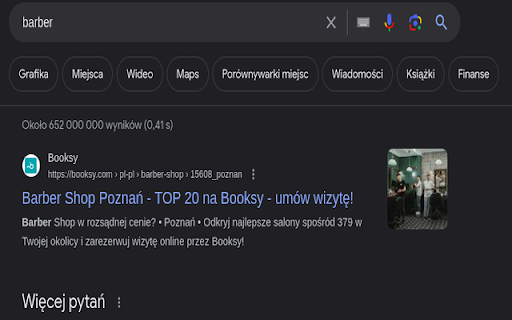
restores the google maps button to google search Restore the seamless integration of Google Maps with your Google Search experience using the 'Return Google Maps Search' extension. This lightweight extension brings back the familiar Google Maps button to your Google Search results, providing you with quick and direct access to location information. Never miss a beat when searching for places, businesses, or addresses. With the 'Google Maps Search Restorer,' effortlessly navigate from your search results directly to Google Maps, gaining instant access to detailed maps and directions. Reintroduces the Google Maps button to Google Search results. Simplify your online navigation and exploration by adding the Google Maps Search Restorer extension to your browser. Save time and enjoy the convenience of having Google Maps readily available whenever you perform a search.

Search the current site
Search any site you're on by the simple click of a button. The search is done not only on the 1 page you are viewing as [Ctrl]+[F] does but instead Google is used to "site search" within ALL pages of the site. How to customize: Right-click the 🔍 "Search this site" button, then click "Options". See second screenshot above for what options are available. If you find the extension useful, you can leave me a tip if you want: ko-fi.com/tschmidbauer Want the same functionality for searching websites in Firefox? Install the "Site Searcher" add-on from https://addons.mozilla.org/addon/site-searcher/

Download Images for Google Search
This extension helps by implementing the Google Images' "View Image" button. Adds a 'View Image' button back to let users view the image in a new chrome tab. It restores the "View Image" button to Google Image Search™ results again. When you select an image, you may choose to download or view the image. These additional buttons will appear next to the usual buttons. Google Search is a trademark of Google Inc. The use of the trademark is subject to Google’s permission. This extension is neither endorsed by or affiliated with Google.

Meters to Yards for Google Maps
The Google Maps "Measure distance" tool is great, and this extension makes it even better. Made especially for golfers that don't rely on meters, you'll now be able to see distances in yards. How to Use the Extension: 1. Open Google Maps. 2. Right-click anywhere on the map and select “Measure distance.” 3. Click on the map at least twice to plot your points. 4. Continue adding points along the golf hole — the white distance box at the bottom will automatically display the converted distance in yards. Note: The extension only converts line distances (not area). It won’t display conversions for closed loops (when the first and last point overlap). Distances equal to or greater than 1 km won’t be converted. Need help? Watch the tutorial here: https://youtu.be/wa0DmiOIH60 If you're having problems with the extension, please email me at meterstoyards@gmail.com.

Google Search to Youtube Redirector
Simple browser extension to redirect YouTube videos being opened embed in Google Search to YouTube directly. Supports opening in a new tab and go back to Google Search with the back button. In addition, the extension also adds a YouTube button on the Google Search results page, allowing you to quickly and easily redirect your search query to YouTube. No configuration needed, just install and enjoy ! This project is entirely open source and can be found here : https://github.com/Drarox/GoogleYoutubeRedirect
