
miiikpjlpidgkblngfgmlejalodkeomj
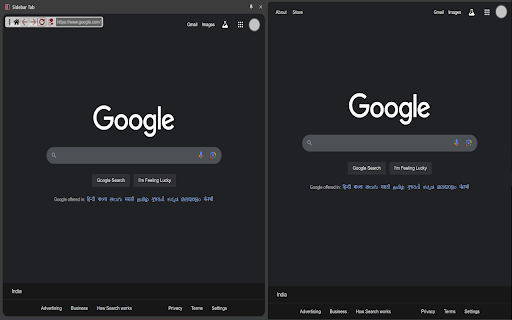


Give your browser a new window! Give your browser an extra tab! Open and navigate websites directly within a sidebar, enabling seamless dual-panel browsing and productivity boosts. Take your browsing to the next level with Sidebar Tab! Designed for multitaskers, developers, and efficient web users, this extension provides a robust sidebar for browsing websites, navigating content, and managing shortcuts—all while keeping your main browsing experience uninterrupted. Key Features: Open Any Website in the Sidebar: Easily load any HTTP/HTTPS website and navigate directly within the sidebar. Custom Navigation Bar: Includes buttons to go back, forward, or to the home page, plus a toggle to switch between desktop and mobile views. Keyboard Shortcuts for Efficiency: - Refresh Navigation Bar: Shift + Alt + M - Open Sidebar Tabs Outside (Background): Ctrl + Click* - Open Sidebar Tabs Outside (Foreground): Alt + Click* - Copy the current URL to clipboard: Click* - Toggle Address Bar display: Double Click* vertical ellipsis icon * - Click on the URL bar in navigation menu. Quick Search Integration: Select text and search with six pre-configured search engines directly within the sidebar. Search easily from the input field or the context menu. Dynamic Shortcuts: Add custom links to the sidebar for instant access to your favorite or frequently used websites. Flexible Bookmark Access: Open any bookmark directly in the sidebar via the context menu. Address Bar Integration: Open the current tab in the sidebar instantly with a single click. Contextual Tab Opening: Click anywhere on a page and open that link directly in the sidebar via the context menu. Why Choose Sidebar Tab? Whether you’re researching, testing web layouts, or managing multiple tabs, this extension enhances your multitasking potential by enabling a split-view experience. Toggle desktop or mobile views, copy URLs, or customize navigation—all designed to streamline your workflow and productivity. Perfect For: Web developers testing responsive designs. Content creators managing multiple sources simultaneously. Professionals who need quick access to frequently used sites or tools. Anyone who loves an organized, multitasking browsing experience! Access Bookmarks: To enable sidebar bookmark navigation. Access Active Tab: For opening active tabs in the sidebar. Access Browser Context Menu: For enabling the "Search in Sidebar" and "Open in Sidebar" options. Network Requests: For enabling the mobile view of websites. Access to websites: For showing the navigation bar. Get Started Now: Download Sidebar Tab today and unlock the power of multitasking with your browser. DISCLAIMER: The Google logo displayed in the extension's interface is not affiliated with or endorsed by this extension. It is used solely for demonstration purposes to showcase the dual-pane functionality (Sidebar Tab) by featuring the Google Search Engine's homepage. Any brand logo and/or icon with respective name is displayed in screenshot above for demonstration purpose only and has no affiliation to the developer or Sidebar Tab. All copyrights and trademark rights are reserved to their respective owners. Update v1.0.2 Added settings for changing default behaviour of navigation bar inside pages open with sidebar tab. Option to: - Disable Navigation Bar - Change position to show at the bottom of page. - Show minimized version of Navigation bar, which expands on hover. - UI Redesign... - Added option to hide link action (edit/delete) button until hovered over the link... - Added option to show URL along with the link title... - Drag and Drop to reorder shortcut links... - Select multiple links to delete at once... - Drag and drop link on empty area to visit link... - Drag and drop link to ADD + button to add link to shortcut. Dragging link over top half of button will add link to start of shortcut link and end half will add link to end of list... - Drag and drop link on Location hint in navigation bar to visit the dropped link page... NOTE: ⚠️ Chrome is actively evolving its extension APIs. While the extension is working now, occasional compatibility shifts may occur.

Anything Sidebar: All-in-One, AI, Bookmarks, Vertical Tabs
All-in-One Sidebar: Chat with AI, browse, search & translate. Features vertical tabs, bookmarks & multi-tab. Ultimate productivity. Anything Sidebar: Your AI-Powered Multitasking Command Center. Stop switching tabs. Start working smarter. Anything Sidebar transforms your browser into a powerful, flexible workspace, putting AI chat, web pages, vertical tabs, and bookmarks right at your fingertips. 🚀 Three Core Pillars to Revolutionize Your Workflow 1. Always-On AI Command Center 💡 Integrated AI Power: Keep your favorite AI models—like ChatGPT, Gemini, and Claude—open and accessible 24/7. Ask questions, draft content, or compare answers instantly in the sidebar without interrupting your main workflow. Instant Query: Your AI sidekick is always a click away, ready to assist with research, coding, or brainstorming on any page you visit. 2. Universal Sidebar & True Multitasking 🧩 Vertical Tabs & Bookmarks Mastery: Manage dozens of tabs efficiently with scrollable Vertical Tabs. Access and search all your Bookmarks instantly, keeping your main browser clean. Open Nearly Any Website: Use the sidebar to load virtually any web page (e.g., social feeds, docs, calendars) for a true split-screen experience alongside your main window. 3. Full Control & Quick Search 🔍 In-Page Interaction: Utilize powerful content scripts to interact with the sidebar content, enabling actions like searching within the loaded page, zooming, and providing context-specific assistance for your main tab. Integrated Search Engines: Perform Google, Bing, and other searches directly within a dedicated sidebar tab, keeping your research organized and fast. ✅ Add to Browser and Start Exploring Now Lightweight & Fast: Won't slow down your browsing experience. ⚡ Completely Free: Install and unlock your new workflow. 🎉

Page Sidebar | Open any page in side panel
Effortlessly open any website in your web browser's sidebar – streamline your workflow instantly! Are you tired of constantly switching between tabs while working or browsing the web? With the Page Sidebar browser extension, you gain instant access to a customizable sidebar that allows you to effortlessly drag and drop your favorite websites and view them side by side. Streamline your workflow, eliminate unnecessary tab-switching, and take control of your online experience today! The Page Sidebar is a lightweight and useful add-in designed to elevate productivity. With this tool, you can effortlessly drag and drop your favorite websites into the sidebar, creating a convenient hub for quick access. Moreover, when you drag a highlighted text into the sidebar, it will automatically search for that keyword in your favorite search engine. No need to open new tabs or interrupt your workflow – the information you need is right at your fingertips in the sidebar. Browser extension features: ◆ Browsing Experience: Open any webpage seamlessly with a robust web browser sidebar view. Whether reading a Wikipedia article, watching a YouTube video, write in a text editor, coding, split-view your calendar, translating a word, shopping, or responding to emails, enhance your browsing experience, ChatGPT, Gemini, Claude, Microsoft Copilot, or any other AI conveniently accessible in the sidebar, etc. ◆ Multi-Tab Sidebar Easily open and manage multiple pages within a single sidebar. For example, open Notion, Todoist, Trello, and Google Translate, and effortlessly switch between tabs. ◆ Prevent Accidental Tab Closure Enable a warning to prevent tabs from closing accidentally when you click the "x" icon. ◆ Context Menu Access the context menu by right-clicking to seamlessly open any link in the side panel. And selected text to open the side panel search page. ◆ Pinned Side Panel: The side panel remains open until you choose to close it, allowing for convenient reference and effortless page comparison within a single window. ◆ Drag and drop: Easily drag and drop links and text for efficient navigation. ◆ First Page: Customize the initial home page displayed in the side panel for a tailored browsing experience. ◆ Navigation Bar: - The home button to reset the view with a single click to the default page or your custom home page - Utilize the search box in the navigation bar for quick URL tracking, with search terms automatically using the default search engine. Additionally, paste URLs directly into the search box to open websites in the side panel, streamlining your browsing workflow. - Designate the position of the navigation bar at the top, bottom, or hidden for a personalized interface. ◆ Customizable Search Engine: Enjoy customizable search engine options, including Google, Bing, DuckDuckGo, Baidu, and Yandex. ◆ Custom Toolbar Icon: Select your preferred toolbar icon in either light or dark mode, adapting to your visual preferences. ◆ Resizable Side Panel You can adjust the width of the side panel by grabbing the edge, either increasing or decreasing its size. ◆ Define custom keyboard combinations to activate the sidebar swiftly ◆ Support for Dark Mode Project Information: https://www.stefanvd.net/project/page-sidebar/browser-extension/ Required Permissions: ◆ "contextMenus": Add a context menu to instantly open the side panel. ◆ "sidepanel": Allow the website to be visible in the side panel. ◆ "storage": Save settings locally and sync with your web browser account. ◆ "declarativeNetRequestWithHostAccess": Allow all websites to be viewed in the side panel. Note: CSP headers have been customized to allow this page to be viewed in the sidebar. >> Unlock an option feature to protect your eyes at night and focus on the video player, such as YouTube™, by installing Turn Off the Lights browser extension for YouTube and Beyond. https://chromewebstore.google.com/detail/turn-off-the-lights/bfbmjmiodbnnpllbbbfblcplfjjepjdn

Open in Sidebar
Drop any link to the sidebar for dual-pane access The "Open in Sidebar" extension revolutionizes browsing by allowing you to load any webpage in a convenient sidebar view. Access web content while reading without switching tabs with a click or keyboard shortcut. Drag and drop links or use the built-in address bar for seamless navigation. Enhance productivity by opening online tools like text editors or dictionaries in the sidebar. Reset the view with a single click or load new pages by pasting URLs. Note that some pages with CSP headers may have limitations, but future updates aim to address these. Features: Loads any webpage in a convenient sidebar view Activate the sidebar with a click or assigned keyboard shortcut Drag and drop links or use the built-in address bar for seamless navigation Access web content while reading without switching tabs Enhance productivity by opening online tools like text editors or dictionaries in the sidebar Intuitive interface with an address bar for easy URL tracking Reset the view with a single click Load new pages by pasting URLs into the address bar Search for dropped text with your preferred search engine (e.g. Google, Bing, or DuckDuckGo) Supports split view (two panes)

QuickAccess Sidebar
Customizable sidebar to open Gmail, ChatGPT, WhatsApp and any custom URL. Add icons, set shortcuts, and stay focused. New Features: 🌙 Dark Mode: Toggle between light and dark themes 📍 Position Control: Move sidebar to left or right side ⏰ Auto-Hide Toggle: Keep sidebar always visible or auto-hide ⚙️ Settings Panel: Easy access to all customization options *Please restart the browser once so the sidebar loads on all tabs* *You will see the sidebar only when you take the cursor to the left edge of the screen or if you use any shortcut* *To edit shortcuts, go to chrome://extensions/shortcuts* QuickAccess Sidebar is a lightweight, customizable sidebar for quick access to your most-used web tools. Features: - Up to 10 configurable shortcuts - Custom icons - Keyboard shortcut support - Persistent across sessions - Auto-collapses after opening - designed to stay out of your way 📌 Notes: - All shortcuts are opened as pinned tabs within the browser. There is no option within chrome for opened tabs to not show up as a tab - To edit shortcuts, go to: `chrome://extensions/shortcuts` - The sidebar collapses automatically after use. This is intentional - loading websites inside the extension frame causes compatibility issues. We’ve optimized for a smooth, unobtrusive experience.
