
gicelbgejdlljbdpnoddmookdbeigcbl
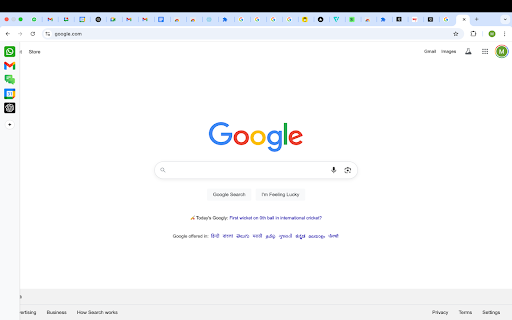
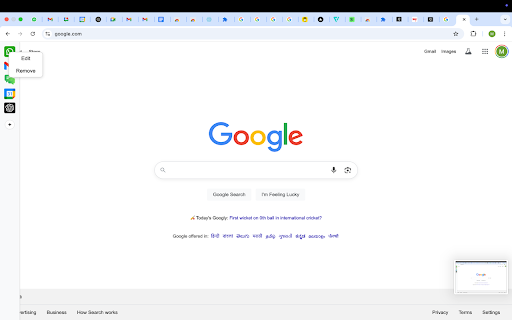

Customizable sidebar to open Gmail, ChatGPT, WhatsApp and any custom URL. Add icons, set shortcuts, and stay focused. New Features: 🌙 Dark Mode: Toggle between light and dark themes 📍 Position Control: Move sidebar to left or right side ⏰ Auto-Hide Toggle: Keep sidebar always visible or auto-hide ⚙️ Settings Panel: Easy access to all customization options *Please restart the browser once so the sidebar loads on all tabs* *You will see the sidebar only when you take the cursor to the left edge of the screen or if you use any shortcut* *To edit shortcuts, go to chrome://extensions/shortcuts* QuickAccess Sidebar is a lightweight, customizable sidebar for quick access to your most-used web tools. Features: - Up to 10 configurable shortcuts - Custom icons - Keyboard shortcut support - Persistent across sessions - Auto-collapses after opening - designed to stay out of your way 📌 Notes: - All shortcuts are opened as pinned tabs within the browser. There is no option within chrome for opened tabs to not show up as a tab - To edit shortcuts, go to: `chrome://extensions/shortcuts` - The sidebar collapses automatically after use. This is intentional - loading websites inside the extension frame causes compatibility issues. We’ve optimized for a smooth, unobtrusive experience.

Bring ChatGPT & Claude to Every Text Box | Clico
Clico brings AI directly into Google Docs, Gmail, and every text box, so you can work faster without switching tabs. Use AI like ChatGPT and Claude directly in Gmail, Google Docs, and anywhere you write. Stop switching tabs and copying text into AI chatbots. Clico brings AI into your existing workflow with full context, instant access, and one shortcut across every website. HOW IT WORKS Press ⌘+O (Ctrl+O on Windows) inside any text field to open the inline AI dialog. Describe what you want, whether that's a reply, a draft, or a rewrite, and it generates right where your cursor is. The page you're on is read automatically, so context is already understood. No setup required. FOUR SHORTCUTS TO REMEMBER ⌘+O (Ctrl+O) : Open in any text field Double tap ⌘ : Summarize the current page Hold ⌘ : Voice input (release to send) Highlight text : Instant AI powered search GET STARTED FREE No account is required to start using Clico. You can use it free up to 5 times per day, forever. If you sign in, you unlock unlimited writes, access to model selection, and your personal writing history. POWERED BY LEADING AI MODELS Clico uses top AI models to help you write better wherever you work. If you sign in, you can choose the model you want. If you’re using it as a guest, Clico will automatically pick a strong default for you. WRITE, REWRITE, AND REPLY ANYWHERE Draft emails without the blank page stare. The full thread is read and a reply that fits the conversation is generated instantly. Works as your personal email assistant and reply generator. Write social media posts and replies in seconds. Describe the angle, and the draft appears in the native composer. Great for content creation and quick comment replies. Continue writing in any editor or document tool. It picks up where you left off and matches your voice. Use it as a text generator, paragraph expander, or brainstorming partner. Rewrite and improve selected text. Highlight a sentence, press the shortcut, and ask for it to be shorter, more formal, or clearer. Think of it as a paraphrasing tool that works everywhere you type. Fix grammar and polish your writing. Proofread, correct errors, and improve clarity across any text field. A grammar checker and writing improver built into your browser. SUMMARIZE AND SEARCH WITHOUT SWITCHING TABS Summarize any webpage or PDF instantly. Double tap ⌘ to get key points, takeaways, and action items from whatever you're reading. Search without leaving the page. Highlight any text or image to get an AI powered explanation and web search summary. No new tab needed. Stay in your reading flow. VOICE INPUT Hold ⌘ to speak, release to send. Real time transcription with waveform visualization. Reply, draft, or message without touching the keyboard. A voice to text tool built right into your browser. WORKS ON EVERY WEBSITE It activates in any text field on any website. Your email client, document editors, social platforms, messaging apps, project management tools, and more. If there's a text box, it works there. See our website for the full list of tested platforms. WHY THIS INSTEAD OF CHATGPT IN A TAB ChatGPT doesn't know what page you're on. You spend half your time re explaining context. Unlike standalone AI chatbots, Clico understands the page you're already on. Email threads, documents, posts, highlighted text, and surrounding context are automatically included, so responses are relevant from the start. WHY THIS INSTEAD OF OTHER WRITING EXTENSIONS Most AI writing extensions only work in specific apps or require complex setup. This works on every website, activates with one shortcut, and includes voice input, page summarization, sentence rewriting, paraphrasing, and highlight search. BUILT FOR Writers, marketers, students, freelancers, founders, support teams, and anyone who types in a browser. FREE TO USE Install and start writing immediately. No API key, no configuration, no credit card. Works on all Chromium based browsers. Dark mode included. PRIVACY Your data stays yours. We do not sell your data to third parties or use it for purposes unrelated to the core features.

Gmail Settings Extender
Bookmark mails and start compose in chrome-like tabs, add custom rich-text editor, auto add CC/BCC, reverse conversations and more.. Version 4.6: -Added an option to always show attachments on top of the mail body. Version 4.5: -Fixed the new Google AI assistant is not working on tabbed compose window. -Fixed the compose window is not auto scrolling after adding new line. -Added an option to auto show CC or BCC list separately. By default, Gmail doesn't allow dragging mails outside the opened window, so you'll not be able to download your mails or transfer them as attachment to another browser window or tab, unless you download them manually from mail menu. Also, you can't drag an attachment from any opened mail and drop it into the compose window as attachment, the same when you need to transfer this attachment to another account opened in another browser window. By using this extension, you'll be able to drag attachments directly to any opened compose window, you'll notice a download mail button which is draggable to your file system, or to compose window, or even to another browser tab, you'll get another button which will move the attachment section to top. To make it easy for you to reply or forward mails, this extension adds action buttons and moves the inline compose view to top. A new tab bar will change the look of Gmail and will allow composing mails in new tabs inside the same window, or add mails as chrome like bookmark tab. For those who are using a delegated Gmail accounts and looking for a way to auto change the signature without being forced to select it manually on each compose or change it from the main settings, this extension adds an option to do it for you, just enter the name of the signature from the main settings and the account you are delegated access to and it will be selected automatically. That's it!. add this extension to your browser now and enjoy. wanted scrolling area.

Chat Collapse & Outline for ChatGPT, Gemini, Claude
Automatically generate a Table of Contents and collapse long responses for ChatGPT, Google Gemini, and Claude. Take control of your long AI conversations. Do you find yourself scrolling endlessly through long chat threads? AI Chat Collapse is the ultimate productivity tool for power users of ChatGPT, Google Gemini, and Anthropic Claude. It brings organization and structure to your AI interactions, making it easier to review, navigate, and manage long discussions. 1. Collapsible Responses Instantly declutter your chat. A sleek, Reddit-style vertical bar is added to every AI response. Click to Collapse: Hide long answers you’ve already read. Click to Expand: Bring them back when you need them. Visual Focus: Keep your screen clean and focus only on the active part of the conversation. 2. Automatic Table of Contents (TOC) Never lose your place again. The extension automatically detects your questions and builds a floating Table of Contents. Quick Navigation: Click any item in the list to instantly smooth-scroll to that specific message. Live Updates: The TOC updates in real-time as you continue your conversation. Highlighting: The selected message briefly highlights so you know exactly where you are. 3. Bulk Controls Collapse All: Instantly minimize every response to see a high-level overview of your entire conversation history. Expand All: Open everything back up with a single click. 4. Native Design The interface is designed to blend perfectly with each platform. It supports Dark Mode and Light Mode automatically based on your system settings, ensuring it looks like a native feature. ⚙️ Customization: Use the popup menu to easily enable or disable the extension for specific platforms without uninstalling. Privacy Focused: This extension works 100% locally on your browser. It does not collect, store, or transmit your chat data to any external server.

Radial New Tab
Wallpapers, shortcut grid and folders, web/AI access (ChatGPT/Gemini temp chats), floating quick access anywhere. Radial New Tab transforms your start page into a personalized command center for productivity. YOUR DASHBOARD, YOUR WAY - Customizable wallpapers with blur, brightness, and positioning controls - Organize your go-to sites in a clean grid with folders - Drag-and-drop arrangement for quick access - Automatic icon fetching plus custom icon support - Access ChatGPT, Gemini, and other AI assistants directly - Temporary chat support for private AI conversations - Floating quick-access bar on any webpage (toggle with keyboard shortcut) - Right-click any text for instant actions - Keyboard shortcuts for power users Your layout and preferences sync so your setup stays consistent across sessions. Shortcuts, AI tools, and quick access—all in one clean dashboard.
