
fogdlfdfpjlpmpmnmeepffaikefkacnc


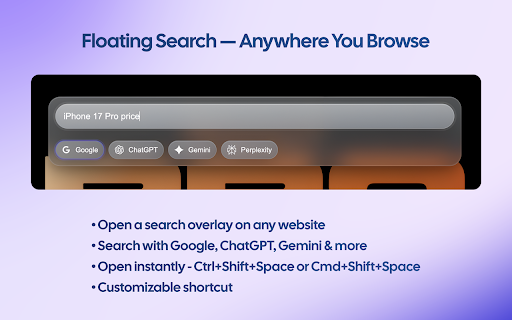


Wallpapers, shortcut grid and folders, web/AI access (ChatGPT/Gemini temp chats), floating quick access anywhere. Radial New Tab transforms your start page into a personalized command center for productivity. YOUR DASHBOARD, YOUR WAY - Customizable wallpapers with blur, brightness, and positioning controls - Organize your go-to sites in a clean grid with folders - Drag-and-drop arrangement for quick access - Automatic icon fetching plus custom icon support - Access ChatGPT, Gemini, and other AI assistants directly - Temporary chat support for private AI conversations - Floating quick-access bar on any webpage (toggle with keyboard shortcut) - Right-click any text for instant actions - Keyboard shortcuts for power users Your layout and preferences sync so your setup stays consistent across sessions. Shortcuts, AI tools, and quick access—all in one clean dashboard.

Tab Monitor
Monitor your tabs and reclaim your RAM. Tab Monitor: Real-Time Resource Management Monitor your tabs. Reclaim your RAM. ======================================= Tab Monitor provides a granular, real-time dashboard of your browser’s performance. Instead of guessing which tab is slowing down your system, see exact RAM and CPU metrics for every open window and terminate resource-heavy processes with a single click. Key Features: ------------------------------------------- * Real-Time Metrics: RAM and CPU usage per tab, refreshed every 3 seconds. * Resource Status: Instant visual feedback using Green (Healthy), Yellow (Warning), and Red (Critical) indicators. * Focus Mode: Whitelist specific tabs and block new distractions for a set duration. * Bulk Management: "Clear the Room" allows you to close all critical resource hogs simultaneously. * Safety Net: Automatic session saving every 5 minutes to prevent data loss during crashes. * Privacy-Centric: All metrics stay 100% local. No telemetry, no tracking, and no account required for core features. Tab Monitor PRO: ------------------------------------------- * Customizable Focus Mode * Grid View - get an overview of your tabs in a new way * More back-up sessions in cause of browser crash * Automated Suspensions: Automatically offload inactive, high-RAM tabs after 10 minutes. * Leak Detection: Smart alerts for tabs with abnormally fast memory growth. * The Parking Lot: Temporarily hibernate tabs and restore them later with full context with reminders if needed. * Custom Thresholds: Set domain-specific limits for "Critical" status alerts. * Advanced Analytics: Trend tracking and memory peak breakdowns by domain. Changelog =============== Update 1.0.9 – May 6 2026 ------------------------------------------------- Functionality: Fixed visual bug on side panel when opening it for the first time. =============== Update 1.0.8 – March 26 2026 ------------------------------------------------- Functionality: Grid view - display your tabs as a grid by pressing ALT + G Localization: Added full language support for Italian, Russian, Chinese (simplified), Japanese and Portuguese. Notifications: Added information notifications to users at given events. Updated Parking lot functionality to allow reminder in the future Onboarding: Added a new welcome.html upon installation to get an overview of the extension functionality =============== Update 1.0.7 – March 20, 2026 ------------------------------------------------- Selective Restore: Added the ability to choose specific tabs to restore from backups rather than a full session overwrite. UI Fixes: Resolved issues with non-responsive buttons in the dashboard. =============== Update 1.0.6 – March 16, 2026 ------------------------------------------------- Localization: Added full language support for French, Spanish, and German. =============== Update 1.0.5 – March 12, 2026 ------------------------------------------------- Security: Refined Supabase authentication permissions; the extension now only requests access to its specific database. Bug Fixes: General stability improvements. =============== Update 1.0.4 – March 9, 2026 ------------------------------------------------- Permission Refactor: Several mandatory permissions are now optional and can be toggled via Settings. Focus Mode 2.0: * Added HH:MM timer support for Pro users. Automatic restoration of the previous tab state upon deactivation. Added manual termination input to prevent accidental deactivation. =============== Update 1.0.3 – March 5, 2026 ------------------------------------------------- Focus Mode: Introduced a 1–60 minute focus timer to restrict browsing to selected tabs. Session Recovery: Added background auto-save (5-minute intervals) for crash protection. =============== Update 1.0.2 – March 3, 2026 ------------------------------------------------- Compatibility: Added official support for Microsoft Edge. UI Updates: Improved authentication flow and fixed missing tab favicons.

Omni Search - Spotlight Tab Search & Tab Manager
The fastest tab manager for Chrome. Search tabs, bookmarks, history & page content. Sort by recent, snooze, find duplicates. Tired of hunting through dozens of open tabs? Omni Search is a fast tab manager that gives you instant access to everything in your browser from a compact popup or a Spotlight-style search overlay. Use the compact popup for quick tab management, or open OmniSearch Spotlight to search without leaving the page you are on. Chrome lets you customize both shortcuts from chrome://extensions/shortcuts, and Omni Search shows the current shortcut status in the popup. Search Prefixes for Power Users Type normally to search open tabs for recently closed tabs for bookmarks @ for history ! to find duplicate tabs ~ to find suspended tabs % to search page content (opt-in) ^ to find snoozed tabs Key Features • Spotlight mode — search tabs, bookmarks, history, and more without leaving the current page • Sort tabs by most recently used — see your active tabs first • Instant fuzzy search with smart ranking • Search page content across all open tabs (opt-in) • Snooze tabs — set reminders to come back later • Duplicate tab detection — find and close redundant tabs • Suspended tab search — quickly find unloaded tabs • Tab groups support with color coding • Full keyboard navigation — never touch your mouse • Copy URLs with one click • Restore recently closed tabs instantly • Light and dark theme support Privacy Focused Omni Search works entirely locally. No data is sent to external servers. Optional content search requires explicit permission and indexes only on your device. Popup shortcut: shown in the popup footer and configurable in Chrome shortcuts Spotlight shortcut: shown in the popup when available, or use Set to configure it Arrow keys / Tab: Navigate results Enter: Switch to selected tab Ctrl+Backspace: Close selected tab Escape: Close popup or Spotlight Perfect for researchers, developers, and anyone who needs to manage tabs efficiently.

Tabs++
Premium tab management with Workspace Switching, Ghost Prevention, and Smart Grouping. Tabs++ v2.2.0 — What's New Pick your search engine Type > search engine in the palette — now you're not stuck with Google. Switch to DuckDuckGo, Bing, Brave, or Perplexity with one click. All your searches from the palette follow your choice. Revert to your browser's normal new tab There's a new Default NTP switch in the popup's Tools tab. Flip it on, and new tabs open your search engine homepage instead of the Tabs++ dashboard. No flash, no jank — instant. Smarter peek windows Auto-peek now knows when not to bother you. It skips search engines, YouTube, Twitter, Reddit, Amazon — sites where popping out links is just annoying. On Wikipedia, docs sites, or articles, it still works like before. Shift+Click peeks anything, anytime. No more duplicate new tabs The extension now keeps just one new-tab page per window. Open Ctrl+T ten times — you stay on one tab instead of piling them up. Settings no longer get lost Fixed a bug where toggling settings in the popup could accidentally reset others. Your preferences stay put now. Tabs++ is a professional, high-performance browser extension that transforms Google Chrome into a persistent, focused workspace with tab protection, workspace management, and 90+ developer-first tools. * Pinned Protection: Auto-recreates closed pinned tabs to baseline URL * Group Guard: Restores closed grouped tabs back into their group * Deterministic Hibernation: Restored tabs use zero RAM until clicked * Session Vault: Automatic backup of closed tabs for recovery * Domain Auto-Grouping: Sorts tabs into Dev, Design, AI, Media, News, Social * Magic Organize: Auto-sort all tabs into domain-based groups * Deduplicate Tabs: Close all duplicate tabs in current window * Gather Standalone: Pull all ungrouped tabs into one group * Merge Duplicate Groups: Consolidate groups with identical names * Consolidate Domain: Group all tabs from same hostname together * Extract Group to Window: Move a tab group into its own window * Group All Tabs: Put all unprotected tabs into one group * Ungroup All Tabs: Flatten all grouped tabs in current window * Close Unprotected Tabs: Remove all unpinned and ungrouped tabs * Close Other Tabs: Close everything except the active tab * Save Workspace as Set: Snapshot current pinned and grouped tabs * Save All Tabs as Set: Capture every tab in the window * Save Group as Set: Store a specific tab group * Launch Set: Open a saved set in a new window * Summon Set: Merge a saved set into the current window * Replace Workspace: Swap current window contents with a saved set * Stash Group: Save a group then close all its tabs * Export/Import Sets: Backup and restore tab sets as JSON * Hibernate Background Tabs: Discard all inactive tabs to free RAM * Hibernate Window: Sleep all background tabs in current window * Hibernate Pinned Tabs: Discard all pinned tabs to reclaim memory * Hibernate Current Tab: Sleep the active tab immediately * Smart Auto-Hibernate: Auto-sleep idle tabs after configurable timeout * Ruthless Clean: Auto-close stale tabs after configurable timeout * Mute Background Tabs: Silence all audible tabs except the current one * Extract Media Assets: Scan and batch download images and videos * Smart Media Filtering: Filter by format, dimensions, ratio, and keywords * Staggered Downloads: Reliable bulk downloads with 150ms spacing * Tab Volume Control: Set current tab audio level (0–100%) * Volume Up/Down: Adjust tab volume by ±10% * Picture-in-Picture: Pop out any video into a floating overlay * Pause All Media: Stop all playing audio and video instantly * Focus View (Reader Mode): Strip distractions for a clean reading layout * Zen Fullscreen: Enter fullscreen with all browser UI hidden * Pomodoro Timer: Focus/Break timers with desktop notifications * Cross-Tab Pomodoro Sync: Timer synced and visible across all tabs * Split View: Tile current and previous tabs side by side * Focus Guard: Redirect to NTP when closing the last tab * Auto-Collapse Groups: Collapse group when all its tabs are hibernated * Toggle Pin: Pin or unpin the current tab * Instant Search: Find open tabs, history, bookmarks, and actions * Bangs: Quick external search (!yt, !gh, !gpt, !mdn) * Action Mode: Type > to launch any extension command * Tab Switching: Jump to any open tab by name instantly * Full-Page Screenshot: Capture entire scrollable page as PNG * Color Eyedropper: Pick any pixel, get hex, RGB, and HSL * Smart Unit Converter: Convert px↔rem, m↔ft, cm↔in, and more * Math Calculator: Evaluate arithmetic expressions in the palette * Color Converter: Hex to RGB and HSL with one-click copy * Case Converter: Transform text to slug, camel, snake, title case * Base64/URL Encoding: Encode and decode strings from the palette * Lorem Ipsum Generator: Generate placeholder text of any length * Copy Markdown Link: Copy current page as a markdown link * Duplicate Tab: Clone the current tab * Toggle Mute: Mute or unmute the current tab * Toggle Group: Group or ungroup the current tab * Hard Reload: Force refresh the page bypassing cache * Open Downloads: Navigate to Chrome downloads page * Open Extensions: Navigate to extension management page * Open Settings: Open Chrome settings * Hardware Acceleration: Open GPU and hardware acceleration settings * Performance Settings: Open memory saver and energy configuration * Privacy & Security Hub: Open privacy settings overview * Clear Browsing Data: Open clear browsing data dialog * Cookies & Site Data: Manage cookie and tracking settings * Ad Privacy Settings: Configure ad topics and targeting preferences * Site Permissions: Manage camera, mic, location, and notifications * Password Manager: Open saved passwords and credentials * Autofill & Addresses: Configure saved addresses and form data * Payment Methods: Manage credit cards and digital wallets * Appearance & Themes: Change theme, colors, and browser look * Fonts & Page Zoom: Configure text size and typography * Search Engine Settings: Change default search engine * Download Settings: Configure download path and behavior * Languages & Spellcheck: Set language and spell check options * Accessibility Features: Configure vision, captions, and shortcuts * Experimental Flags: Open chrome://flags for beta features * Reset Browser Settings: Factory reset browser configuration * About / Updates: Check Chrome version and updates * Sync & Google Services: Manage account sync and cloud backup * On Startup Settings: Configure homepage and startup behavior * Panic Close: Close all tabs from last hour, wipe history * Snapshot Session: Force a manual backup of current session * Update Baseline URL: Change the persistent URL for a protected tab ### 🏠 New Tab Page * Dynamic Backgrounds: Fractal, mesh, and minimalist designs with accent colors * NTP Palette Integration: Full Command Palette baked into new tab page

YourDynamicDashboard
A dynamic and personalized new tab dashboard. 🚀 YourDynamicDashboard: The Privacy-First Command Center Transform your browser's new tab into a powerful, lightning-fast workspace. Tired of the boring default new tab? YourDynamicDashboard (YDD) replaces the blank slate with a stunning, highly customizable interface that combines deep focus tools with advanced productivity features. Whether you want a distraction-free "Zen Mode" or a fully loaded dashboard with interactive drag-and-drop controls, YDD adapts entirely to your workflow. ✨ ULTIMATE PRODUCTIVITY Your dashboard is no longer static. Build a workspace that actually works for you. - Drag & Drop Engine: Freely reorder your To-Do tasks, AI Tools, and Google Apps. - Local Search History: A native, lightning-fast search history with real-time filtering and customizable auto-delete. - Pinned Tasks: Never lose track of what matters. Lock your absolute highest-priority To-Do items at the very top of your list. - Keyboard-First Navigation: Navigate without a mouse using hotkeys. Overwhelmed? Press 'Z' for Zen Mode to instantly hide all widgets for deep focus. 🎨 TOTAL CUSTOMIZATION Take absolute control of your browser's aesthetics. - High-Res Backgrounds: Upload your own 4K wallpapers or let the engine automatically fetch stunning random backgrounds. - Blur & Glow Controls: Fine-tune background blur intensity and toggle neon UI glow effects for perfect readability. - Custom Shortcut Icons: Upload and set your own image icons for your most-visited web shortcuts. - Fluid Themes: Choose between sleek digital/analog clocks, and wake up to a fresh color palette or animated glassmorphism gradient every time you open a new tab. ☁️ SMART UTILITIES - Advanced Local Weather: A zero-setup, API-free local weather widget that includes daily Minimum and Maximum temperatures. - Universal Search & Voice Widget: Switch search engines (Google, Bing, YouTube) instantly, or activate hands-free local voice search. - Quick Access Panels: One-click menus for top AI Tools (Gemini, ChatGPT, Claude), Google Apps, and your custom speed-dial shortcuts. 🛡️ ZERO TRACKING & ABSOLUTE PRIVACY Your browser is your personal space. We respect that. - No Tracking: We do not collect analytics, telemetry, or user data. Period. - 100% Local Storage: Your search history, to-do lists, settings, and heavy background images live exclusively on your device's local database. We have no servers, and we cannot see your data. - Transparent Permissions: Microphone (Voice Search) and Location (Weather) are completely optional and only active when you explicitly trigger them. 🔽 Stop settling for a blank page. Install YourDynamicDashboard today and take control of your browser.
