
jfagfdnkjealcolbjcdmkhamfmemimnb
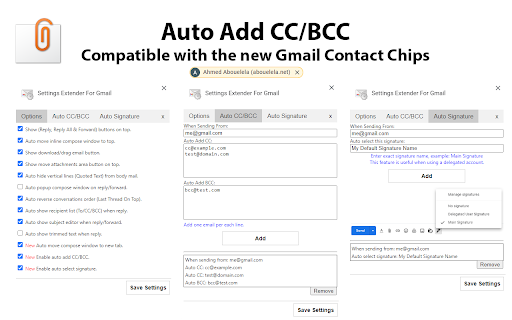
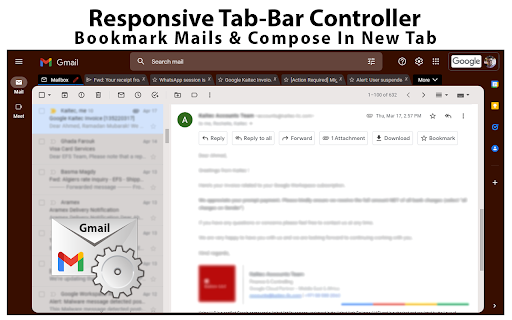
Bookmark mails and start compose in chrome-like tabs, add custom rich-text editor, auto add CC/BCC, reverse conversations and more.. Version 4.6: -Added an option to always show attachments on top of the mail body. Version 4.5: -Fixed the new Google AI assistant is not working on tabbed compose window. -Fixed the compose window is not auto scrolling after adding new line. -Added an option to auto show CC or BCC list separately. By default, Gmail doesn't allow dragging mails outside the opened window, so you'll not be able to download your mails or transfer them as attachment to another browser window or tab, unless you download them manually from mail menu. Also, you can't drag an attachment from any opened mail and drop it into the compose window as attachment, the same when you need to transfer this attachment to another account opened in another browser window. By using this extension, you'll be able to drag attachments directly to any opened compose window, you'll notice a download mail button which is draggable to your file system, or to compose window, or even to another browser tab, you'll get another button which will move the attachment section to top. To make it easy for you to reply or forward mails, this extension adds action buttons and moves the inline compose view to top. A new tab bar will change the look of Gmail and will allow composing mails in new tabs inside the same window, or add mails as chrome like bookmark tab. For those who are using a delegated Gmail accounts and looking for a way to auto change the signature without being forced to select it manually on each compose or change it from the main settings, this extension adds an option to do it for you, just enter the name of the signature from the main settings and the account you are delegated access to and it will be selected automatically. That's it!. add this extension to your browser now and enjoy. wanted scrolling area.

Auto BCC for Gmail™
Automatically add BCC and CC when you send mail. Auto BCC and auto CC for Gmail, different Gmail BCC per From account. ★ Features of "Auto BCC for Gmail™" extension: ✔ Integrated with Gmail UI, auto add BCC & CC email addresses based on your config. Allow different Gmail BCC & CC addresses per each of your Gmail accounts. ✔ Write mails conveniently by auto pop-out Reply/Forward to a stand-alone compose window and expand it to full screen. ✔ Import/Export settings to set up Auto Bcc Gmail™ quickly on both your work & home computers. ★ Example of usage: Auto BCC all emails from "you@company-1.com" to "email-to-salesforce@salesforce.com" and all emails from "you@company-2.com" to "zoho-bcc-dropbox@mails.zohocrm.com" ★ How to connect Gmail to Salesforce: https://help.salesforce.com/articleView?id=email_my_email_2_sfdc_landing_page.htm&type=5 ★ How to integrate Gmail with "Zoho CRM BCC dropbox": https://help.zoho.com/portal/kb/articles/bcc-dropbox#Send_Emails_Using_BCC_Email_Address Auto Bcc Gmail™ extension is developed and maintained by autobcc.com team - If you run into a problem, contact us at support@autobcc.com

Gmail Auto BCC
Open source automatic cc/bcc for gmail. - Automatic CC & BCC for Gmail, now with multiple sender support - Customize rules based on sender information - Auto-populate recipients for sends and replies - Ad-free, distraction-free, tracking-free environment - Enhances Gmail productivity

Short Gmail Labels
Shorten your Gmail labels so parent labels are not displayed. Nesting gmail labels results in an unnecessarily long display that includes both parent and child labels. This will trim down the label names so you only see the child.

Gmail - Reply at the TOP
Move the reply/compose box to the top of conversation thread. Allows you to refer the latest response as you compose the reply. If you are frustrated of scrolling up and down while composing your email replies in Gmail, THIS IS THE EXTENSION YOU NEED! This will move the reply/compose box from the bottom of the page to the top of the page. You can now see the latest email in the thread as you type, without have to scroll up and down. This is especially loved by Outlook users who are used to the reverse chronological view. I developed this after I could not find any solution. After using it for a while, I have noticed a significant boost in email productivity ... no more scrolling for those long conversation threads! NOTE: Refresh/reopen the Gmail tab for the extension to start working.
