
pbnemfflkolkhamplnhoaljkogfhajaf
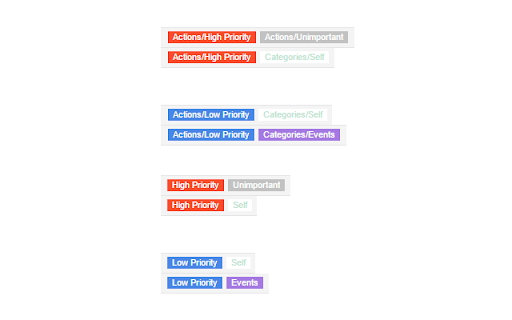
Shorten your Gmail labels so parent labels are not displayed. Nesting gmail labels results in an unnecessarily long display that includes both parent and child labels. This will trim down the label names so you only see the child.

Simple Gmail Screen
Simplify Gmail screen, make the sidebar and top bar auto-hide. This extension simply hides the top menu bar and left sidebar of Gmail. The hidden menus could then be re-activated via moving your mouse cursor to the edge of screen. Website: https://www.bart.com.hk/simple-gmail-screen/ Open sourced under GPL v3: https://github.com/bartsolutions/simple-gmail-screen == Update 2022-07-08 (v0.10.1) == - Added option for bar hidden delay == update 2020-11-23 (v0.5.1) == - fix problem for side bar menu collapse

Gmail Sender Icons
Quickly identify the sender of email messages in Gmail without opening the message. Gmail Sender Icons is a Google Chrome extension that makes it easy for you to quickly and visually identify email senders in Gmail. It shows the company domain name of the email sender and the official logo (favicon) of the sender's organization alongside the email message. For instance, if you receive an email from larry@google.com, the Gmail extension will add a virtual label google.com to your email message and also a logo of the Google website next to the message so you can immediately identify the sender in the email list. Gmail Sender Icons has been featured on Product Hunt, LifeHacker, The Next Web and host of popular websites. The favicons and the sender's domain are visible across Gmail including search results. The sender's label is applied virtually and the actual labels of the email message are left unchanged. The Gmail Chrome extension uses the Google S2 service for generating the website's favicon while the Gmail messages are parsed with the Inbox SDK framework. All processing is done locally in your browser and no Gmail data is ever shared or uploaded anywhere. The add-on is open source and the code is available on Github.

Gmail Tabs by cloudHQ
Which can be time-consuming when scrolling through your labels in order to find the one you want. Cut the time you spend sorting through Gmail labels with our newest (and free!) email productivity tool, Gmail Tabs! Gmail Tabs lets you customize Gmail to give you clear visibility (and easy access) to: - Your favorite Gmail Labels - Common Gmail search queries, like: receipts with attachments, or emails from your customers or boss Key features: ✅ Add any query as a tab in Gmail ✅ Add tab with all emails in a label ✅ Add tab with all emails in a label and sublabels ✅ Change font color of your tabs ✅ Change background color of your tabs ✅ Modify tabs descriptions and queries Try it today, and start working smarter to save more time. 1) Install the extension. 2) Select a label or enter a search query 3) If you selected the label, in label menu select "Add to tabs" or "Add to tabs (including sublabels)" 4) If you entered the query, click on the "Add to tabs" button cloudHQ. Helping your productivity, 1 click at a time. Website: https://www.gmailtabs.com/ Pricing: https://www.gmailtabs.com/pricing Support page: https://support.cloudhq.net/category/browser-extensions/gmail-tabs/ Blog: https://blog.cloudhq.net

Unread Tab for Gmail
Adds UNREAD tab to Gmail where you can only see unread mails. This extension adds "UNREAD" tab to GMAIL where you can see only unread mails
